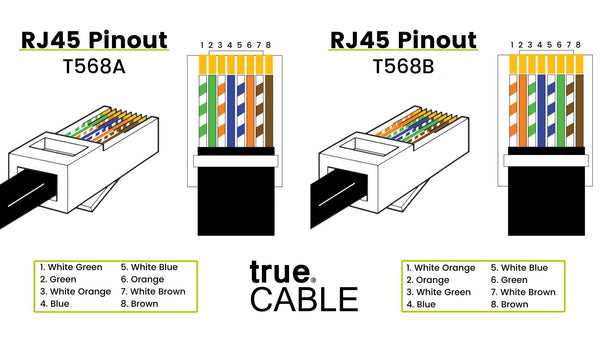
Ensure each conductor is aligned according to its assigned slot to maintain reliable signal transmission. Use a color-coded reference to match each line precisely and avoid cross-connections that could disrupt communication.
Always strip insulation carefully to prevent damaging the copper core. Expose only the necessary length for insertion into the connector, typically around 6 millimeters, to secure a stable contact without short circuits.
Test continuity before final installation using a multimeter or line tester. Verify that each channel correctly transmits signals from source to destination, which helps prevent call dropouts and intermittent noise issues.
Label both ends of the cord to identify the specific line in multi-cable setups. This practice reduces troubleshooting time and ensures consistent connections in offices or residential setups where multiple lines run simultaneously.
Complete Guide to Cable Connections and Pin Configurations
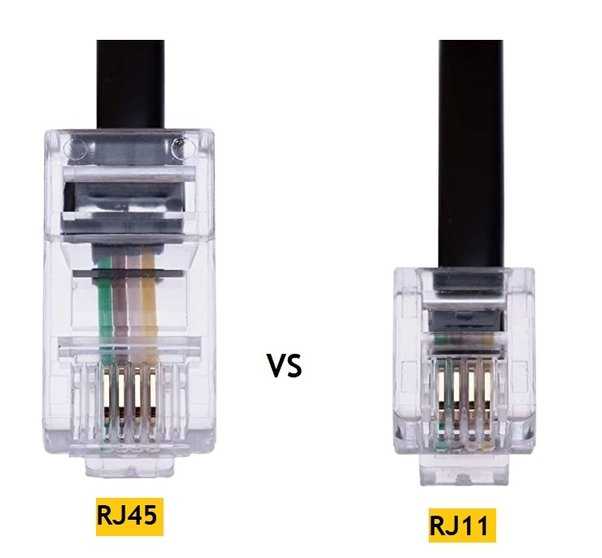
Align each conductor with its designated slot according to the standard sequence to ensure proper signal flow. For typical four-conductor cords, place the red and green lines in the center pins while yellow and black occupy the outer positions. This setup supports single-line telephone connections and reduces the risk of cross-talk between channels.
Verify continuity and polarity before final insertion into jacks or sockets. Use a line tester to confirm that each channel correctly transmits tones or data pulses. For multi-line arrangements, label each end to avoid confusion during maintenance and future expansions, and maintain consistent color coding across all runs to simplify troubleshooting.
Understanding Pin Assignments and Functions
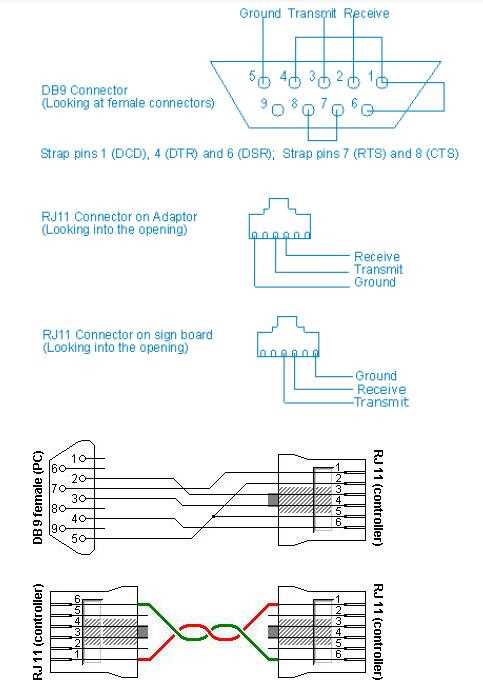
Center pins handle primary signal transmission in four-conductor connectors. Red and green lines typically occupy these positions, carrying analog voice signals for single-line telephony. Correct alignment avoids crosstalk and ensures clear audio or data transfer across the network.
Outer pins serve auxiliary roles such as grounding or secondary channels. Black and yellow lines in these slots provide backup connections or additional lines, enabling multi-line setups without altering the main communication path.
Maintain consistent polarity throughout the installation. Swapping positive and negative leads can result in reversed signals, intermittent connections, or complete loss of service, especially in modular jacks connected to multiple endpoints.
Test each pin individually with a continuity tester before finalizing terminations. This step identifies broken conductors, shorts, or misassigned colors that could compromise signal integrity, reducing troubleshooting time and preventing repeated disassembly.
Label both ends of every cord when connecting multiple units. Clear identification of each line’s function simplifies future maintenance, expansions, or replacement of connectors, ensuring the setup remains organized and operational without ambiguity.