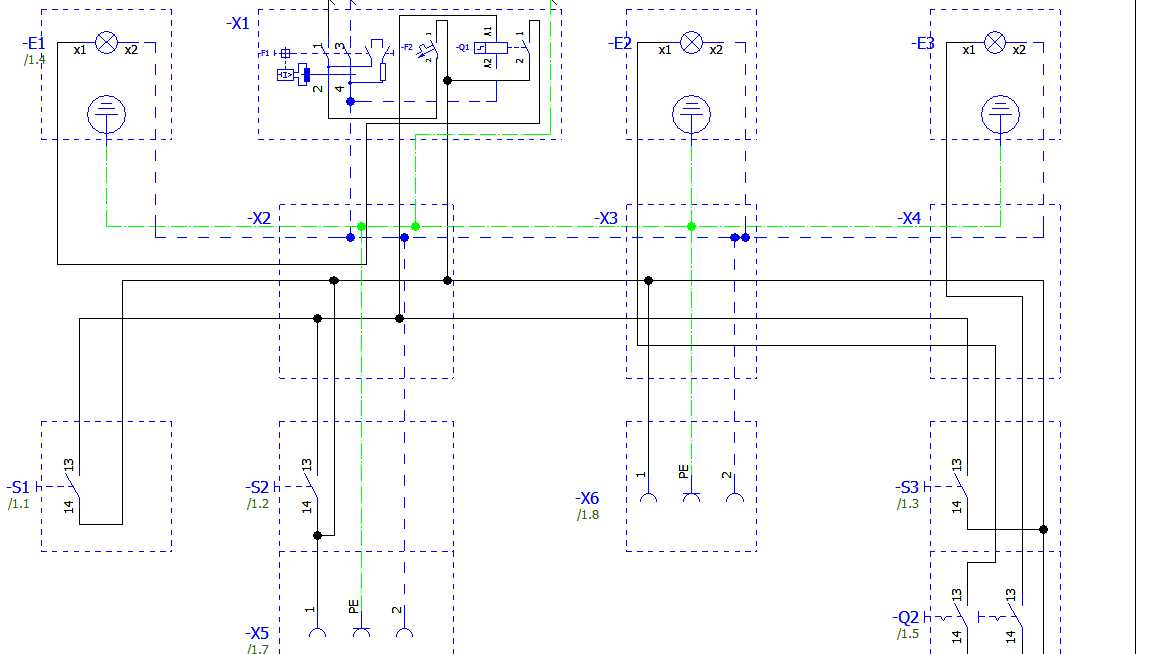
Place the power source at the top or left side of the page and route connections toward loads. This layout allows anyone reading the plan to follow current flow quickly from supply to ground. A battery or DC supply symbol usually appears first, followed by switches, resistors, coils, lamps, or semiconductor devices. Clear alignment reduces confusion when troubleshooting or assembling a prototype.
Use standardized component symbols defined by IEC or ANSI conventions. A resistor appears as a zigzag line or rectangle, a capacitor as two parallel plates, and a diode as a triangle pointing toward a vertical line. Keeping symbol shapes consistent prevents misinterpretation during assembly or repair. Each component should sit horizontally or vertically with straight connection lines rather than angled paths.
Label every component with a reference code and value. Typical identifiers include R1 for a resistor, C2 for a capacitor, Q3 for a transistor, and U1 for an integrated chip. Values such as 10kΩ, 100µF, or 5V provide clear specification for assembly. Place labels close to the symbol but not overlapping connection lines so that each element remains readable when the layout grows larger.
Ground points should appear as a common reference symbol linked to several parts of the layout. These points show where current returns to the supply. In many electronic plans the ground symbol appears repeatedly across the page rather than a single long line, preventing clutter and making the connection map easier to read.
Drawing Circuit Diagrams
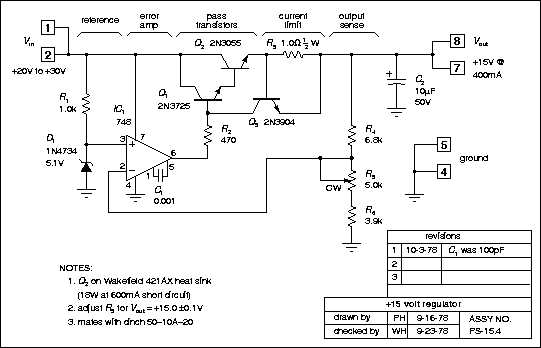
Place the power supply symbol first and build the layout outward from that point. A battery or DC source usually appears at the top or left side of the page. From this symbol, connection lines lead toward switches, resistors, capacitors, transistors, and loads such as lamps or motors. This orientation mirrors current flow and helps readers follow the path from source to ground without confusion.
Use straight horizontal and vertical lines rather than angled paths. Intersections should only appear where a connection exists, marked by a solid dot. If two lines cross without contact, one line should arc over the other or remain separated. This small visual rule prevents incorrect interpretation during assembly or troubleshooting.
Standard symbols and layout rules
Component symbols follow international conventions used in engineering manuals. A resistor appears as a zigzag or rectangle, a capacitor shows two parallel plates, and an inductor uses a curved coil symbol. Transistors include labeled terminals such as collector, base, and emitter. Each symbol must maintain consistent orientation across the page so that signal flow remains clear.
Reference designators identify each part. Labels such as R1, C3, D2, or U5 appear next to the symbol and match a parts list in project documentation. Include numeric values directly beside the identifier, for example 4.7kΩ for a resistor or 220µF for a capacitor. This labeling allows technicians to assemble the hardware without guessing component ratings.
Connection labeling and signal paths
Large electronic plans often span multiple pages. Arrows or net labels indicate where a conductor continues elsewhere. A label such as “VCC,” “GND,” or “CLK” marks a shared node used across the layout. Matching labels show that those points connect electrically even though the lines do not appear on the same page.
Check spacing between symbols and lines before finalizing the layout. Crowded areas make identification difficult, especially when several components connect to the same node. Maintaining consistent spacing and alignment keeps the schematic readable during testing, repair, and future design updates.
Choosing Standard Electrical Symbols for Resistors Capacitors Switches and Power Sources
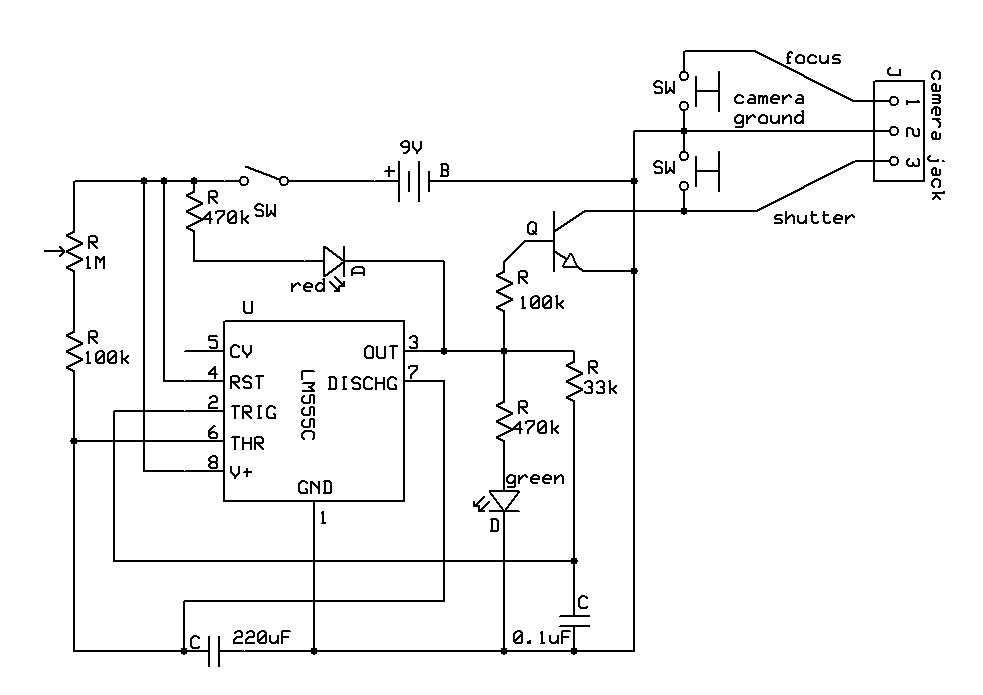
Use IEC or ANSI graphic marks for each component so every reader interprets the layout the same way. A resistor appears as a zigzag line in ANSI style or a small rectangle in IEC style, while a capacitor shows two parallel plates. Power supplies appear as a pair of long and short lines for a battery or a circle labeled with voltage for a regulated source. Keeping these marks consistent across the page allows technicians to read the schematic without confusion.
Common component symbol choices
Several parts appear frequently in electronic layouts. Using the correct symbol prevents mistakes during assembly or troubleshooting.
- Resistor represented by zigzag or rectangular element
- Non-polarized capacitor shown as two equal parallel plates
- Polarized capacitor marked with a plus sign near the positive plate
- Toggle switch illustrated by a break in a line with a movable lever
- Battery symbol drawn with alternating long and short vertical lines
- Ground reference displayed as three descending horizontal lines
Keep polarity marks visible whenever a component requires a fixed orientation. Electrolytic capacitors, diodes, and DC sources must show positive and negative terminals clearly. Without these markings a technician could install the component in reverse, which may damage the device or cause malfunction.
Placement and labeling rules
Symbols should remain aligned horizontally or vertically and spaced so that connection lines remain clear. Each component receives a reference identifier such as R1, C2, SW1, or V1 placed near the graphic mark.
- Add the identifier beside the symbol
- Write the component value such as 4.7kΩ or 220µF
- Position labels so they do not cross conductors
- Repeat the same naming pattern throughout the schematic
Consistent symbol selection combined with clear labeling keeps the schematic readable during assembly, testing, and repair. Anyone examining the layout can match each graphical mark with the physical component installed on the board or inside the device.