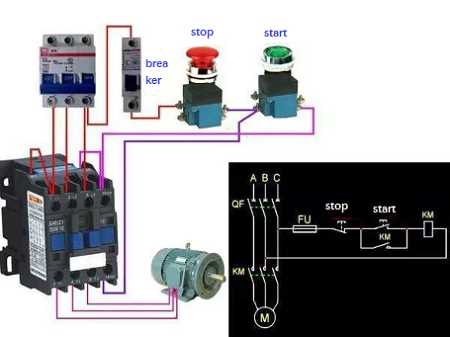
For a safe and effective installation, ensure the connections are made correctly between the components. Start by identifying the terminals on the switch and the correct placement for the power and control wires. Pay close attention to the markings on the terminals and ensure that the lines are consistent with the electrical specifications for your air conditioning system.
Incorrect connections can lead to system failure or even safety hazards. Double-check the line and load terminals, making sure the power supply is properly linked to the device. Always verify the voltage rating of your components and match them to the requirements of the air conditioning system. Doing so will prevent overheating and potential electrical damage.
It’s also important to use the right gauge wire for each part of the setup. Choose thicker cables for the power side and ensure the control wires are well-insulated and not too thin. A mismatch here can lead to inefficient operation or dangerous overheating of the wiring. Keep the wiring as short as possible to reduce power loss and prevent any electrical interference.
Contactor Wiring Diagram for AC Unit
To begin, connect the high-voltage power input to the correct terminal on the switch. Typically, this will be the terminal marked for the line or “L” side. Ensure that this connection is secure and properly insulated to prevent any accidental short circuits. The live wire from the power source should be directly linked to this terminal.
Next, attach the load side of the system to the appropriate terminal on the device. This will route power to the air conditioning system. It’s crucial to ensure that the connection is tight and that no loose ends are exposed. An improper connection here can cause sparking, overheating, or system failure.
Finally, for the control connections, ensure the low-voltage terminals are connected to the thermostat or controller. This typically includes a set of wires that activate the switch when the thermostat signals the system to turn on or off. Double-check the polarity to avoid incorrect operation of the temperature regulation system.
How to Wire a Contactor for an AC Unit Step by Step
Start by identifying the power input terminal. This is where you will connect the live wire from the power source. Check the voltage rating to make sure the power source is compatible with the device. Strip the insulation from the wire and securely fasten it to the terminal using a screwdriver. Ensure that the wire is tight to prevent any movement that could cause an electrical fault.
Next, connect the load terminal, which will route power to the air conditioning system. This terminal is often marked as “T” or “Load.” Use the same procedure as before–strip the wire and attach it securely. This step is crucial for powering the AC correctly, so double-check that the wire is well-connected.
For the control side, locate the low-voltage terminals. These are where you’ll connect the wires that will be controlled by the thermostat. Typically, these terminals are marked for easy identification. Attach the wires from the thermostat to these terminals, ensuring that the connections are clean and secure. Improper connections here can cause the system to malfunction or fail to turn on at the correct temperature.
After the connections are made, verify the integrity of all connections. Make sure there are no exposed wires and that all terminals are tightly secured. Loose connections can result in overheating, arcing, or electrical shorts. Use electrical tape or wire nuts to cover any exposed areas if needed.
Once the wires are securely in place, check for any potential grounding issues. The device should be properly grounded to avoid electrical hazards. A dedicated ground wire should be connected to the grounding terminal of the device, which is typically marked with a symbol or “G”.
Finally, perform a test by turning on the power supply and adjusting the thermostat. Ensure that the system responds correctly and that all components are functioning as intended. If the system doesn’t activate as expected, double-check all connections and troubleshoot for any errors that may have occurred during installation.