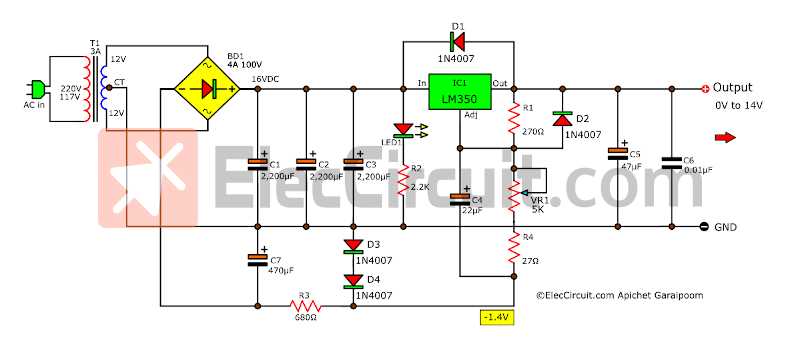
Connect the main feed directly to the input terminal using 12 AWG insulated wire. Tighten the connector to 8–10 Nm torque to ensure stable voltage delivery under load conditions.
Attach ground lines to a clean, unpainted metal surface on the chassis. Verify continuity with a multimeter to avoid voltage fluctuations and ensure consistent operation of all components.
Link output terminals to the designated loads using appropriately rated wires. Use terminal ferrules or ring connectors to improve contact quality and reduce the risk of overheating at connection points.
Route all signal and supply lines separately, avoiding contact with high-current paths. Apply protective sleeving where wires pass near moving parts or hot surfaces to maintain long-term reliability and safety.
Test the assembly at low voltage before connecting full supply. Monitor voltage at each load and inspect for any loose terminals or unexpected resistance that could affect performance.
Power Circuit Connection Guide
Connect the main supply directly to the input terminal using 12 AWG insulated wire. Ensure the terminal screws are tightened to prevent voltage drops and maintain stable current flow under load conditions.
Link all protective ground lines to a clean metallic surface on the enclosure. Verify continuity using a multimeter and avoid painted or corroded areas to reduce resistance and improve safety performance.
Attach output lines to each load using appropriately rated wires. Use ring terminals or ferrules at all connections to minimize heating and maintain secure contact points over repeated operation cycles.
Route high-current paths separately from signal lines, maintaining at least 10mm spacing to reduce interference. Apply heat-resistant sleeving where wires pass near hot components or moving parts to prevent insulation damage.
Test the complete assembly at low voltage before applying full supply. Measure voltage at each load, inspect for loose connections, and adjust terminals as needed to ensure consistent operation across the system.
Identifying Terminals and Component Connections
Start by labeling each terminal on the distribution block according to its function. Use a digital multimeter to verify continuity and confirm that live, neutral, and ground points are correctly identified before making any connections.
Inspect each component for marked input and output terminals. Follow manufacturer codes and use color-coded wires to distinguish between supply lines and load connections, minimizing the chance of incorrect assembly.
- Check for tightness at all screw terminals and compression fittings.
- Verify that no exposed wire strands could create short circuits.
- Confirm that each load is matched to its designated output terminal.
Maintain clear separation between control and supply lines. Route high-current conductors away from sensitive components and secure connections with insulating sleeves to prevent accidental contact and improve operational reliability.