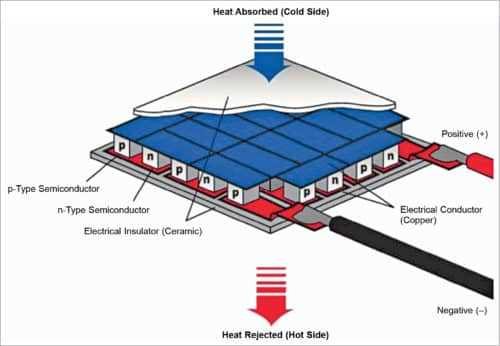
Verify the voltage rating before connecting to the power supply. Most semiconductor cooling units operate between 12 and 15 volts DC. Applying higher voltage can overheat the junctions and reduce lifespan.
Check polarity on each lead to ensure correct heat transfer direction. Red typically connects to positive and black to negative. Reversing leads will switch hot and cold sides.
Integrate a temperature controller or sensor to regulate the junction temperature. Thermistors or digital sensors provide feedback to prevent overcooling or overheating.
Use proper conductors with adequate gauge to handle the current. For a 5A module, 18 AWG or thicker wire is recommended to avoid voltage drops and heating.
Secure connections with solder or crimp terminals and insulate exposed parts. Heat shrink tubing rated at 105°C or higher protects against shorts and vibration stress.
Thermoelectric Module Connection Guide
Verify supply voltage before powering the module. Units typically operate between 12 and 15 volts DC. Exceeding this range may damage semiconductor junctions and reduce lifespan.
Confirm lead polarity to ensure proper heat transfer direction. Red usually connects to positive, black to negative. Reversing leads will switch the hot and cold sides.
Integrate a temperature controller or sensor to prevent overheating. Thermistors and digital sensors provide accurate feedback for maintaining target temperatures.
Select conductors with adequate gauge to carry the module’s current. For a 5-amp unit, 18 AWG or thicker wires minimize voltage drop and heat buildup.
Use proper terminals and insulation for each connection. Crimp or solder leads and cover with heat-shrink tubing rated 105°C or higher to prevent shorts and vibration damage.
Include a heat sink on the hot side to improve performance. Metal plates with thermal paste reduce thermal resistance and maintain stable operation under load.
Test the assembly under controlled conditions before full deployment. Measure voltage and current to confirm the module operates within safe parameters.
Document all connections with photos or sketches. This ensures consistent reconnection during maintenance or upgrades and avoids potential errors.
Identifying Module Terminals and Power Connections
Check each lead for polarity markings before making any connection. Red typically indicates positive input while black marks negative. Reversing these leads changes the direction of heat transfer and can damage the unit.
Measure resistance between terminals using a digital multimeter. Typical readings range from 2 to 8 ohms for small 12V modules. Open or zero readings indicate damaged or shorted elements.
Identify high and low side leads on multi-stage modules.
- Striped or differently colored insulation often marks auxiliary or secondary inputs
- Label each wire to maintain correct connections
- Ensure no accidental cross-connection between stages
Secure connections with appropriate terminals and avoid twisting wires together. Crimp or solder joints covered with heat-resistant sleeves prevent loosening and shorts during operation.
Verify voltage before energizing. Supply voltage should match the module rating, commonly 12–15V DC, with minimal fluctuation to prevent overheating or underperformance.
Document and label all leads for maintenance and troubleshooting.
- Use durable tags or printed labels
- Photograph connections for reference
- Maintain consistent lead identification to avoid confusion during future service