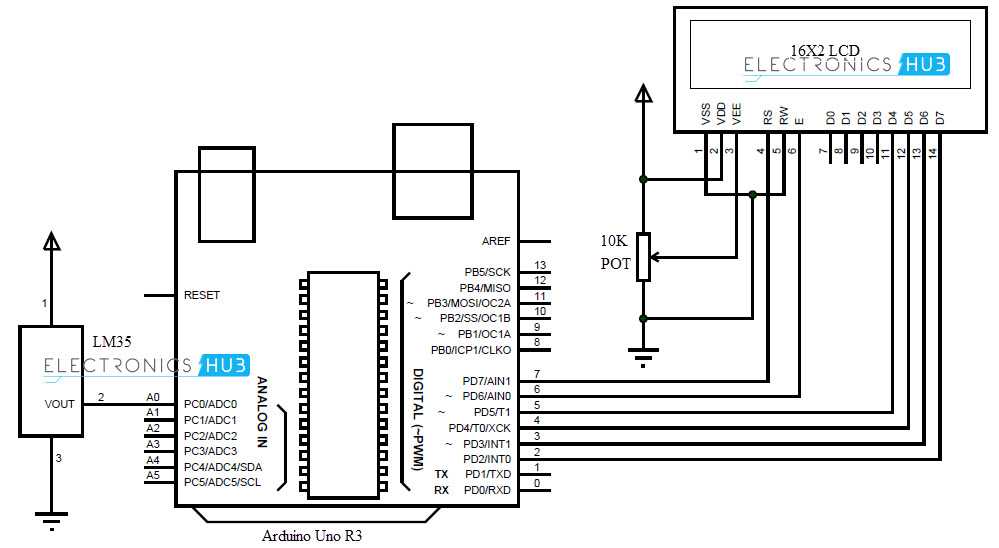
Use a precise semiconductor sensor such as a thermistor or an IC module capable of reading small variations in thermal conditions. Connect it to a microcontroller with analog-to-digital conversion to ensure accurate measurement within ±0.5°C.
Integrate a clear numerical display to show readings directly, choosing an LCD or OLED screen compatible with your processing unit. Include proper resistors and filtering capacitors to reduce signal noise that can distort measurements.
Calibrate the system by comparing outputs against a standard reference thermometer. Store calibration offsets in the controller memory to correct fluctuations and maintain consistent readings across temperature ranges from -20°C to 100°C.
Building an Accurate Electronic Thermometer with Sensor and Display
Choose a high-precision sensor such as a PT100 RTD or a thermistor with a tolerance of ±0.1°C. Ensure the sensor operates reliably across the target temperature range and has fast response time for real-time monitoring.
Use a stable reference voltage for the sensor input to maintain measurement consistency. Fluctuations in voltage can cause inaccurate readings, so a regulated 3.3V or 5V source is recommended depending on the sensor specifications.
Implement an analog-to-digital conversion module with at least 12-bit resolution to capture subtle temperature changes. Higher resolution reduces rounding errors and allows precise representation of thermal variations.
Include filtering components such as small capacitors or low-pass filters to smooth out electrical noise. This prevents the display from flickering and ensures stable values are presented to the user.
Integrate a numerical display like an LCD or OLED that clearly shows temperature readings in Celsius or Fahrenheit. Ensure proper voltage compatibility and include series resistors if required to protect the display.
Calibrate the device using known reference points, such as ice water (0°C) and boiling water (100°C). Apply offsets to the measurement algorithm to correct systematic deviations and improve overall accuracy.
Test the assembly under different environmental conditions to confirm sensor responsiveness and display readability. Adjust placement and shielding if electromagnetic interference or heat sources affect performance, ensuring reliable readings in all scenarios.
Selecting the Sensor and Display Components
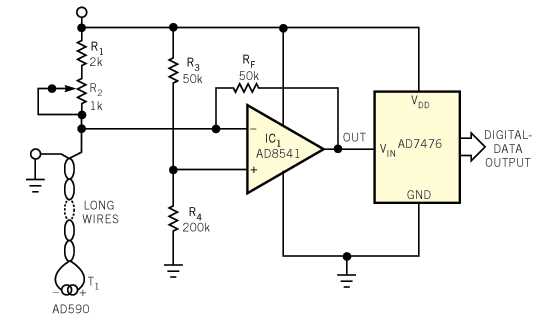
Choose a sensor with high accuracy and stability such as a PT100 RTD or thermistor rated for ±0.1°C. Ensure the sensor tolerates the full operational temperature range and responds quickly to environmental changes.
Consider the response time when selecting the thermal probe. Fast-reacting elements reduce lag in readings, which is critical for applications requiring near-instant feedback.
Verify the compatibility of the sensor with the input voltage of the measurement module. Sensors designed for 3.3V, 5V, or higher supply levels require proper matching to avoid measurement errors or damage.
Use a numerical display with clear visibility such as an LCD or OLED. Check the backlight brightness and contrast to ensure readability in various lighting conditions and angles.
Match the resolution of the display with sensor accuracy to avoid misleading data. For example, a sensor accurate to 0.1°C should be paired with a display that shows at least one decimal place.
Include current-limiting resistors or driver circuits if the display requires higher current than the sensor or measurement module can supply. This prevents overheating and extends component lifespan.
Check connector types and mounting options to ensure secure attachment of both the probe and display. Loose connections can produce erratic readings and intermittent operation.
Perform initial calibration with reference temperatures such as ice water and boiling points. Apply correction factors in the display logic to maintain consistent readings across the full range.