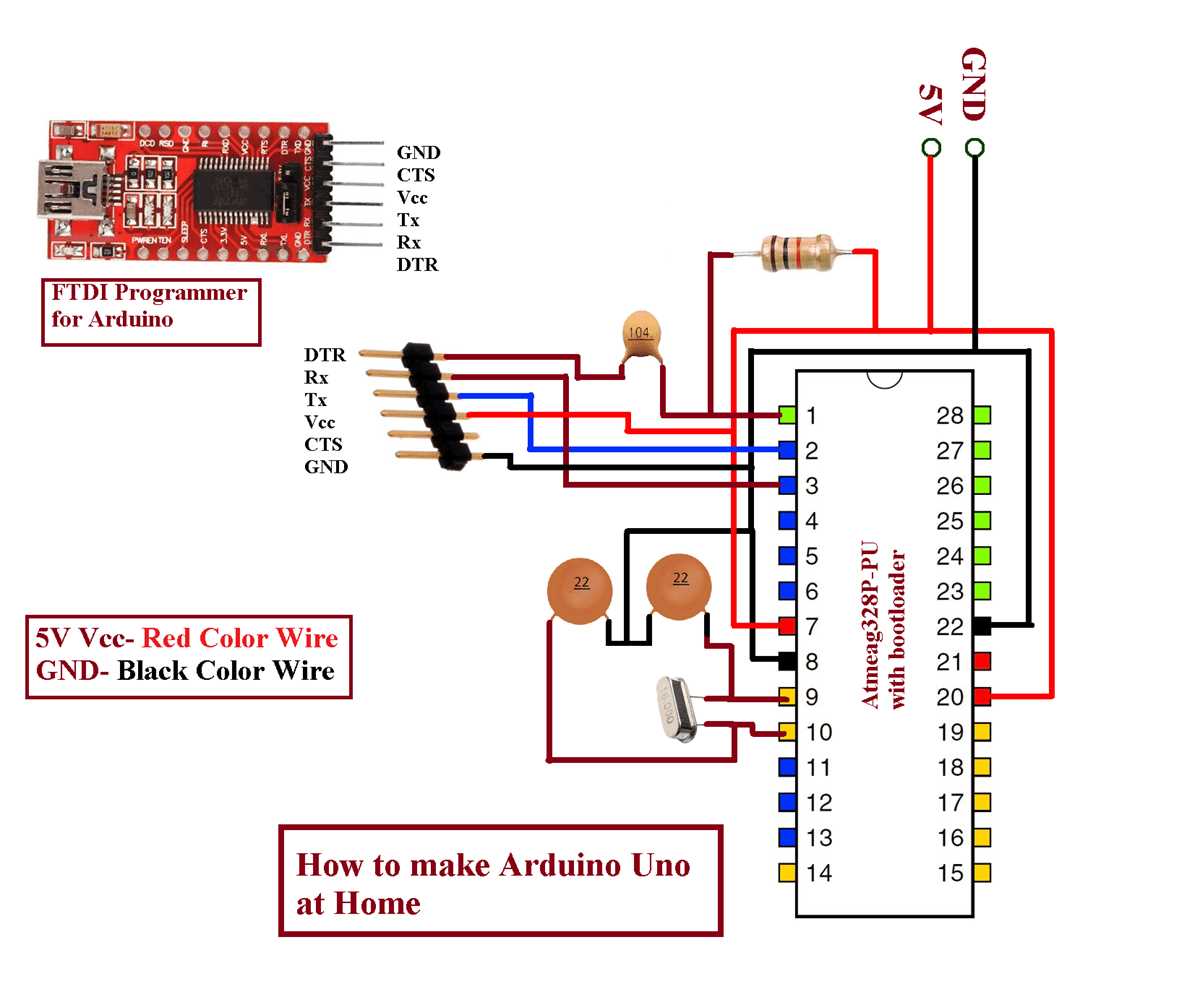
Start by listing every component in your project, including microcontrollers, resistors, LEDs, and sensors. Assign clear labels to each part to avoid confusion when connecting pins and power lines.
Use a structured grid or schematic software to position elements logically. Group related modules close together, such as power supply circuits separate from signal processing sections, to simplify tracing connections.
Mark all connections with distinct lines and consistent thickness. Indicate voltage levels and signal directions for each wire to reduce errors during assembly and testing.
Review the layout before building by cross-checking every node against component datasheets. Verify pin numbers and polarity to prevent short circuits and ensure sensors and modules function correctly.
Include notes for uncommon components or jumpers, specifying exact wiring and placement. This documentation makes it easier to troubleshoot and replicate the setup later without ambiguity.
Planning and Connecting Electronics Layouts
Identify all modules and components required for the project, including microcontrollers, sensors, actuators, and resistors. Label each element with unique identifiers to prevent confusion when establishing connections.
Arrange components logically on a virtual grid or software platform. Keep power sources and ground lines distinct from signal paths to reduce interference and make troubleshooting easier.
Trace every wire individually, using straight lines and consistent spacing. Mark voltage and current requirements for each line to avoid overloading traces or miswiring sensitive devices.
Grouping Related Sections
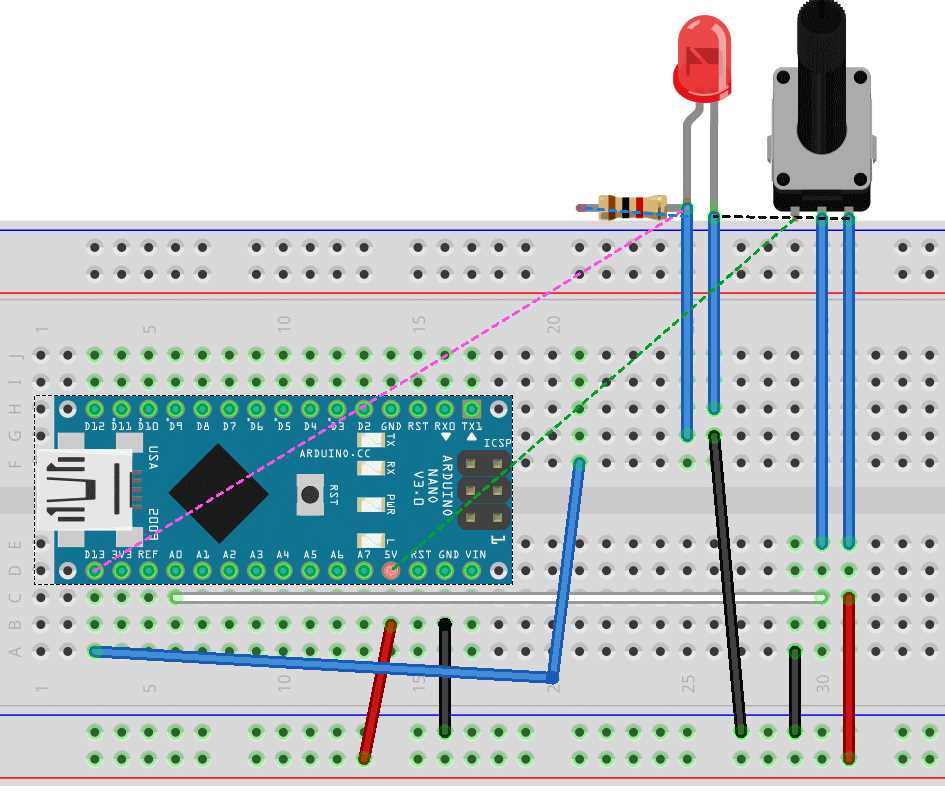
Cluster elements that interact closely, such as input sensors with their corresponding analog pins. Separate communication modules like serial interfaces from high-current outputs to maintain signal integrity.
Double-check every connection against datasheets. Confirm pin functions and orientation before soldering or finalizing the physical layout to prevent malfunctions.
Document unusual or custom components with notes on placement and wiring. This record makes it easier to replicate the configuration or troubleshoot issues without guessing connections.
Choosing Components and Understanding Their Symbols
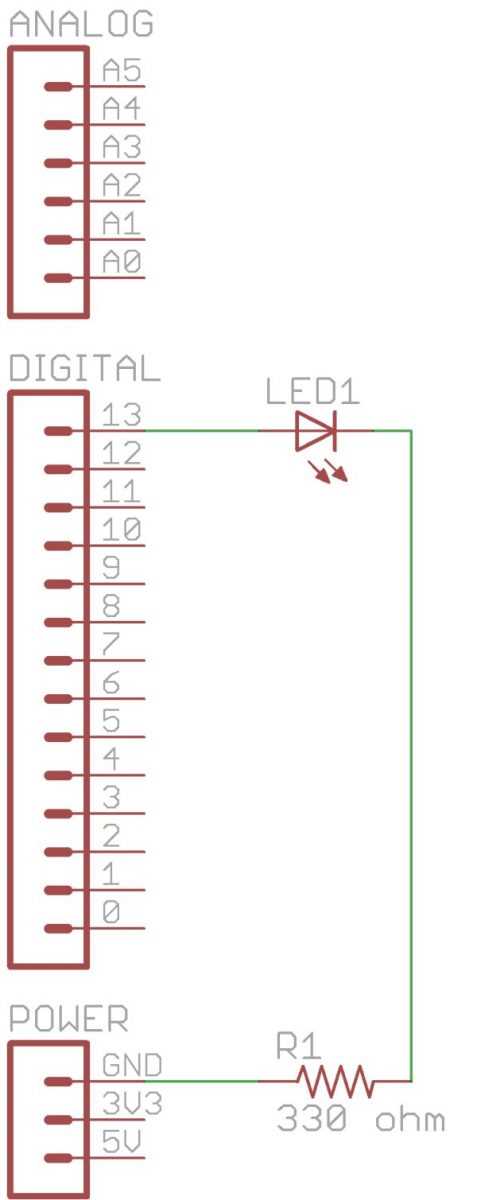
Select resistors, capacitors, transistors, and ICs according to voltage and current ratings. Verify maximum tolerances to prevent overheating or failure in your layout.
Identify the correct type of LED or display module needed for your project. Note forward voltage and current requirements to choose proper limiting resistors and prevent burnout.
Use a reference table for standard symbols to represent each element consistently:
- Resistors – zigzag or rectangle lines with value labels
- Capacitors – parallel lines for fixed, curved line for polarized
- Diodes – triangle with a line indicating current direction
- Transistors – labeled with collector, base, emitter pins
- ICs – rectangular block with pin numbers clearly marked
Double-check datasheets for non-standard modules like sensors or communication shields. Confirm pinout and voltage levels to match with other components in the setup.
- List all components with identifiers
- Assign symbols based on the reference chart
- Mark power supply and ground connections separately
- Verify orientation for polarized elements
- Cross-check values to prevent mismatches
Include notes for complex or custom parts to simplify assembly and troubleshooting. Document any jumpers, pull-up resistors, or voltage dividers needed for correct operation.