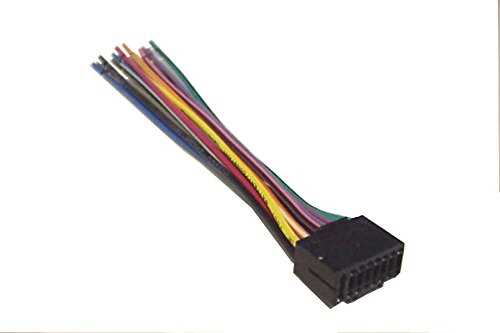
Start by matching each colored lead to its corresponding terminal on the receiver to avoid short circuits and signal loss. Red wires usually carry switched power, yellow connects to constant voltage, and black goes to ground. Confirm these with a multimeter before securing connections.
Ensure speaker outputs align with vehicle channels by tracing positive and negative leads. Incorrect pairing can cause phase issues, reducing sound clarity and causing distortion. Label each cable with tape for easier installation and future maintenance.
Use insulated connectors and secure clips to prevent loosening during motion. Avoid twisting bare wires together, as this can create poor contact and overheating. Applying a small amount of dielectric grease improves conductivity and prevents corrosion in metal terminals.
Double-check fuse ratings for the audio unit and the main electrical line. Overloading can damage the amplifier and main board. Maintain proper routing away from sharp edges, moving parts, and heat sources to preserve wire integrity over time.
Connections Layout for JVC Audio Units
Begin by identifying each colored lead and matching it to the corresponding terminal on the receiver. Red leads supply switched power, yellow carries constant voltage, black connects to ground, and blue often controls remote amplifier activation. Testing each connection with a multimeter before fastening prevents short circuits and signal issues.
Label and secure all cables using insulated connectors or clips to prevent loosening from vibrations. Route signal lines separately from high-current wires to reduce interference, and avoid sharp bends that can damage insulation. Small adjustments in routing can significantly improve sound clarity and component longevity.
Identifying Wire Colors and Their Functions
Check each lead color before making connections to avoid reversed polarity or short circuits. Use a multimeter to confirm voltage on power lines and continuity on speaker feeds.
Red leads typically carry switched power from the ignition, activating the audio unit only when the key is on. Yellow leads supply constant voltage to maintain memory settings such as presets and clock functions.
Black wires connect to ground, ensuring a stable return path for current. Secure them to a clean metal surface to reduce noise and prevent intermittent operation.
Speaker leads are usually paired in distinct colors with a stripe on one wire to indicate polarity:
- White and white/black for front left
- Gray and gray/black for front right
- Green and green/black for rear left
- Purple and purple/black for rear right
Blue leads often handle remote amplifier or antenna signals. Connecting them incorrectly can prevent external components from powering on. Verify these lines with the unit’s pinout before securing.
Some models include orange or orange/white wires for illumination control, allowing display brightness to adjust with dash lighting. Use a test light to confirm function and avoid overloading circuits.
Label each conductor using tape or pre-printed tags, especially when multiple connections are routed through the same harness. This reduces errors during installation and future troubleshooting.