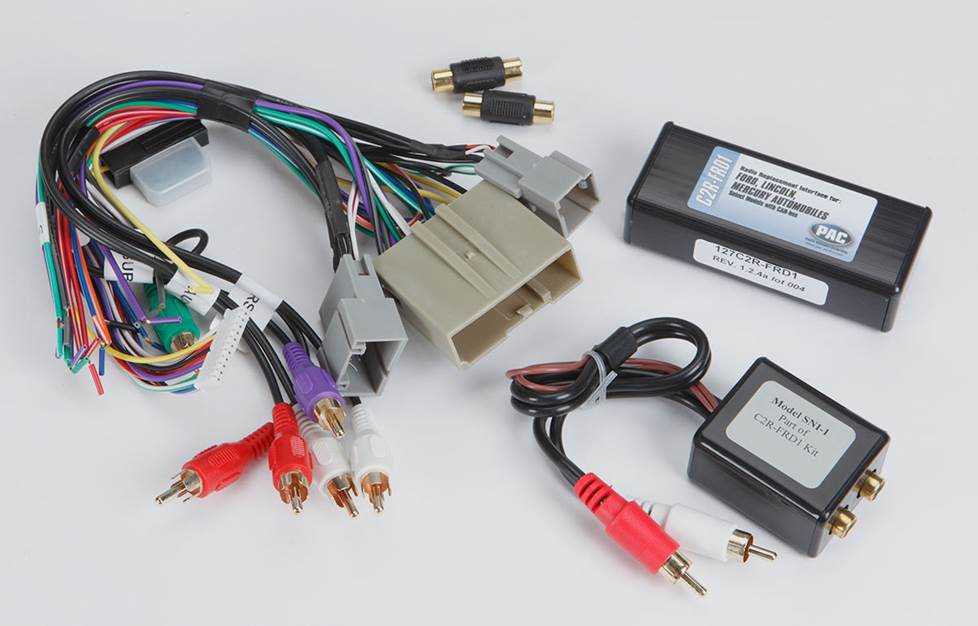
Identify the power and ground terminals before attaching any leads. Ensure proper polarity on all connections to prevent blown fuses, overheating, or damage to amplifiers and head units. Use a multimeter to verify voltage at each input.
Use conductors rated above the maximum current load of each circuit. Crimped or soldered connectors prevent loose contacts that can cause intermittent operation, distorted sound, or failure of amplifiers and speakers.
Trace each lead from the power source to the head unit, amplifiers, and speaker clusters. Label wires with color codes or numeric tags to simplify future maintenance and avoid misconnection during upgrades or repairs.
Check continuity and resistance across all connections before energizing the system. Short circuits, open leads, or high-resistance points in speaker or power loops can reduce sound quality and may permanently damage electronic components.
Install inline fuses or circuit breakers rated slightly above the expected load. Verify each protection device operates correctly to prevent overloads and ensure stable, safe operation of the entire audio system under all conditions.
Electrical Connections for Vehicle Audio Units
Begin by identifying the main power input and ground points on the head unit. Ensure correct polarity at these terminals to prevent blown fuses and avoid damage to internal circuitry. Verify voltage with a multimeter before connecting amplifiers or auxiliary devices.
Trace all speaker leads and auxiliary outputs to their respective terminals. Use color-coded or numbered labels to match positive and negative connections, preventing phase reversal that can distort sound or reduce output efficiency. Secure each end with properly sized connectors or soldered joints.
Test each circuit individually before full operation:
- Confirm the head unit powers on and responds to input signals.
- Verify each speaker produces clear sound without distortion.
- Check auxiliary inputs and amplifier triggers for correct operation.
Document all connections for future maintenance or system upgrades to avoid misconnection and ensure stable, reliable performance.
Identifying Power and Ground Connections
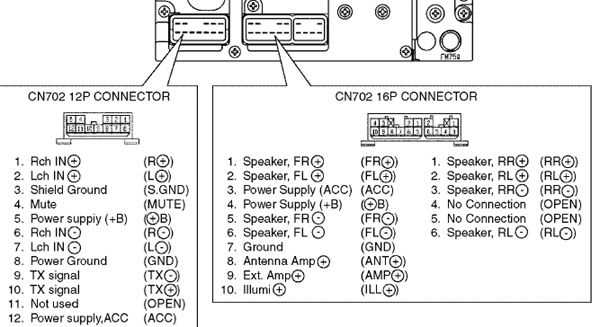
Locate the primary power input on the head unit and confirm the positive lead is connected to the battery or fused distribution point. Incorrect polarity can blow internal fuses and damage sensitive electronics instantly.
Identify the ground terminal and attach it to a clean, unpainted metal surface on the chassis. Loose or corroded grounding points can cause intermittent power loss, static, or speaker distortion.
Measure voltage at both power and ground points with a multimeter. Ensure consistent voltage levels under load conditions to prevent overcurrent on amplifiers and auxiliary devices.
Route the positive and ground leads separately from signal wires to reduce interference. Twisting power and ground together can induce noise into audio channels and reduce signal clarity.
Install inline fuses or circuit breakers on the positive lead near the battery. Choose a fuse slightly above the maximum expected current to protect the head unit and connected amplifiers from short circuits or overloads.
Verify that all terminals are firmly crimped or soldered. Loose connectors can produce heat buildup, voltage drops, and erratic operation of the audio system.
Document each connection with labels or color codes. This makes troubleshooting and future upgrades simpler and prevents misconnection of power or ground lines during maintenance.
After completing all connections, test the system under normal operating conditions. Check that the head unit powers on consistently, amplifiers trigger correctly, and no abnormal noise appears before securing the unit into the dashboard.