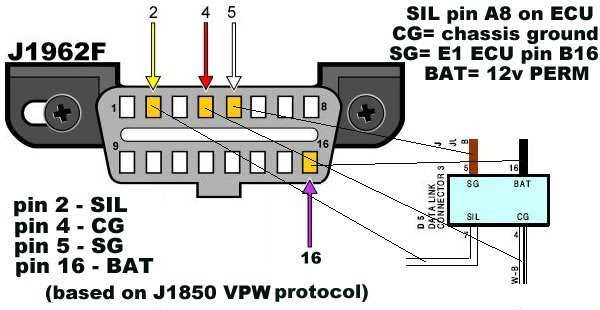
Locate the 16-pin diagnostic port under the dashboard near the steering column. Ensure the ignition is off before handling any terminals to avoid short circuits or blown fuses.
Identify key pins including power, ground, and communication lines. Pins 4 and 5 typically provide chassis and signal ground, while pin 16 delivers constant 12V from the battery. Use a multimeter to confirm voltage levels before making connections.
Connect communication terminals using properly rated diagnostic leads. Maintain correct polarity and avoid crossing CAN high and CAN low lines, as reversed connections can damage onboard modules.
Secure all connections with insulated clips or terminals. Loose contacts can cause intermittent faults and false error codes during vehicle testing. Double-check pin placement against manufacturer specifications before powering the system.
Test continuity on each line before engaging the scan tool. Verify ground integrity and power supply stability to ensure accurate readings from all sensors and modules during diagnostics.
OBD2 Data Link Connector Pin and Connection Overview
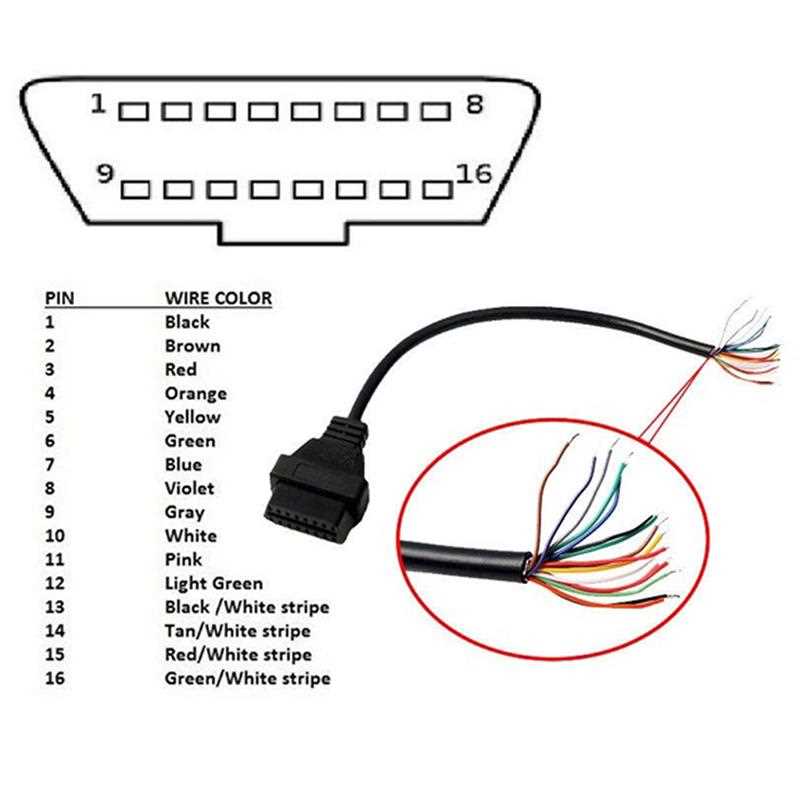
Locate the 16-pin diagnostic interface beneath the driver’s side dashboard. Confirm the pin layout against the vehicle’s service manual to avoid misconnecting terminals that carry power, ground, or signal lines.
Power and ground terminals are critical for proper operation. Pin 16 provides constant 12V supply, while pins 4 and 5 serve as chassis and signal ground. Test voltage with a multimeter before attaching any diagnostic leads.
Communication pins carry messages between the vehicle control modules and external tools. CAN high and CAN low typically occupy pins 6 and 14, while pins 2 and 10 may host K-line or L-line connections. Avoid reversing connections to prevent module faults.
Securing connections prevents intermittent errors. Use insulated terminals and verify that no pins are bent or loose. Loose contacts can generate false error codes during system scans or live monitoring.
Perform continuity checks on all lines prior to using diagnostic equipment. Ensure stable ground and power paths, and confirm that communication pins maintain correct resistance levels to avoid miscommunication with engine or transmission modules.
Identifying Connector Pins and Their Functions
Pin 16 supplies constant 12V power to the interface and must be verified with a multimeter before connecting any diagnostic device. Using an unstable or reversed source can damage modules.
Pins 4 and 5 provide grounding for both chassis and signal reference. Check continuity to the vehicle frame to confirm proper connection and prevent erratic readings during scans.
Communication lines occupy pins 6, 14, and sometimes 2 or 10. These transmit signals between engine and transmission modules and external analyzers. Ensure polarity is correct and lines are free from corrosion to maintain reliable data flow.
Reserved and manufacturer-specific terminals may appear in pins 1, 3, 7, 8, 9, 11, 12, and 13. Consult the vehicle’s service manual before attempting to connect these to avoid triggering fault codes or interfering with control networks.
Inspection and maintenance tips include verifying that pins are straight, clean, and seated fully in the housing. Loose or bent pins can produce intermittent signals, causing false alerts or module communication errors.