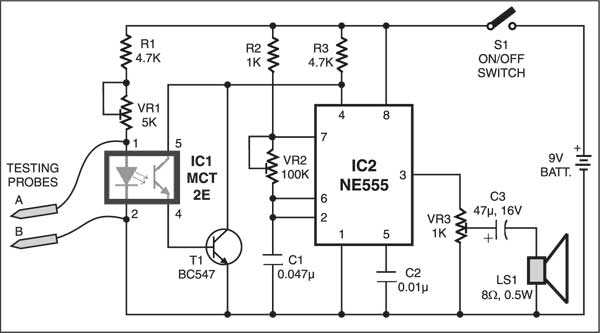
Connect the LED input and phototransistor output correctly to ensure proper signal transfer. Use series resistors to limit current and prevent damage to components.
Verify polarity for all leads before applying power. Reversing connections can prevent activation and may shorten device lifespan.
Use a low-voltage power supply to reduce risk during initial testing. Measure voltage drop across the output to confirm isolation and switching functionality.
Document each connection with labels for input, output, and common terminals. This record allows accurate troubleshooting and helps when replicating or modifying the setup.
Test response under varying input conditions to ensure the module switches cleanly. Adjust resistor values if signal is too weak or too strong for reliable detection.
Optocoupler Tester Setup
Connect the LED side of the device under inspection to a regulated 5V DC source through a 330Ω resistor to prevent overcurrent. Ensure polarity matches the anode and cathode correctly.
Use a standard NPN transistor such as BC547 to act as the switching element on the output side. Wire its collector to a 9V supply via a 1kΩ resistor and emitter to ground for accurate signal detection.
Insert a multimeter in series with the transistor collector to monitor voltage changes when the LED is activated. The reading should jump from near 0V to the supply voltage if the device is functional.
Mount a small breadboard to hold all components securely. Keep jumper wires short to reduce parasitic resistance and prevent false readings during testing.
Include a pushbutton in series with the LED driver to allow momentary activation. This simplifies repeated measurements without constantly reconnecting power.
- Verify the LED intensity is visible and not dim; low brightness can indicate an internal fault.
- Double-check all resistor values using a digital ohmmeter to avoid incorrect current flow.
- Ensure the transistor switches fully; partial conduction may produce misleading voltage levels.
Once connections are stable, perform multiple test cycles. Observe the voltage rise on each activation to confirm consistent switching performance. Adjust resistor values if the response is weak or sluggish.
Identifying Components and Connections
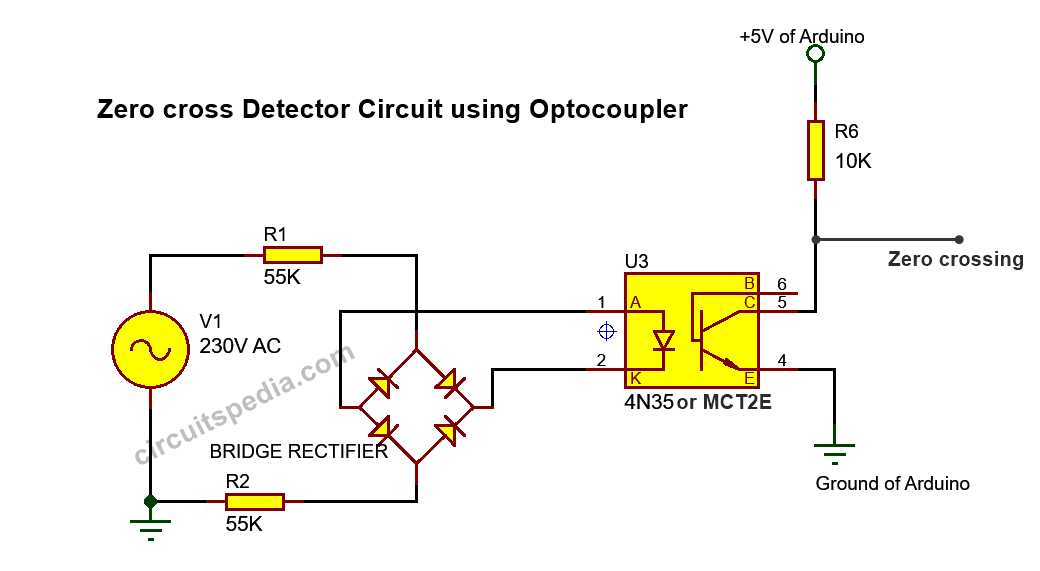
Label each resistor and capacitor using a multimeter to verify their actual resistance and capacitance before assembly. Mark the LED terminals clearly, noting anode and cathode orientation with permanent labels for repeated testing.
Trace all jumper wires with continuity checks. Ensure the transistor’s base, collector, and emitter are correctly positioned; misplacement can prevent switching or damage the device under inspection. Use color-coded wires to distinguish input from output lines.
Check each connection point on the breadboard for loose contacts. Small gaps or bent pins can create intermittent signals, causing voltage readings to fluctuate unexpectedly. Firm seating of components prevents erratic behavior during activation cycles.