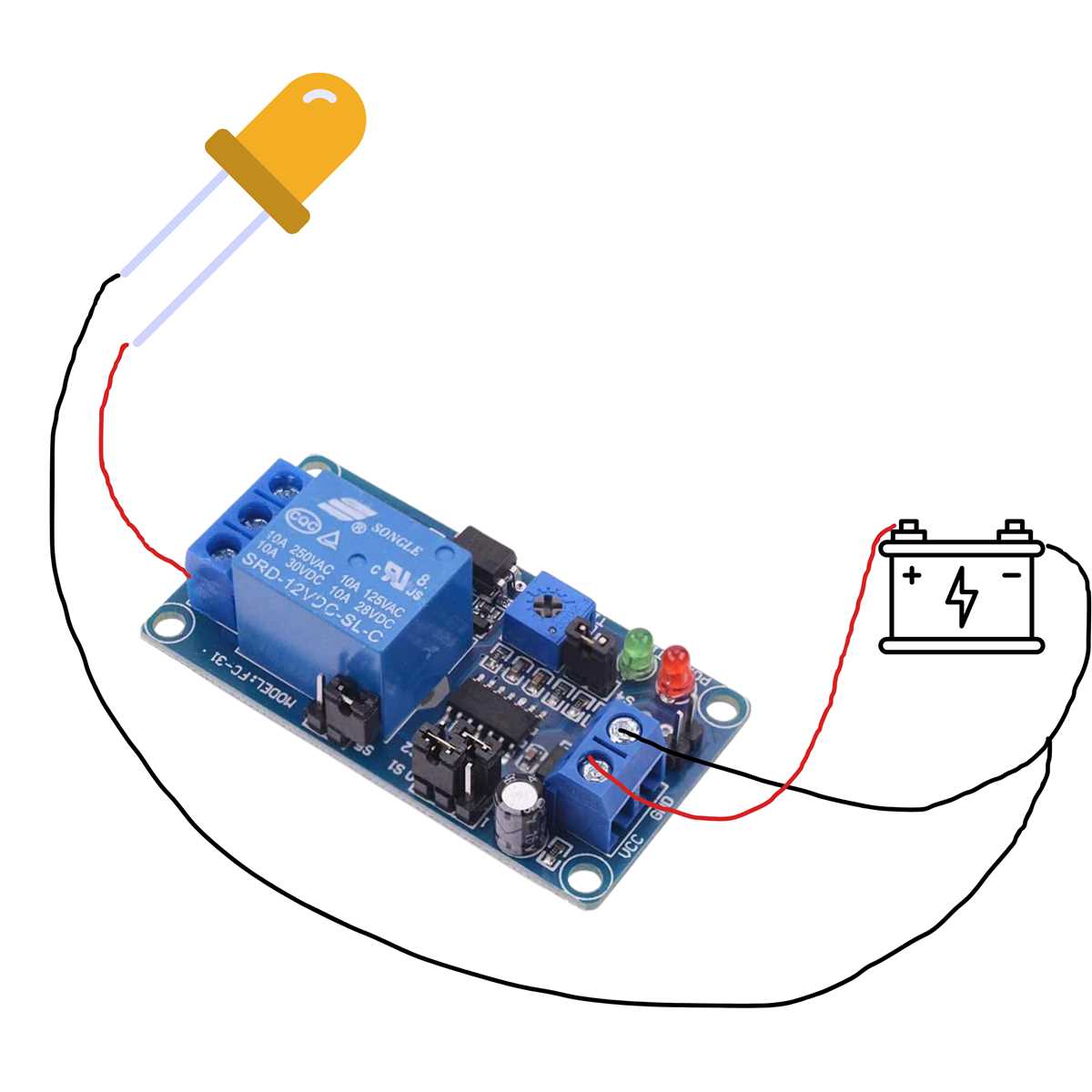
To set up a switching system for controlling high-power devices, proper connections are crucial. First, identify the correct pinout configuration of your switch. Each terminal has a specific role: one for power input, one for the load, and others for control and switching functions. Understanding these roles ensures the correct flow of electricity to your load, which prevents errors and potential damage to components.
Begin by connecting the power input to the designated terminal, followed by the load to the output terminal. The control terminals will connect to the activating switch, which can either be manual or automated. It’s important to verify that the load’s voltage and current requirements match the switch’s specifications to prevent overheating or failure of the switch.
Next, ensure the proper grounding. Grounding is a vital part of any electrical setup, ensuring safety and reducing the risk of shorts or electrical fires. Typically, the ground wire will be connected to the common terminal. Always use insulated cables to avoid accidental short circuits and ensure a stable and secure connection.
Finally, check the connections with a multimeter before powering up the system. This helps identify potential issues such as incorrect wiring or loose connections. Once everything is verified, the system can be activated, allowing you to control the connected devices efficiently and safely.
12V Relay Wiring Guide
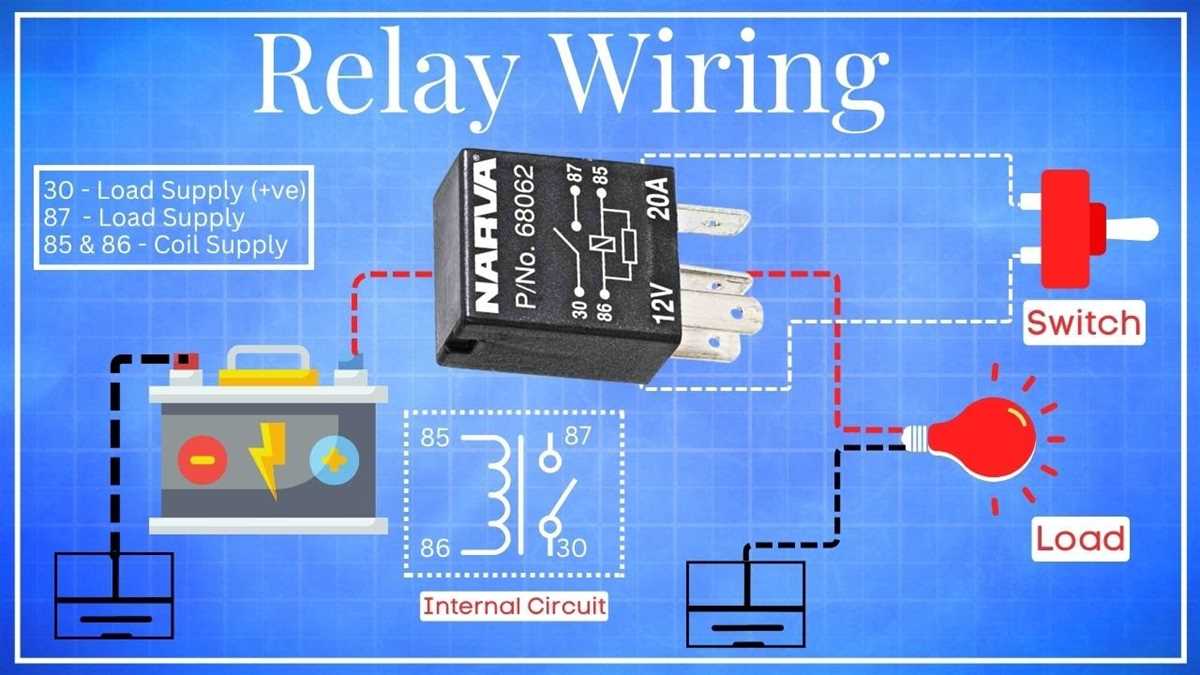
Start by identifying the pins of the component. There are typically five or four pins: common, normally open (NO), normally closed (NC), coil positive, and coil negative. Pin configuration is crucial for establishing the right connections to power the system correctly.
Connect the power source to the appropriate terminal that corresponds with the input voltage. This ensures that the device receives power when the control mechanism is activated. Use proper gauge wire for handling the required current to avoid overheating.
The next step is wiring the control side. Connect one terminal of the coil to the power source and the other to the control switch or transistor. The switch or transistor will provide the signal needed to activate the mechanism. When the switch is closed, the current will flow through the coil, creating a magnetic field that causes the switch to close or open the contact points.
Once the control side is connected, wire the load. The output terminal should be connected to the device that will be powered. If the device is a motor, for example, one terminal of the motor will connect to the NO terminal, and the other will connect to the power supply.
For safety, it is important to double-check the connections before turning the system on. Verify that the common terminal is wired to the input power, and that the NO or NC terminals are connected to the load device, depending on whether you want the device to be powered when the relay is activated or deactivated.
After verifying the wiring, test the system by activating the control switch. Observe whether the relay engages correctly, completing the circuit and powering the load. If it does not, check for loose connections or incorrect wiring that could be preventing activation.
Finally, ensure that all connections are secure and insulated to prevent shorts. Use terminal blocks or connectors for a professional finish. Regular maintenance and checks will help keep the system functioning without issues over time.
How to Properly Connect a 12V Relay to a Power Source
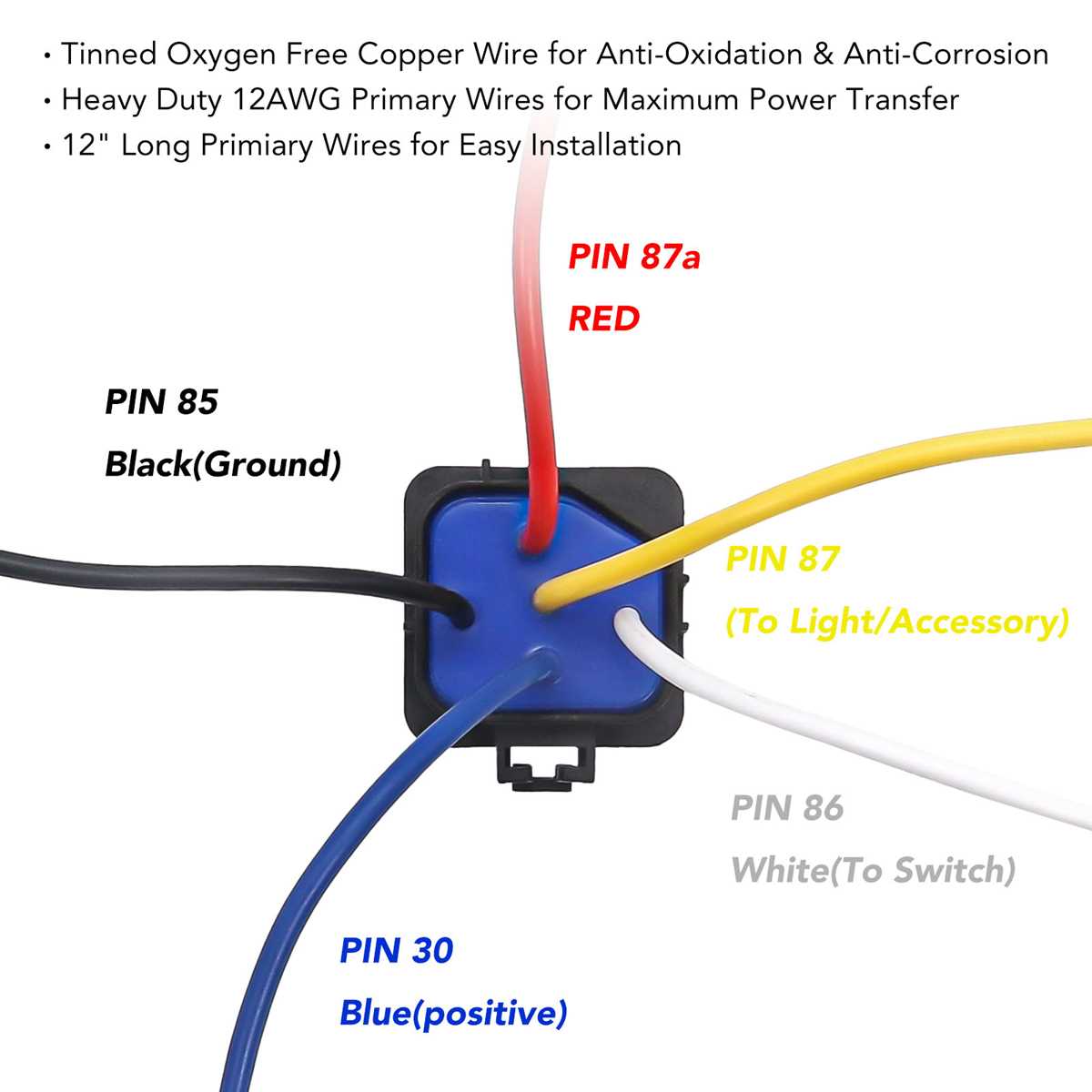
Begin by identifying the correct input terminal that corresponds to the power supply. This is typically marked as the “common” or “coil” terminal. The power supply should be connected to this terminal to ensure that the component is powered when triggered.
Next, ensure that the ground connection is securely attached to the negative terminal of the power source. This completes the basic electrical connection for the device, allowing current to flow through the system when activated.
For the control side, connect the other terminal of the coil to the switch or signal output. This switch could be a manual toggle, a transistor, or another mechanism that activates the system when closed. Ensure the switch is rated for the current that will flow through the coil when triggered.
Connect the device that you intend to control. One terminal of the device should be linked to the normally open (NO) terminal. The other terminal of the device connects to the power source, completing the path when the system is engaged.
Before powering up, double-check all connections. Confirm that the control side of the device is connected correctly, ensuring that the switch operates as intended, and that the load device is connected to the output terminal correctly.
Once verified, you can proceed to power the system. When the switch is closed, the coil should activate, and the contacts will close, providing power to the load device. If the system is wired correctly, the load should now receive the intended power.
If the system does not operate correctly, check for any loose connections or incorrect wiring that could prevent activation. Ensure that all components are rated for the voltage and current they are expected to handle to avoid damaging the system.
Finally, use proper insulation and secure the connections to prevent shorts or disconnections. Regularly inspect the wiring to ensure long-term reliability, and always follow safety guidelines when working with electrical components.