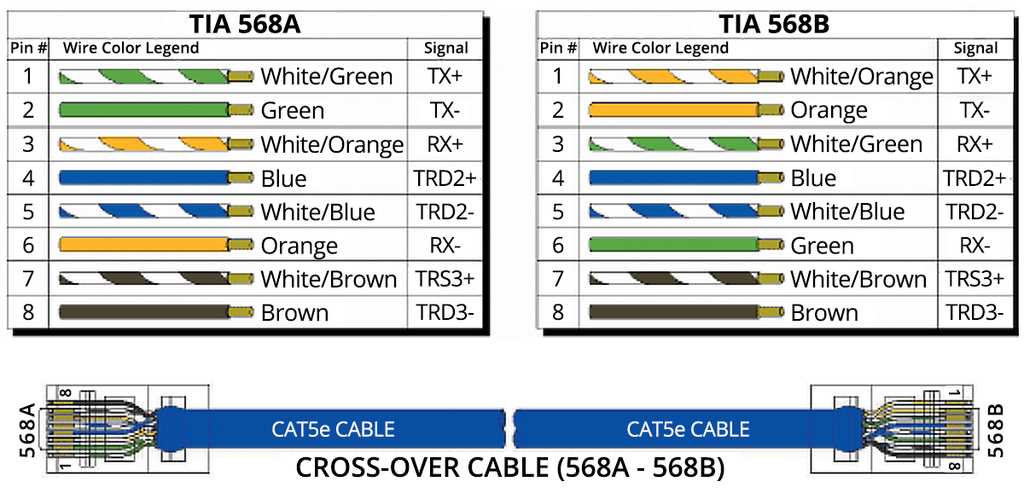
Arrange the twisted pairs according to the T568A or T568B standard before inserting them into the connector. Maintain consistent color order to ensure signal integrity and avoid cross-talk between channels.
Trim the cable ends evenly to expose the conductor cores without nicking them. Use a precision cutter to prevent damage that can lead to intermittent connections or reduced data transmission speeds.
Insert the prepared conductors fully into the connector slots so that each wire reaches the metal contacts. Verify that each conductor aligns correctly to avoid miswiring that could disrupt network communication.
Crimp the connector using a compatible crimping tool to secure all conductors. Apply firm, even pressure to ensure reliable electrical contact and reduce the risk of loose connections under strain.
Test the assembled cable with a network tester to confirm proper connectivity and detect any crossed or open lines. Check both ends to verify that the cable supports full data transfer rates without errors.
RJ45 Connector Pinouts and Connections
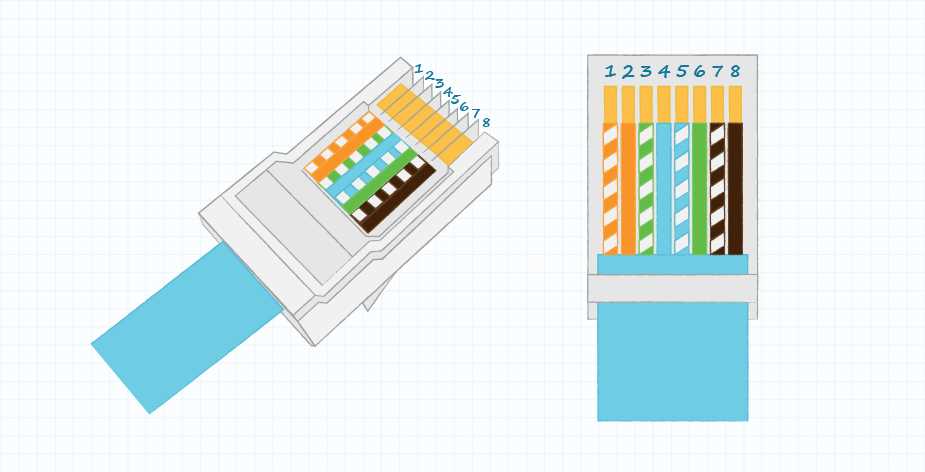
Follow the color-coded sequence carefully when preparing the conductor cores for insertion into the connector. Align each pair precisely to its designated slot to prevent signal interference and ensure proper transmission.
Use the T568A or T568B standard depending on your network setup. Maintain the same standard at both ends to avoid crossover errors that can disrupt communication between devices.
Trim the outer insulation cleanly and untwist each pair just enough to insert into the connector. Do not separate pairs excessively as this can increase crosstalk and reduce network reliability.
- Insert wires fully into the connector so the metal contacts pierce the insulation.
- Verify that each wire sits correctly without overlap or misalignment.
- Crimp the connector using a compatible tool to secure all conductors firmly.
After crimping, test continuity with a cable tester to confirm correct pairing and signal flow. Check for open, shorted, or misaligned conductors to prevent network failures.
Label both ends of the assembled cable to indicate the chosen standard. This helps future troubleshooting and ensures consistent connections in complex network installations without guessing or errors.
Understanding T568A and T568B Standards
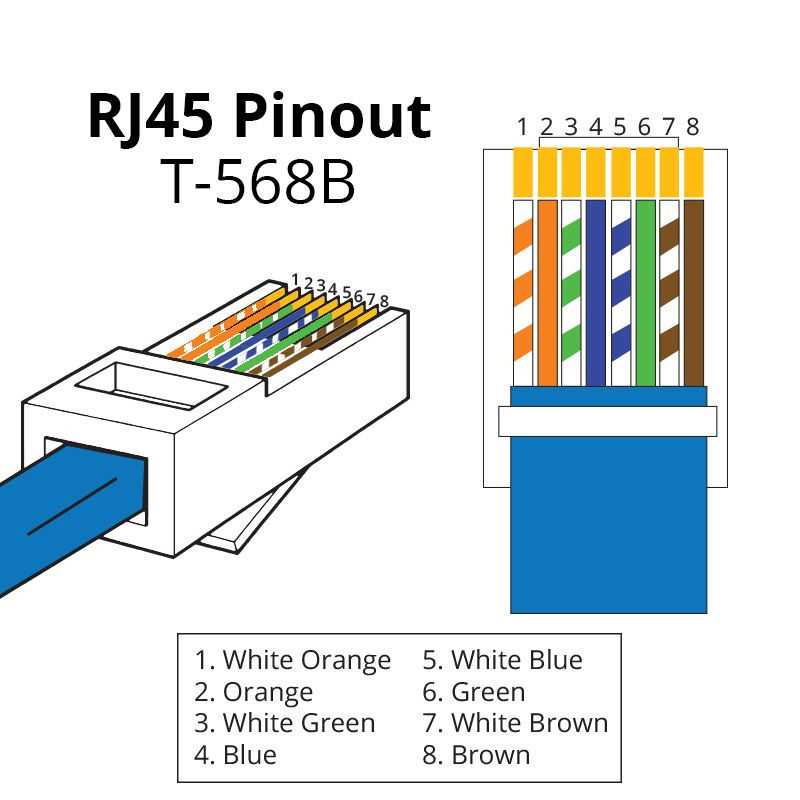
Use the T568A or T568B sequence consistently when terminating network cables. Choose one standard and maintain it across all connectors to prevent misalignment and signal mismatch between devices.
T568A places the green pair on pins 1 and 2, while T568B swaps this with the orange pair. Both standards support gigabit and fast Ethernet, but mixing them on a single link can create a crossover configuration unintentionally.
When connecting patch panels or wall jacks, verify the color order visually before inserting conductors into the connector. Misplaced pairs can introduce crosstalk and reduce transmission quality, especially over longer runs.
For new installations, consider using T568B for consistency with most commercial network equipment. Label each cable end to indicate the chosen standard, which simplifies future upgrades and troubleshooting in larger network setups.