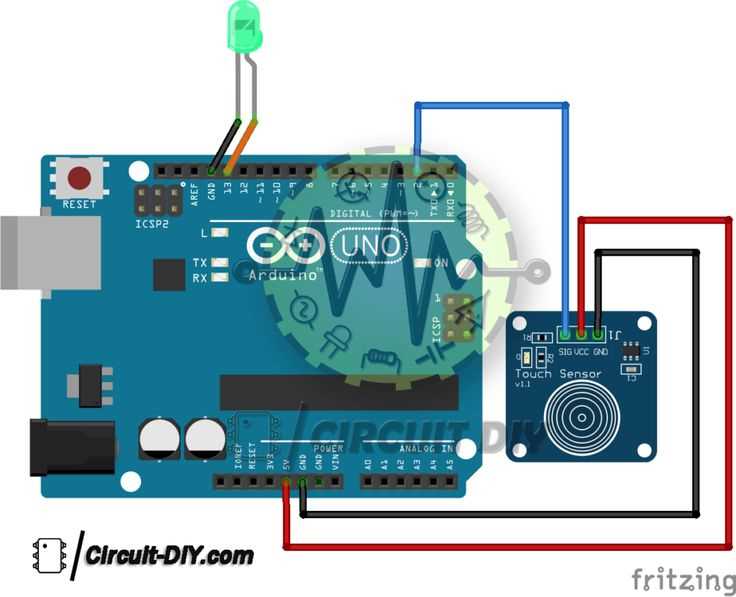
Connect the module’s power input to a stable 3.3V or 5V source and verify polarity using a multimeter before any other connections to prevent damage. Ensure all ground leads are securely fastened to avoid signal instability.
Align the electrode terminals precisely with the control inputs to maintain accurate detection. Use short, shielded wires when bridging long distances to reduce interference from nearby electronics.
Verify that the output lines are properly routed to the microcontroller or switching device. Maintain a clean separation between input and output paths to prevent false triggering or erratic responses.
Incorporate a pull-up resistor of 10kΩ on digital outputs to stabilize readings during idle states. Check continuity after assembly to confirm no unintended short circuits exist between terminals.
Test the assembly with incremental activation rather than full engagement to identify any irregularities early. Adjust sensitivity settings if the module allows, ensuring that detection occurs only under intended conditions.
Label all connections clearly to simplify troubleshooting and future modifications. This reduces the likelihood of reversing leads or misconnecting components in complex setups.
Use insulating tubing or heat shrink on exposed leads to prevent accidental contact and preserve signal integrity. Avoid tightly bundling input and output wires together to minimize cross-talk.
Finalize the setup by observing the module under typical operating conditions. Monitor voltage levels and response times to confirm that connections are stable and outputs are consistent with expected activation patterns.
Capacitive Touch Sensor Connection and Setup
Attach the module’s power lead to a steady 3.3V or 5V source and connect the ground terminal directly to the common return line. Confirm voltage levels with a multimeter to prevent damage and ensure stable operation during activation tests.
Link the detection terminals to the controller inputs using short, shielded leads to minimize interference. Maintain separation between input and output paths and secure all connections with proper insulation to avoid accidental shorts or erratic triggering.
Test response by lightly activating the interface while monitoring the output signal. Adjust any sensitivity controls provided and label each connection clearly, which simplifies troubleshooting and preserves signal integrity across repeated setups.
Identifying Sensor Terminals and Input Points
Start by locating the power and ground leads on the module. The positive connection typically aligns with the voltage rating printed on the board, while the common return is often marked with GND. Verify polarity using a multimeter before applying power.
Determine input points for signal detection by tracing the conductive pads or connectors that link directly to the controller. Label each lead as either signal or control to maintain clarity during repeated testing and prevent misrouting that could interfere with response accuracy.
Check continuity between terminals and interface pins to confirm proper routing. Use small jumper wires or test probes to activate each input lightly while monitoring the output; this ensures that each point responds correctly and simplifies adjustments to sensitivity or threshold settings.