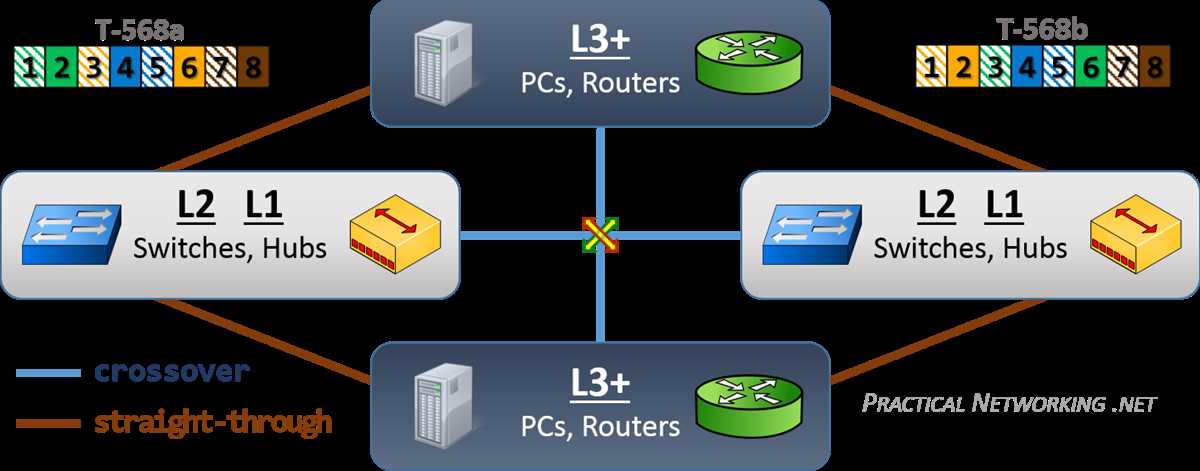
Use a standard color coding sequence to prevent miscommunication between devices. Maintain proper pair alignment and ensure no untwisted sections exceed 0.5 inches to reduce signal loss.
Terminate each line with modular plugs rated for 10/100/1000 Mbps performance. Verify that each conductor fully seats in the connector to avoid intermittent connectivity and crosstalk.
Measure continuity with a tester immediately after installation. Testing identifies miswires, opens, and shorts before deployment, ensuring stable data transfer across the network.
Route lines away from interference sources such as fluorescent lights, motors, or power cords. Maintain a separation of at least 12 inches to minimize electromagnetic interference affecting signal integrity.
Step by Step Guide to Connecting Twisted Pair Lines for Reliable Network Setup
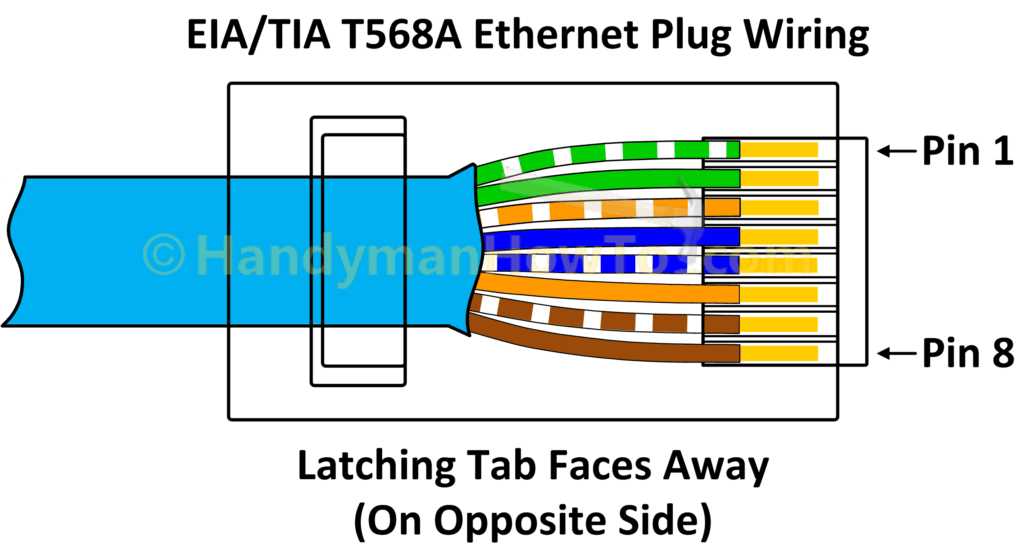
Strip the outer sheath carefully using a precision stripper to expose four pairs of twisted conductors. Avoid nicking the inner insulation, as even minor damage can degrade signal quality.
Separate and untwist each pair only as much as needed for termination, keeping untwisted lengths under 0.5 inches. Excess untwisting increases the risk of crosstalk and reduces transmission performance.
Arrange wires in the desired sequence based on T568A or T568B standards. Consistency at both ends ensures proper connectivity and avoids network faults caused by misaligned pairs.
Insert each conductor fully into modular plugs, ensuring each reaches the end contact. Confirm the jacket seats flush with the plug to provide strain relief and stable mechanical connection.
Crimp plugs with a reliable tool to secure conductors in place. Verify that each pin makes firm contact with the copper core, avoiding intermittent connections that can disrupt data flow.
Test continuity and pair mapping using a dedicated network tester. Check for opens, shorts, or crossed pairs, and correct any issues immediately to guarantee full network functionality.
Label both ends to indicate the connection endpoints. Proper labeling simplifies future maintenance, prevents accidental cross-connections, and ensures organized network infrastructure.
Selecting the Right Cable Type and Connector to Ensure Network Reliability
Choose the appropriate twisted pair type based on required transmission speed and distance. Unshielded twisted pairs (UTP) suit typical office setups up to 100 meters, while shielded pairs (STP) prevent interference in electrically noisy environments.
Match connector type to installation needs using standard modular plugs compatible with RJ45 ports. Verify that plug contacts align precisely with each conductor to maintain signal integrity and reduce data errors.
Consider jacket material and rating for environmental conditions. Plenum-rated jackets resist fire and smoke in ceiling spaces, whereas PVC jackets are adequate for general in-wall runs.
Assess twisted pair categories such as Category 5e or Category 6, based on bandwidth requirements. Higher categories support Gigabit and 10-Gigabit connections with reduced crosstalk and attenuation.
Inspect conductor gauge to ensure minimal resistance over the cable length. Typically, 24 AWG solid conductors provide reliable connectivity while maintaining flexibility for routing.
Test cable assemblies before deployment using a continuity and certification tester. Confirm proper termination, pair sequencing, and absence of shorts to guarantee network performance under load.
Label connectors and endpoints to maintain organized network mapping. Proper identification reduces troubleshooting time and prevents accidental cross-connections during maintenance or expansion.