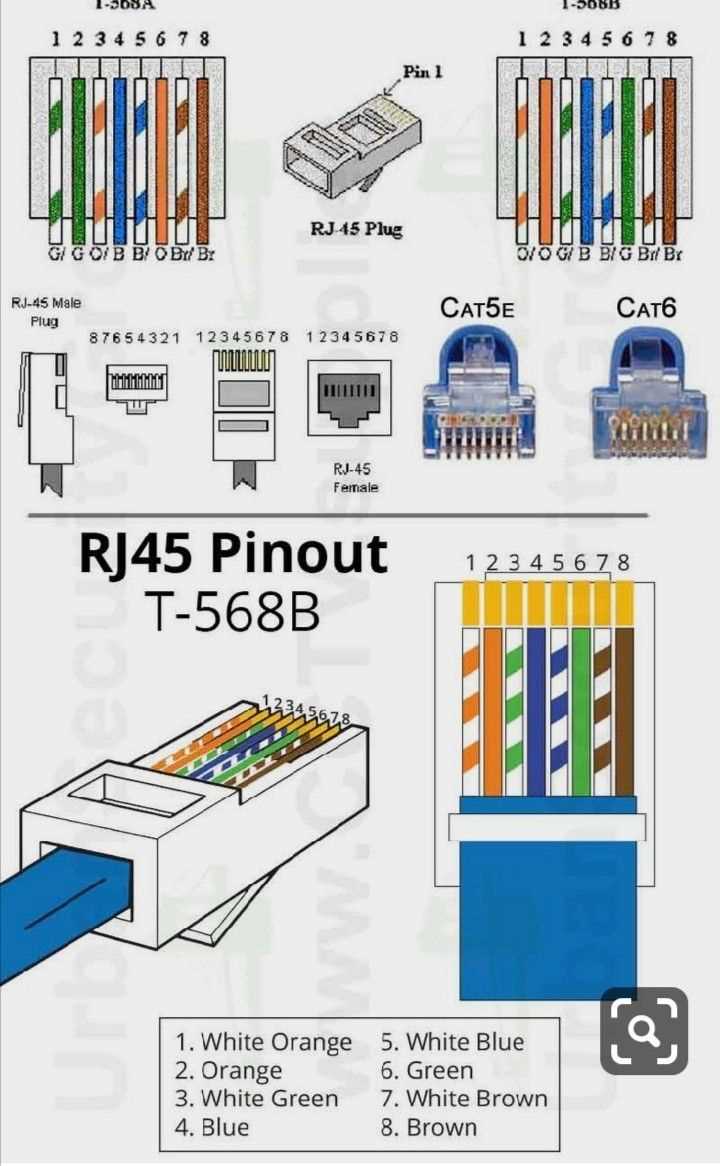
To successfully assemble a reliable network connection, understanding the structure and layout of each conductor is key. Start by recognizing the pinout configuration, which dictates how each wire in the bundle is arranged to ensure proper data transfer. Make sure to match the correct sequence of wires to the pins of the connectors for optimal performance.
For the best results, always adhere to the color coding standards. The colors represent specific wires that correspond to certain roles in the data transmission process. Following this guide will help maintain consistency across installations, and prevent potential signal loss or connection errors. Pay attention to the twisted pairs and their positions in the connector to avoid issues with connectivity.
Once the connections are made, check for common mistakes such as improper seating of wires, poor cable preparation, or incorrect order. A well-prepared setup will significantly reduce the likelihood of signal degradation or loss. Testing the connections using a cable tester can quickly verify if everything is correctly arranged and functioning.
Wiring Diagram Ethernet Cable
Start by selecting the right connectors. For standard networking applications, RJ45 connectors are the most common choice. Ensure that the connector supports the number of pins required for your specific wiring standard, such as T568A or T568B.
When preparing the conductors, carefully strip the insulation off the wires without damaging the inner strands. This is important because a clean cut will ensure better contact with the metal pins in the connector, reducing the risk of connection issues.
Pin Configuration
For T568A, the pinout is as follows: Pin 1 is white with green, Pin 2 is green, Pin 3 is white with orange, Pin 4 is blue, Pin 5 is white with blue, Pin 6 is orange, Pin 7 is white with brown, and Pin 8 is brown. For T568B, the sequence differs, with the key difference being that Pin 1 is white with orange and Pin 2 is orange. Make sure to follow the correct standard throughout your setup to avoid miswiring.
After arranging the wires in the correct order, carefully insert them into the RJ45 connector. Ensure that each wire reaches the end of the connector and is properly seated. This will provide a strong electrical connection and reduce the chances of signal loss.
Crimp the connector securely using a crimping tool to lock the wires in place. Apply consistent pressure during the crimping process to ensure a solid connection. A well-crimped connector prevents the wires from slipping out and maintains good contact with the metal pins.
Testing the Connection
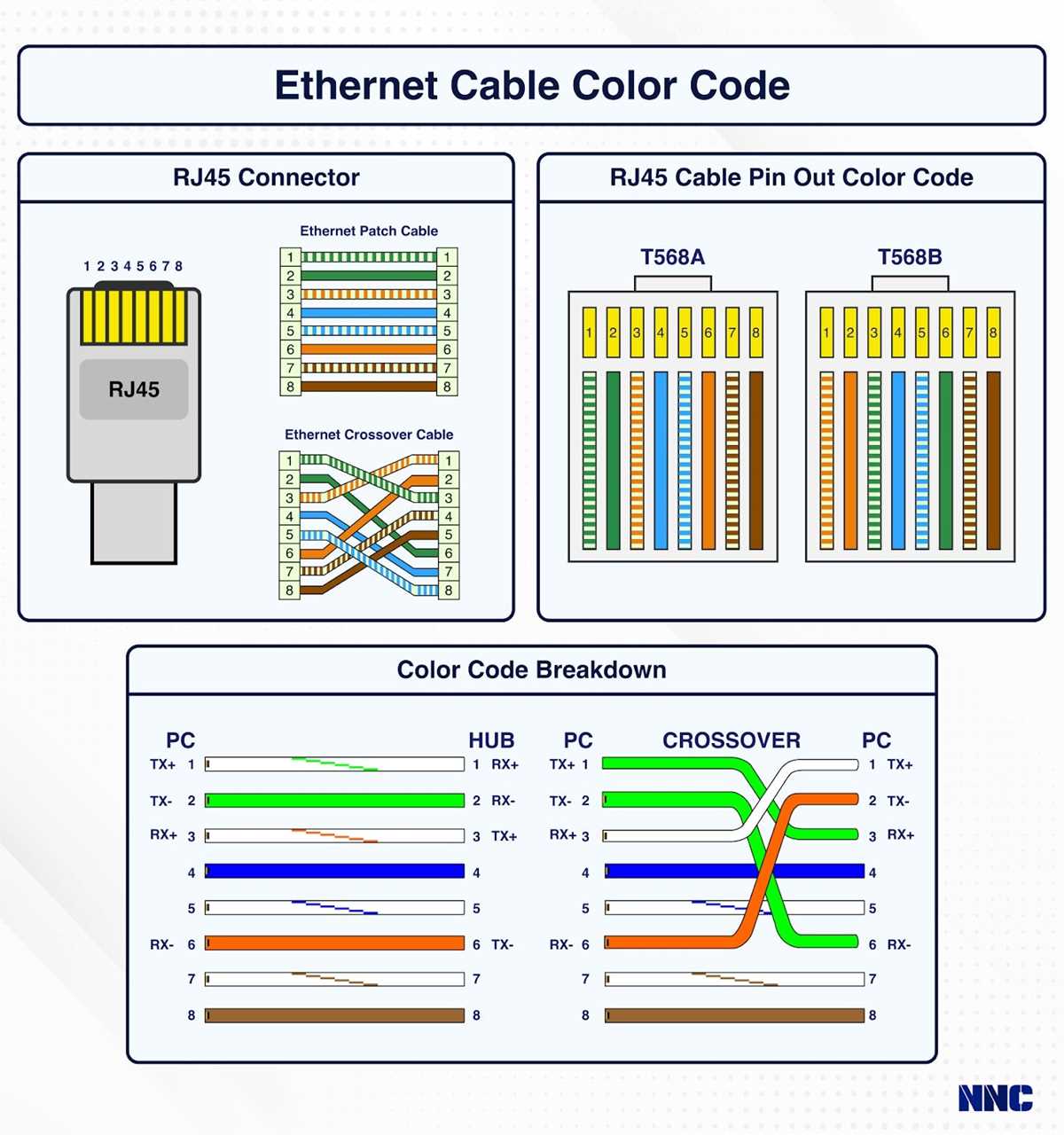
Once the connectors are in place, use a cable tester to check the wiring. A tester will help identify any miswiring or faulty connections. If the tester shows that all connections are correct, the assembly is complete and ready for use in your network.
For troubleshooting, ensure that the wires are correctly aligned in the connector and that the conductors have good contact with the pins. If you’re experiencing issues like intermittent connection or slow speeds, re-check the connections and re-crimp the connectors if necessary.
Step-by-Step Guide to Wiring an Ethernet Cable
Begin by gathering all necessary tools: an RJ45 connector, a crimping tool, a cable stripper, and a tester. The right equipment ensures accuracy and reliability in the final connection. Make sure the RJ45 connectors match the number of wires you plan to use.
Measure the length of the cord you need, allowing extra slack for flexibility. Using a cable stripper, carefully remove about 1.5 inches (3.8 cm) of the outer jacket, exposing the individual wires inside. Be cautious not to damage the inner wires during this process.
Once the jacket is stripped, untwist the individual wires and arrange them in the correct order. If you are using the T568A standard, the correct wire sequence from left to right should be: white-green, green, white-orange, blue, white-blue, orange, white-brown, brown. Ensure each wire is straightened and in the correct position.
Trim any excess wire to make them all even in length, about 0.5 inch (1.3 cm) from the connector’s end. Insert the wires into the RJ45 connector, ensuring that each wire reaches the front of the connector and is properly aligned with its respective pin.
Once the wires are inserted, use the crimping tool to secure the connector onto the cable. The crimping tool will push the metal pins inside the connector into the wires, making the necessary connections. Apply firm pressure, ensuring that the connector is securely attached to the cord.
Finally, test the assembled connection using a cable tester to ensure all wires are correctly connected. If the tester indicates any faults, double-check the alignment and re-crimp the connector if necessary. A properly wired and tested connection will guarantee a stable and reliable network connection.