Match each conductor to the correct terminal to prevent short circuits and ensure stable data transfer. Use a multimeter to verify continuity before powering devices.
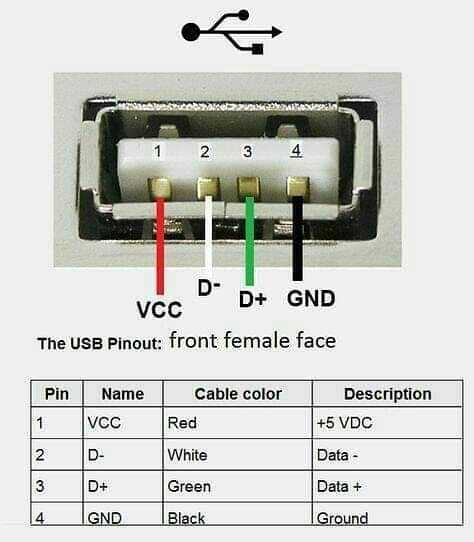
Follow standard color codes for signal and power lines–red for positive voltage, black for ground, green for data plus, and white for data minus. Maintaining this order avoids reversed connections that can damage electronics.
Secure insulation around exposed wires to reduce the risk of accidental contact and interference. Heat-shrink tubing or electrical tape provides reliable protection for both permanent and temporary assemblies.
Check pin alignment carefully when attaching connectors to prevent bent contacts. Misaligned contacts can result in intermittent signals or permanent damage to the host device.
Label each cable clearly during assembly to streamline future maintenance or modifications. Consistent marking reduces errors when integrating multiple devices or replacing components.
Complete Connector Pin Layouts and Color Codes for Safe Connections
Identify each terminal before making connections to avoid reversed contacts. Standard colors are red for positive power, black for ground, green for data plus, and white for data minus. Using a multimeter ensures the correct match for each wire.
Arrange contacts in the correct sequence within the housing. For a typical 4-conductor interface:
- Pin 1: Red – +5V supply
- Pin 2: White – Data minus
- Pin 3: Green – Data plus
- Pin 4: Black – Ground
Shield exposed conductors with heat-shrink tubing or tape to prevent short circuits and interference. Keep wire lengths minimal and untwisted sections short for stable signal integrity.
Verify connections under load by powering a low-current device first. Observe voltage across pins and continuity to confirm proper installation. Label each line for easier troubleshooting and replacements in future assemblies.
Identifying Connector Types and Pin Functions
Match the interface shape to its standard before connecting any device. Rectangular A-type connectors are for host devices, while smaller B-type or micro versions typically link peripherals. This distinction prevents physical damage and incorrect connections.
Pin Assignments for Data and Power
Check each contact number and function carefully. In common 4-pin layouts, Pin 1 carries positive voltage, Pin 2 transmits negative data, Pin 3 carries positive data, and Pin 4 serves as ground. Misplacement can lead to device malfunction or short circuits.
Special Variants and Extra Lines
Recognize connectors with additional pins for fast charging or data expansion. Five- or nine-pin versions include extra data lanes or power lines. Always consult manufacturer references to confirm which contacts are active and which remain unused to avoid errors during installation.