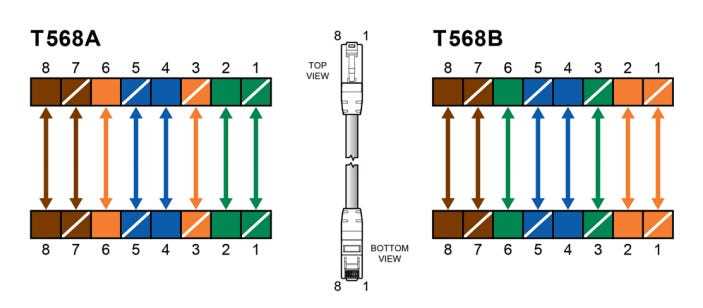
To correctly wire an Ethernet cable, arrange the wires in a specific sequence, ensuring proper alignment for a stable connection. The most commonly used configuration for wiring is a specific pinout pattern, which guarantees high-speed data transfer and reduces the risk of signal interference.
Start by stripping the cable’s outer sheath carefully, exposing the internal wires. Then, follow the color-coding standard, which involves placing the eight wires in a specific order. This sequence will determine the connection’s functionality, whether for a straight-through or crossover cable.
After arranging the wires, trim them to an even length and insert them into a connector. Ensure the wires make full contact with the metal prongs inside the connector for a reliable signal. Use a crimping tool to secure the wires in place, ensuring the connection stays intact during use.
T568b Wiring Guide
To achieve a reliable Ethernet connection, follow the standard pinout sequence. The arrangement of the eight internal wires inside the cable plays a significant role in determining the performance of your network setup.
For the correct arrangement, begin with the wire colors: white with orange, orange, white with green, blue, white with blue, green, white with brown, and brown. This sequence is used in a straight-through cable, which is the most common for connecting devices like routers or switches to computers.
Pinout for Straight-Through Cable
In a straight-through connection, the same wire order is applied to both ends of the cable. Ensure the wires are positioned correctly inside the connector. Each wire should click into place within the metal pins, ensuring proper contact for the signal to flow through the cable.
After positioning the wires, it’s important to trim the wires neatly to an even length. This ensures that all wires make contact with the connector, minimizing the chance of weak or intermittent connections. The crimping tool will secure the wires in place within the connector, locking them in position.
Crossover Cable Configuration
For a crossover cable, which is used to connect like devices (for example, two computers without a switch or router), the pinout sequence changes. On one end, maintain the standard sequence, but on the other end, swap the positions of the orange and green pairs. This allows for a proper two-way communication link between devices.
Once you’ve arranged the wires, carefully check each side for consistency. This ensures that there are no misaligned wires, which can lead to connection failures. It’s always a good idea to test the cable after crimping to make sure the connection is secure and functional.
Finally, ensure the cable is properly protected and shielded, especially in environments with potential interference. Using quality connectors and following the correct pinout sequence will ensure that the cable provides optimal performance for high-speed network transfers.
How to Identify T568b Cable Wires and Pins
Start by understanding the color coding for the internal wires. The standard pinout consists of eight wires arranged in a specific order to ensure proper communication. Recognizing these wire colors is key for correct setup.
- White with orange
- Orange
- White with green
- Blue
- White with blue
- Green
- White with brown
- Brown
When looking at the cable from the connector end, start with the clip facing you. The first pin on the left will be the white with orange wire, followed by orange, white with green, and so on. Ensuring that the wires align correctly within the connector is crucial for signal integrity.
Check the pins on both ends of the cable to confirm that the color sequence is maintained. If the sequence is not consistent, the cable may not function properly. Double-checking at this step can save time troubleshooting later.
Once the wires are in place and securely crimped, perform a continuity test. This ensures the connections are intact and the signal will pass through without issues. Testing the cable with a network tester is an effective way to verify the setup.