Choose a 5 V or 3.3 V compatible liquid-crystal panel module and verify the pin mapping before any wiring. A common 16×2 unit with an HD44780-type controller exposes 16 contacts: ground, power, contrast input, register select, read/write line, enable line, eight data pins, and two backlight leads. For microcontroller projects, connect only D4–D7 for four-bit data transfer; this reduces I/O usage from ten lines to six while maintaining stable character output.
Contrast control requires a small variable resistor between supply and ground with the wiper routed to the contrast pin. Values around 10 kΩ provide stable adjustment across most modules. Backlight terminals often draw 15–25 mA; add a series resistor of roughly 100–220 Ω when the module lacks built-in current limiting. Skipping this step leads to overheating of the LED illumination.
The control sequence relies on precise signal timing. The enable line must receive a pulse longer than 450 ns, while instruction execution may take 37–40 µs for standard commands and up to 1.64 ms for clear or home instructions. Firmware should insert these delays or poll the busy flag through the read line when full bidirectional communication is used.
A clear wiring map also separates logic traces from power routing. Place a 0.1 µF ceramic capacitor close to the module’s power pins to reduce noise that can corrupt character data. Ribbon cables longer than 20 cm may introduce signal distortion; in such cases, slower data transitions or shielded wiring improves reliability of the visual panel.
Pin configuration and signal mapping in a typical LCD display circuit diagram
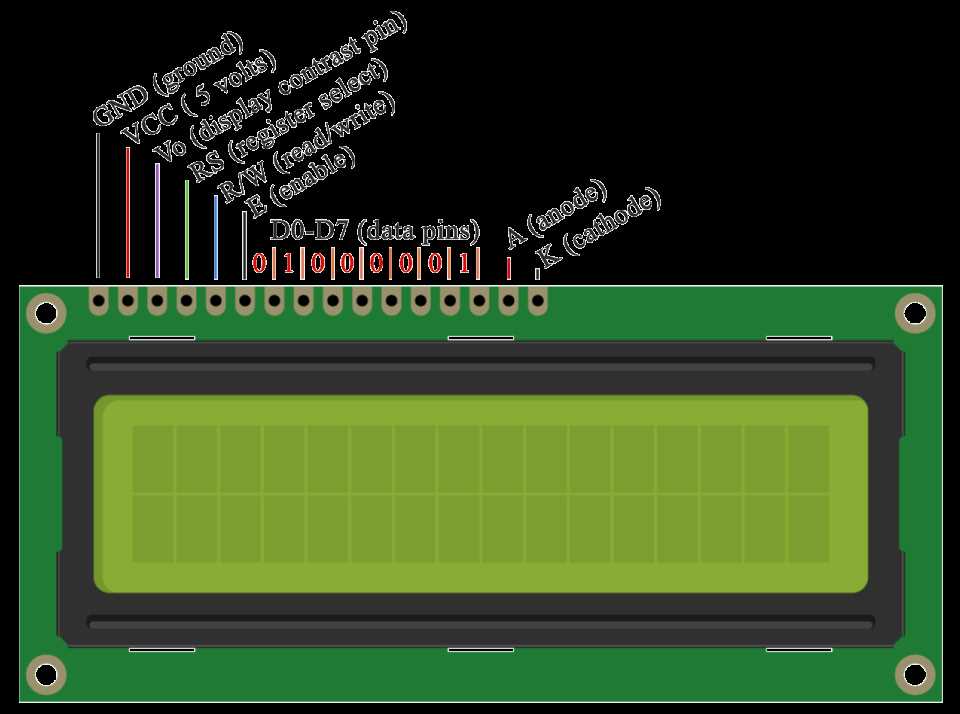
Assign the power and control pins first: VSS connects to ground, VDD to +5 V (or 3.3 V in many modules), while the contrast input (often labeled V0 or VEE) receives an adjustable voltage through a 10 kΩ potentiometer placed between supply and ground. This arrangement allows manual contrast tuning without modifying firmware. The register-select line determines whether incoming data represents commands or character bytes, while the read/write line selects memory access direction. Many embedded projects tie the read/write line permanently to ground to reduce wiring and operate the module in write-only mode.
Map the enable input to a dedicated microcontroller GPIO and generate a short pulse–typically above 450 ns–to latch each byte transferred over the data bus. The timing sequence is simple: configure data lines, set the register-select state, keep read/write low, then toggle enable high-to-low. Reliable operation requires a short delay after each pulse; values between 37 µs and 1.6 ms depend on the instruction type defined by the controller.
Typical signal groups
- Power lines: VSS (0 V), VDD (+5 V or +3.3 V), V0 contrast reference.
- Control interface: RS (register select), R/W (data direction), E (latch trigger).
- Data bus: D0–D7 parallel communication lines.
- Backlight supply: LED+ and LED− pins for illumination, often requiring a 100–220 Ω resistor.
Choose either an 8-bit or 4-bit transfer scheme when connecting the data bus. In the reduced-line approach only D4–D7 are wired to the host controller, cutting required pins by four. Each byte then travels as two nibbles: the higher four bits first, followed by the lower four bits. This configuration lowers pin usage while keeping identical command structure.
Example signal mapping to a microcontroller port
- RS → GPIO pin controlling command/data mode.
- E → GPIO pin used for latch pulses.
- D4–D7 → four sequential port bits (for example PB0–PB3).
- Backlight anode → supply through resistor; cathode → ground or transistor switch.
Trace routing should keep control lines short and parallel data lines grouped along the same port bank. Mixed port assignments complicate firmware because multiple registers must be updated during each transfer. Ground return for the backlight and logic should share a wide copper path to avoid noise injection that may corrupt character data during enable pulses.
Connecting a Microcontroller to an LCD Display: Wiring Details and Control Lines in the Circuit Diagram
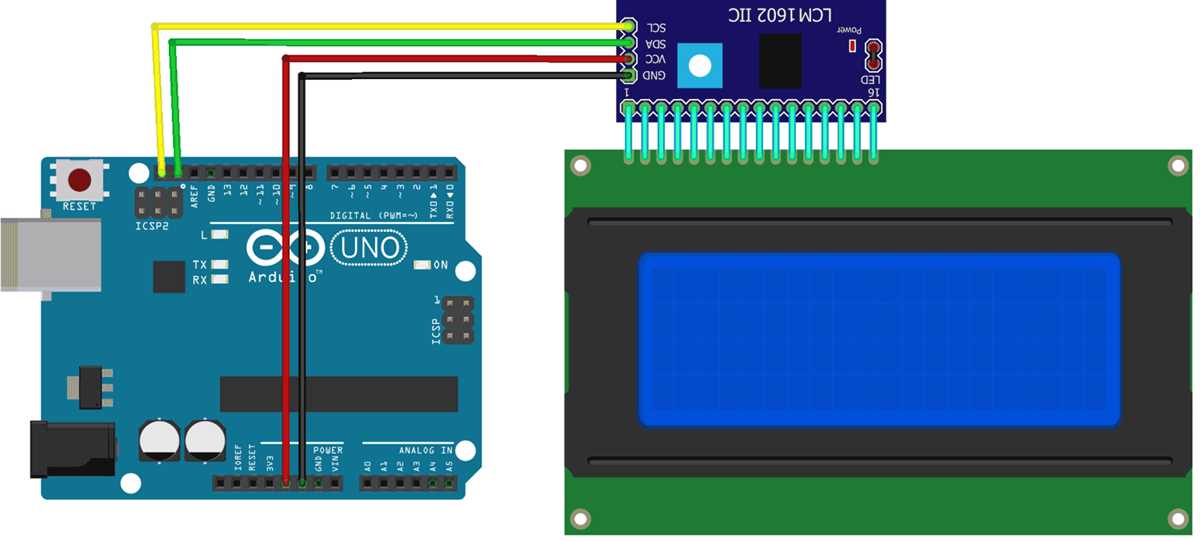
Connect the controller unit to an HD44780-compatible character module using a 4-bit data bus to reduce I/O usage: wire MCU pins to D4–D7 of the alphanumeric panel, while leaving D0–D3 unused. Tie the module’s RS line to a dedicated GPIO that selects instruction register (LOW) or data register (HIGH). The E line must connect to another GPIO used as a short pulse trigger; a HIGH pulse of about 450 ns or longer latches data. The R/W pin can be grounded when read operations are unnecessary, freeing a microcontroller pin. Power pins require +5 V and GND, while the V0 contrast input should connect to the wiper of a 10 kΩ potentiometer placed between VCC and ground.
Route control traces carefully: RS and E should stay short and free of heavy capacitive load, since slow edges may cause incorrect instruction latching. Typical firmware timing expects at least 37 µs after most commands and about 1.52 ms after clear-screen or return-home instructions. When R/W is tied LOW, these delays replace busy-flag reading. Add a 100 nF decoupling capacitor close to the module’s supply pins to prevent voltage dips during backlight switching or rapid instruction bursts.
Backlight leads (A and K) should connect through a current-limiting resistor calculated from LED forward voltage; for instance, with a 5 V rail and a 3.2 V LED drop, a 100–150 Ω resistor keeps current near 12–18 mA. If brightness control is required, drive the anode through a transistor or logic-level MOSFET connected to a PWM-capable MCU pin. Data lines D4–D7 benefit from pull-down resistors around 47–100 kΩ when long ribbon cables are used; this prevents floating states during microcontroller reset and reduces accidental character corruption.