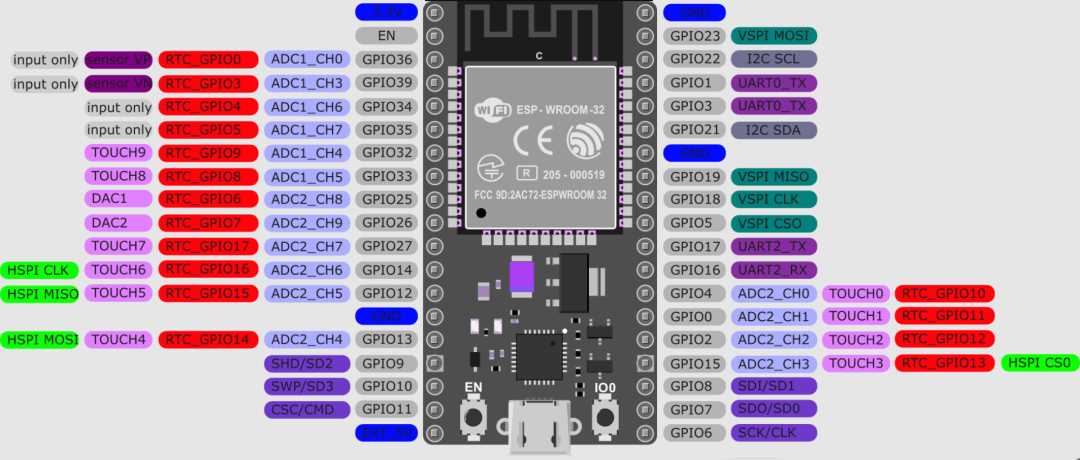
Connect the module to a stable 3.3V power source with at least 500mA output to prevent voltage drops that can trigger unexpected resets. Ensure ground lines are solid and avoid long jumper wires that may introduce resistance.
Identify input/output pins using the silkscreen labels on the PCB. For digital sensors, use pins marked as GPIO; analog devices should connect to ADC-capable pins. Keep high-current components on separate traces to prevent interference with sensitive lines.
Use level shifters when integrating 5V peripherals to avoid damaging the board. Signal wires should be kept short and shielded if routing near motors or other inductive loads. Test each connection individually with a multimeter before powering the complete system.
Double-check communication interfaces like UART, I²C, and SPI. Match the voltage levels between modules and configure pull-up resistors as required. Misaligned logic levels can result in data corruption or permanent component failure.
Pin Layout and Connection Overview for Project Integration
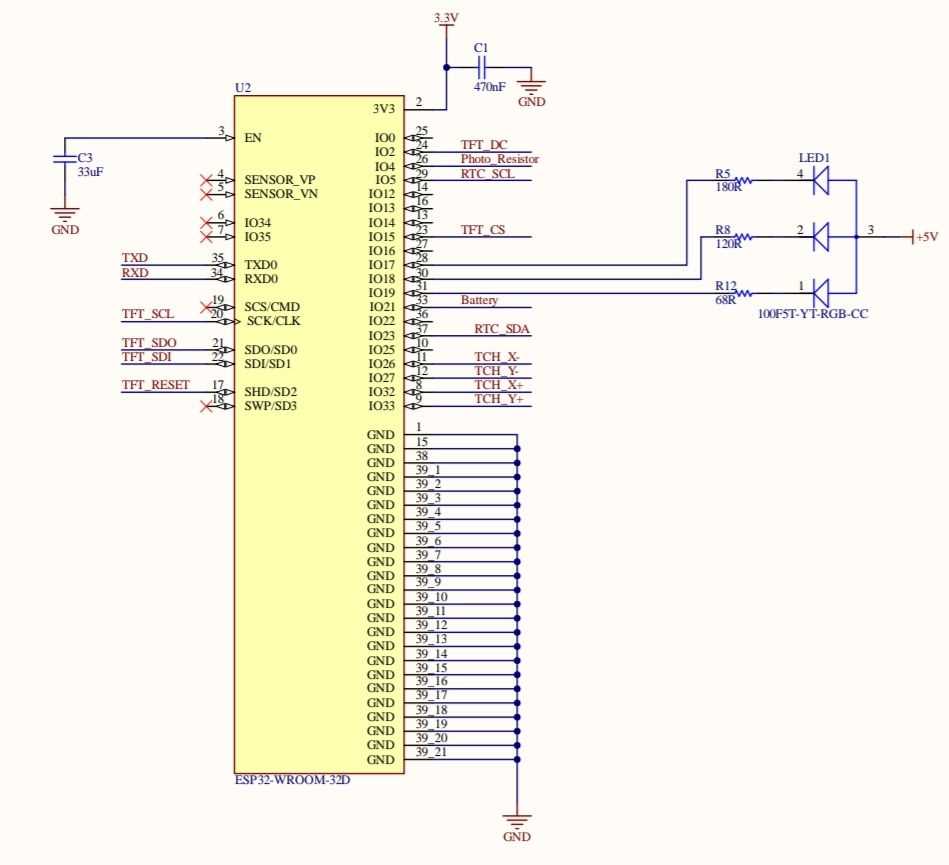
Identify power and ground pins first to secure stable operation. Use the 3.3V outputs for low-current peripherals and connect all ground lines to a common reference point. Avoid placing high-current loads directly on GPIO pins to prevent voltage fluctuations.
Map digital and analog input/output pins according to their labeled functions. GPIO pins can handle PWM signals, interrupts, and standard high/low logic. ADC pins should be reserved for sensors requiring analog-to-digital conversion, while touch-capable pins are best used for capacitive input devices.
Check communication interfaces carefully for proper connections. UART lines must match TX/RX pairs, I²C devices require pull-up resistors on SDA and SCL, and SPI requires proper CS, MISO, and MOSI routing. Confirm voltage levels between modules to prevent signal mismatches or component damage.
Power Supply Options and Voltage Requirements for Module Integration
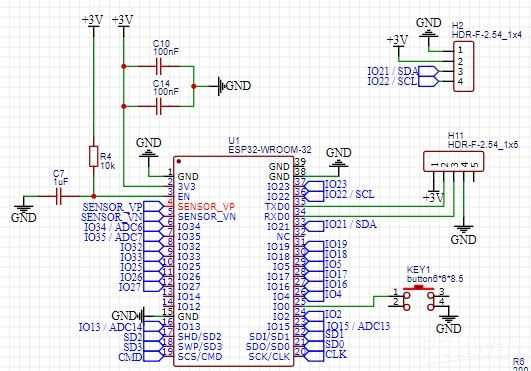
Use a regulated 3.3V source to power the board directly. Ensure the supply can provide at least 500mA during peak transmission periods. Avoid using unregulated adapters as voltage spikes may damage internal components.
Consider USB or external DC input for flexibility in different project setups. USB sources typically provide 5V that can be stepped down via onboard regulators, while external DC can be filtered with capacitors to minimize ripple. Always verify that total current draw from sensors and peripherals stays within safe limits.
Monitor voltage levels during operation to prevent brownouts. Use a multimeter or a logic analyzer to check stability, especially when switching loads or connecting wireless modules. Adding a small decoupling capacitor near the power pins can reduce transient fluctuations and improve reliability in high-frequency applications.