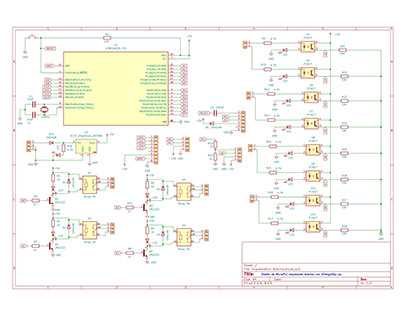
Begin by selecting each component carefully and assign clear, standard symbols for resistors, sensors, LEDs, and microcontrollers. Using consistent notation reduces confusion and prevents misinterpretation when assembling the hardware.
Arrange connections logically to reflect actual wiring paths, keeping power and ground lines separate from signal paths. Group related elements together to make tracing signals and troubleshooting simpler during testing.
Verify pin assignments and voltage requirements for every module before finalizing the layout. Highlighting critical connections and labeling them prevents accidental short circuits and ensures proper operation of all parts.
Use a clear labeling system for each wire and terminal. Number pins sequentially and indicate direction for current flow, which helps anyone following the schematic to reproduce the setup accurately without mistakes.
Test the schematic conceptually by simulating signal paths and checking for potential conflicts or overlaps. Confirm that every connection matches the physical setup, reducing errors before actual assembly and reducing material waste.
Step-by-Step Guide to Creating Accurate Electronics Schematics for Projects
Select each module carefully and verify its voltage and current requirements. Label all pins with unique identifiers, and note signal directions for every sensor, actuator, and microcontroller port.
Organize components logically by function. Place power supply elements on one side, input devices on another, and output modules grouped together. This layout simplifies tracking and reduces the chance of wiring mistakes.
- List all connections before starting the layout.
- Use straight lines for power rails and separate them from signal paths.
- Include decoupling capacitors near voltage-sensitive modules.
Mark pins with standard symbols and abbreviations. For instance, VCC for power, GND for ground, and SCL/SDA for communication lines. This ensures anyone reading the plan can follow it without guesswork.
Check overlaps and crossing lines carefully. Minimize line intersections and use right-angle connections where necessary. Highlight critical traces with color or thicker lines in printed versions for clarity.
Labeling and Verification
- Number each connection sequentially to prevent skipped links.
- Double-check all resistor and capacitor values against the parts list.
- Simulate signal flow in software or on paper before physical assembly.
Keep a reference table with pinouts and power ratings. Include notes on optional components, tolerances, and expected signal levels. This record helps avoid mistakes during testing and future modifications.
Review the schematic for potential conflicts or missing paths. Verify that every sensor, LED, and module connects to the correct power and ground. Correct errors before building to save time and prevent damage.
Choosing Components and Symbols for Electronics Projects
Select modules based on voltage and current ratings. For sensors, check sensitivity and operating range. For LEDs and motors, confirm forward voltage and maximum current. Assign standard symbols to each element to avoid confusion in layouts and maintenance.
Use consistent notation for resistors, capacitors, transistors, and connectors. Label communication lines clearly with I2C, SPI, or UART tags. This helps identify signal paths quickly and reduces the chance of wiring mistakes during assembly or troubleshooting.
Organizing Components for Readability
Group related parts by function: inputs, outputs, and control units. Keep power rails and ground connections distinct. Highlight critical paths with thicker lines or color coding, and maintain proportional spacing between symbols to prevent clutter and ensure a clear, interpretable schematic.