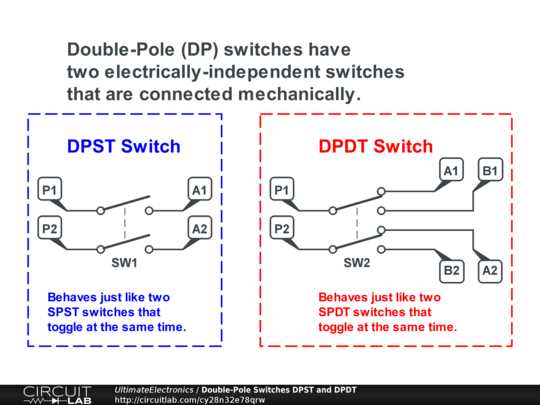
Connect each terminal carefully according to the wiring map to ensure proper operation when changing the direction of a motor or redirecting current between two pathways. Label all input and output lines before making connections to avoid confusion during testing.
Use insulated wires rated for the load to prevent overheating or accidental short circuits. Standard 22 AWG wires are suitable for small devices, while heavier loads require thicker conductors. Check voltage and current ratings on the switch before installation.
Verify continuity with a multimeter after completing the setup. Test each position to confirm that current flows only along the intended tracks and that no cross-connections occur. Adjust connections if resistance readings indicate improper contact.
Mount the toggle securely in an enclosure to avoid movement that could loosen connections. Mechanical stability reduces the risk of accidental shorts and ensures consistent switching behavior over repeated cycles.
DPDT Switch Wiring and Connection Examples
Identify the six terminals clearly before making any connections. The middle pair acts as common inputs, while the outer pairs are outputs for each switch position. Labeling them prevents accidental cross-wiring.
Use short jumper wires to link corresponding terminals when testing a reversal function. Keep wires neat to reduce electromagnetic interference and ensure consistent operation during repeated switching.
Connect the power source to the central terminals and verify polarity. Reversing the connections will invert the output flow, which is particularly useful for controlling motor direction without adding extra components.
Attach loads to the outer terminals with insulated connectors rated for the expected current. Ensure that each load receives full voltage when the switch is engaged to avoid underperformance or flickering.
Test each switch position individually with a multimeter. Measure voltage and continuity across all outputs to confirm that each path engages correctly without unintended cross-connections.
For complex setups, use color-coded wires to distinguish between forward, reverse, and neutral paths. This visual separation reduces errors during assembly and simplifies troubleshooting if the system behaves unexpectedly.
Secure the switch in a stable panel or enclosure to prevent movement. Mechanical stability ensures consistent operation over repeated toggling and protects connections from accidental loosening or shorting.
How to Identify Terminals on a DPDT Switch for Wiring
Examine the switch carefully to locate the six pins. The middle pair serves as the common inputs, while the top and bottom rows act as outputs for each toggle position.
Use a multimeter to test continuity between pins. Place probes on the center terminals and move the toggle to each position, noting which outer pins connect to the center at each stage.
- Mark the central pins as input points for voltage sources.
- Label the upper row for one output path corresponding to a specific switch position.
- Label the lower row for the alternate output path.
Check for molded or etched symbols on the switch body. Many switches indicate common pins and outputs with small markings that help avoid wiring mistakes.
Test connections under low voltage before applying full power. This ensures proper flow and prevents accidental shorts or damage to connected components.
- Use color-coded wires to differentiate inputs from outputs.
- Confirm continuity again after wiring to verify proper connections.
- Secure each wire with insulated connectors to maintain stable operation.