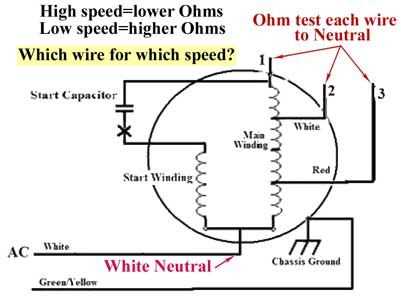
Before starting, ensure your electrical circuit is turned off. For installing a fan with multiple levels of airflow, the first step is identifying the correct wiring for controlling the different speeds. The wiring will usually include a control switch that adjusts the motor’s power, allowing for varying air movement. You’ll need to connect the live wire from the power source to the input terminal of the switch, then run separate wires from the output terminals to the motor, each corresponding to a different speed setting.
Use a capacitor to regulate the fan motor’s rotation speed. Each speed setting typically involves a different capacitor value that alters the voltage reaching the motor. Make sure to wire the capacitor according to the manufacturer’s guidelines, as incorrect installation could damage the motor or reduce the fan’s performance.
Double-check the color coding of the wires. The live wire is often black or red, while the neutral wire is white. The ground wire is typically green or bare. Make sure that the connections are properly insulated and tightly secured to avoid short circuits or other electrical issues.
Test the system once everything is connected. Switch the power back on and test each speed setting. If the fan doesn’t respond correctly, revisit the wiring connections and check for any loose terminals or incorrect capacitor placement.
Wiring for Multi-Level Airflow Control
For installing a unit with multiple airflow settings, begin by ensuring the main power source is turned off. Use a multi-terminal switch that allows control over the airflow intensity. The switch needs to have at least three terminals–one for each setting. The wiring from the power source should connect to the common terminal, while the other terminals will control different levels of airflow, routed to the motor.
Capacitors are used in these systems to manage the motor’s function at different speeds. Ensure you install capacitors with appropriate ratings for each level, as the values will differ depending on the intensity of airflow. The capacitors should be wired into the circuit as specified by the manufacturer to avoid damaging the system. Incorrect capacitor wiring may lead to failure or limited performance.
Once all connections are secured, double-check the integrity of the system. Ensure that no loose wires or exposed connections remain. Turn the power back on and test the airflow settings one by one. If there is any inconsistency, inspect each wire carefully, particularly the capacitor and switch terminals, for potential errors or wear.
How to Wire a Fan for Single Pole Switch
Start by ensuring the power is turned off at the breaker panel before working on the electrical system. Locate the existing switch and remove the cover plate. Identify the live and neutral wires, which will be connected to the terminals of the single-pole switch and the unit itself.
The first step is to connect the incoming power wire (usually black) to the single-pole switch’s terminal. Then, run a wire from the other terminal of the switch to the motor. This will allow the user to control the motor’s flow through the switch’s positions, allowing different settings of intensity for the airflow.
The neutral wire (typically white) should be connected directly to the neutral terminal of the motor, bypassing the switch entirely. This ensures a continuous flow of current, irrespective of the switch’s setting. The ground wire (green or bare) should also be properly connected to the fan’s grounding terminal for safety.
Capacitors are needed to regulate the motor speed. For this setup, install a capacitor with the correct value between the motor and the switch. The capacitor will manage the electrical current that flows through the motor, adjusting the airflow without damaging the system. Be sure to follow the capacitor’s installation instructions carefully to match the voltage and current requirements.
Once all connections are securely made, ensure no wires are exposed, and all terminals are tightened properly. After confirming the wiring is correct, replace the cover plate on the switch, and test the system by turning the power back on. The fan should now respond to the switch positions, providing varying levels of air movement.
If the fan does not function properly, verify the switch connections and capacitor placement. Common issues include a loose connection or an incorrectly installed capacitor. If problems persist, consult the manufacturer’s wiring guide for specific instructions on troubleshooting motor-related issues.