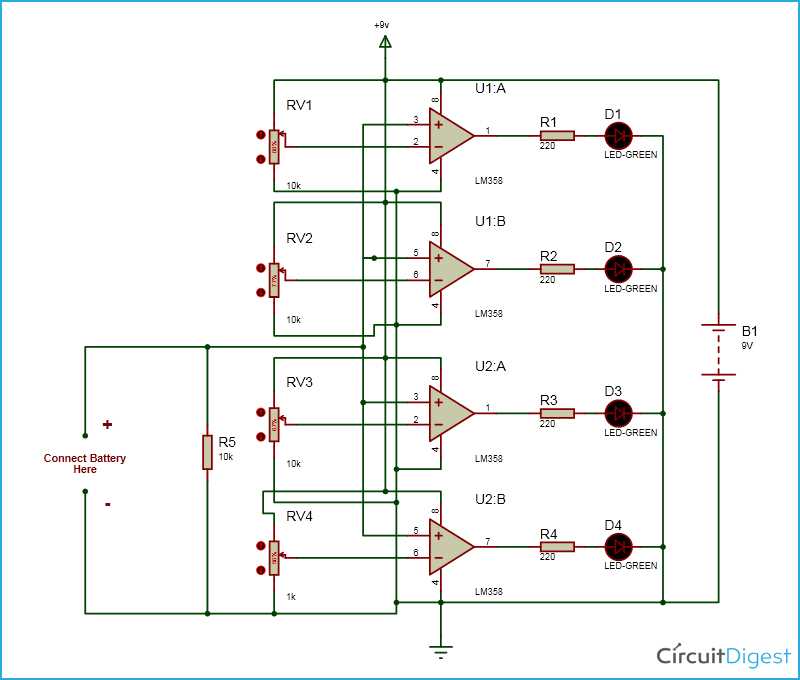
Start by choosing the right components for building an efficient energy tracking system. Focus on resistors, voltage dividers, and integrated circuits that measure and display the charge levels. Make sure the design allows for accurate readings by including a voltage reference and proper calibration methods.
Check the power supply’s connection to the measuring unit to ensure a stable flow. Be mindful of the voltage ranges–different systems operate at specific thresholds, so adjusting the reference voltage will give precise feedback. Also, consider adding a warning feature that alerts you when the power is too low or too high, preventing damage to sensitive parts.
Once you have the basic setup, make sure to test the flow of current and the overall functionality. This step ensures that all components are working as expected and that there are no breaks or loose connections. Adjust the system as needed to optimize performance, ensuring it provides reliable data over time.
Battery Monitoring System Setup and Design
Begin by selecting the proper sensors for voltage and current measurement. Common options include operational amplifiers, voltage dividers, or dedicated voltage sensing ICs. These components will help you track the charge levels and ensure the device functions within the required limits.
Key Components and Their Functions
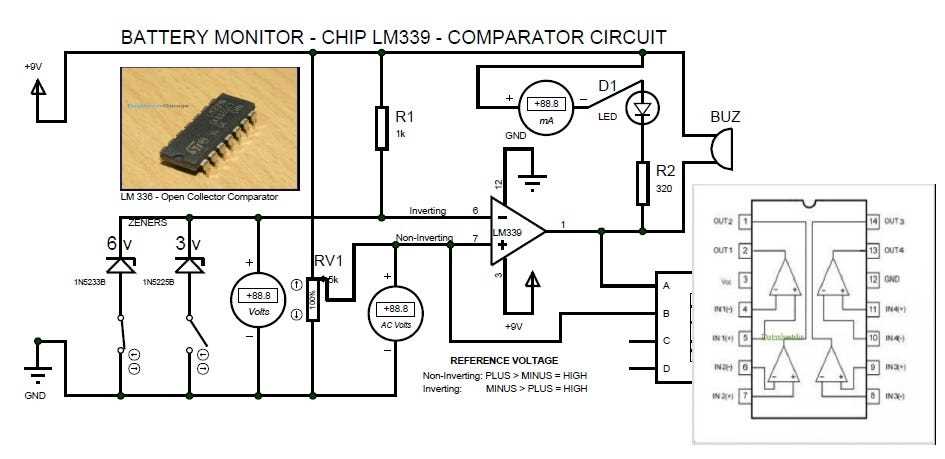
Resistors are crucial for setting reference voltages and ensuring current flows correctly throughout the design. Capacitors can help filter noise and stabilize voltage readings, especially in high-frequency applications. When choosing components, ensure they are rated for the expected voltage levels to prevent damage and ensure accuracy.
Setting Up the Power Source
The power supply should be stable and capable of providing consistent voltage for the monitoring unit. For optimal results, choose a regulated power supply that offers the correct operating voltage. This will prevent voltage fluctuations that could lead to inaccurate readings or malfunction of the system.
Once the power source is in place, check for any possible interference in the signal path. Unstable power can cause measurement errors, so adding voltage regulators or smoothing capacitors can help prevent this. Proper grounding is also essential to ensure a reliable and noise-free signal for accurate monitoring.
For real-time data tracking, incorporate an LED or LCD display that shows the current charge status. This visual output can help you monitor the system at a glance without needing external tools. Choose a display that’s easily readable in various lighting conditions, especially for portable applications.
Consider integrating a microcontroller or other logic components for added functionality. This allows you to add features like warnings when the system’s charge is low or high, or even control other parts of the system based on the charge levels. Programming these devices can automate tasks like turning off or on specific systems depending on the readings.
Finally, test the entire setup under various conditions to ensure its reliability. Simulate different charge states and check that the system provides accurate feedback at all levels. Adjust the components or settings as needed to improve performance, ensuring the monitoring system operates smoothly over time.
How to Build a Simple Battery Monitoring System
Start by selecting a voltage sensing IC that can measure the potential difference between the power source and ground. A common option is the LM3914, which provides a visual output for the voltage level. This will serve as the heart of your design, giving you real-time feedback of the system’s charge status.
Components You’ll Need
- Voltage sensing IC (e.g., LM3914)
- Resistors for voltage dividers
- Capacitors for smoothing and noise reduction
- LEDs or LCD for display
- Power supply (regulated)
- Wires and breadboard for testing
Next, build the voltage divider using resistors to scale the input voltage to the appropriate range for the sensor. Select resistors based on the expected voltage levels, ensuring that the divider produces a safe and accurate signal for the IC to read. A simple rule is to choose resistors that divide the voltage proportionally to avoid overloading the IC.
Once the divider is set, connect the output to an LED or LCD display to show the readings. If using an LED, the LM3914 can drive a bar or dot display, which visually indicates the power level. If you prefer a more detailed readout, an LCD screen can show the exact voltage, providing a numerical representation of the charge.
Finally, ensure the system operates properly by testing under various charge conditions. Check the output for accuracy and adjust the resistor values if necessary. Once confirmed, solder the components onto a PCB or integrate them into a project box for a more permanent setup. This will allow you to consistently monitor the health of your power source.