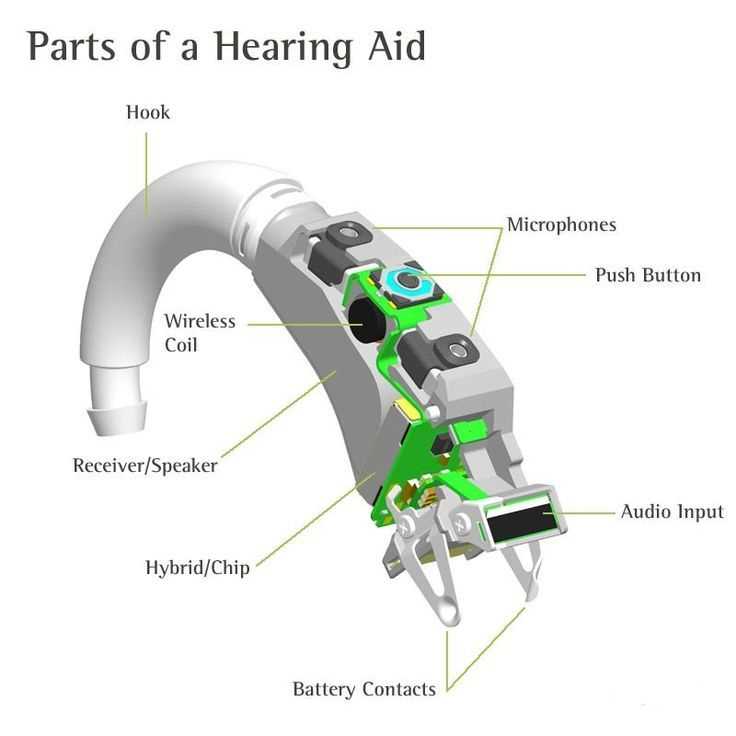
Understanding the internal structure of a listening device is crucial for effective use and maintenance. Each component plays a role in transforming external sounds into signals that the user can process and understand. The microphone, typically located at the device’s entry point, captures ambient sound and sends it to the processor. This part must be highly sensitive to detect all types of noise without distortion.
The processor is responsible for interpreting the sound input. It adjusts frequencies and amplifies sounds according to the user’s needs. The digital processor filters unwanted noise and enhances speech clarity, especially in noisy environments. Some models also include a feedback system to reduce whistling noises caused by improper fit or certain sound conditions.
The receiver is the next step, converting the processed sound into signals that can be heard by the user. This part is responsible for directing the sound directly into the ear canal, often using small speakers or transducers. The battery, which powers the entire device, must provide enough energy to support long usage times without compromising the quality of sound transmission.
The outer shell of the device plays an equally important role in user comfort and durability. It is designed to fit snugly and securely within the ear, providing protection against moisture and physical damage while remaining discreet. Proper care and cleaning of all these elements are necessary to ensure the device continues to perform optimally.
Components of a Sound Amplification Device
The microphone captures external sounds, converting them into electrical signals. This input is then passed to the amplifier, which strengthens the signals to a suitable level for the user’s ear. The processed sound travels to the receiver, which transforms it back into acoustic waves, directing them into the ear canal. The battery supplies the necessary power for all functions, while the casing houses all these components, ensuring protection and comfort during use. Each component plays a distinct role in ensuring the device functions seamlessly, with minimal distortion, and offers clear sound quality.
Understanding the receiver’s role is important, as it must produce sound that is both clear and accurate, matching the user’s hearing needs. The amplifier adjusts the volume and frequency balance, ensuring sounds are not only louder but tailored for specific hearing requirements. Fine-tuning the amplification is crucial for comfort and clarity. For users in different environments, the device may come with custom settings, enhancing sound for varying noise levels.
Proper maintenance of the battery is key to ensuring the longevity of the device. Regular replacement or recharging is necessary to maintain optimal performance. Additionally, ensuring the microphone is clean and unobstructed prevents sound distortion and ensures clear signal capture. The casing should be regularly checked for wear to avoid potential damage to internal components.
Understanding the Functionality of Each Hearing Device Component
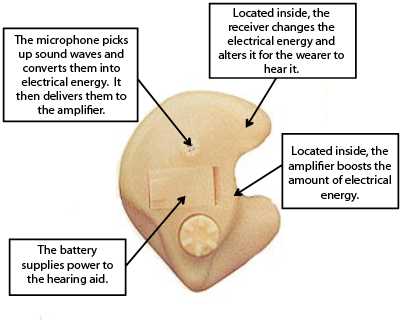
The microphone captures external sounds and converts them into electrical signals. This component is the first step in processing incoming sounds.
The amplifier strengthens these electrical signals, making them loud enough to be processed by other components. Its role is to adjust the volume based on environmental factors.
The receiver, often referred to as the speaker, transforms amplified electrical signals back into sound, delivering the sound to the ear.
The battery supplies the power needed for all components to function. Battery life varies depending on the type and usage, so regular monitoring is necessary to ensure consistent performance.
The signal processor works to refine and adjust the amplified sounds to make them clearer and more natural, often adjusting for background noise or varying environments.
The ear mold or tip holds the device in place within the ear canal, ensuring that sound is directed correctly. Its design may vary for comfort and fit, contributing to the device’s overall usability.
The volume control lets the user adjust the loudness of the amplified sound. Some devices offer automatic adjustments, but manual controls are still common in certain models.
The feedback management system reduces unwanted whistling or feedback noise, enhancing the listening experience. It continuously monitors sound levels to prevent disruption.
The wireless connectivity feature allows the device to sync with other electronics, such as smartphones, to stream audio or receive remote adjustments.
- Microphone: Captures sound and converts it to electrical signals.
- Amplifier: Increases the strength of the electrical signal.
- Receiver: Converts electrical signals back to sound.
- Battery: Powers the entire system.
- Signal processor: Optimizes sound for clarity.
- Ear mold/tip: Ensures proper fit and directs sound.
- Volume control: Allows for manual sound adjustments.
- Feedback management: Prevents unwanted noise.
- Wireless connectivity: Allows interaction with other devices.
How to Troubleshoot and Maintain Hearing Device Components
Check the battery first. Ensure it is properly installed and has enough charge. If the sound quality is poor or there is no sound, replace the battery with a fresh one. Be sure to clean the contacts to remove any dirt or corrosion, as this can affect performance.
If distortion or feedback occurs, inspect the microphone and receiver. Dust, moisture, or debris can cause interference. Use a soft, dry cloth to clean these components carefully. If the microphone is clogged, use a can of compressed air to clear it.
For low volume, examine the tubing for cracks or blockages. Replace any damaged tubes, as they can obstruct airflow and reduce sound output. Clean the tubing regularly with a brush or cleaning tool to prevent accumulation of earwax or moisture.
Make sure the volume control is functioning properly. If it’s not adjusting the sound levels, the internal mechanism might be stuck. Gently turn the dial to check for any resistance. If the control is damaged, it may need professional repair.
If the device is not fitting properly or causing discomfort, adjust the ear mold or dome. Clean it thoroughly and ensure it is correctly aligned with the ear canal. If the mold is worn out, replace it with a new one to ensure a secure and comfortable fit.
For consistent issues with performance, take the device to a technician for a deeper inspection. Professional cleaning and checks are necessary to ensure the internal components are not damaged or malfunctioning.