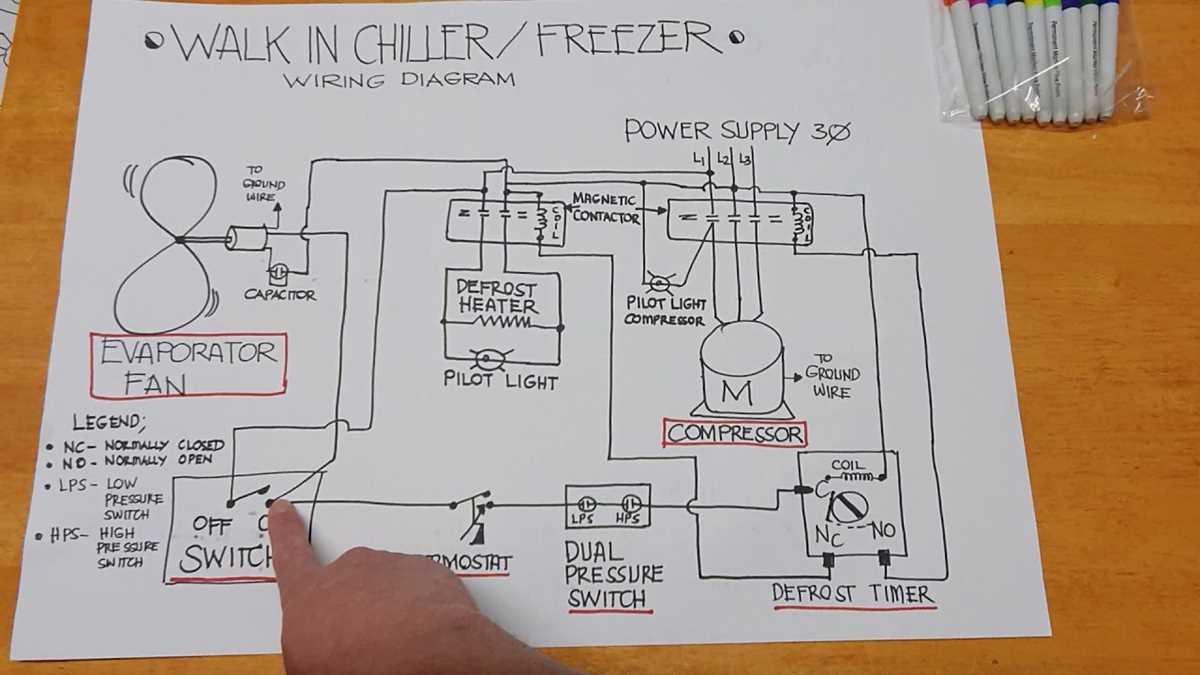
If you’re experiencing issues with temperature control or efficiency, the problem may lie in the individual components of your refrigeration system. Begin by checking the compressor, as it is responsible for circulating refrigerant through the system. A faulty compressor can lead to poor cooling performance. If this is the case, replacing the compressor will restore proper functionality.
The evaporator coil is another crucial component to inspect. If it becomes clogged or frozen, it will hinder the cooling process. To fix this, ensure the coils are clean and the defrost cycle is working correctly. In cases where the coil is damaged, replacing it is necessary for maintaining system efficiency.
Don’t overlook the thermostat; inaccurate temperature readings can cause inconsistent performance. Test it with a thermometer to confirm accuracy. If the readings are off, replacing the thermostat will help maintain a stable internal temperature.
When replacing any part, always refer to the model-specific diagrams for precise identification and installation steps. This will ensure that you are using the correct components and avoid unnecessary replacements or errors during repair.
Refrigeration Unit Components Overview and Maintenance Tips
To keep your refrigeration system running efficiently, focus on key components such as the compressor, condenser, and evaporator coil. Regular inspections and maintenance can prevent many common issues.
Compressor: The compressor is the heart of the system, responsible for circulating refrigerant. Ensure it operates smoothly by checking for unusual noises or overheating. Clean the condenser coils regularly to prevent dust buildup, which can strain the compressor. Replace the compressor if it fails to start or runs inefficiently.
Condenser Coils: Condenser coils release heat from the system. Over time, dirt and debris can block airflow, leading to overheating. Clean these coils at least twice a year. If they are damaged or corroded, consider replacing them to maintain optimal efficiency.
Evaporator Coils: These coils absorb heat from inside the unit. When they become dirty or frozen, it significantly reduces the unit’s cooling capacity. Inspect for ice buildup and ensure proper defrost cycles. Clean the coils annually and replace them if damaged or leaking.
Thermostat: A malfunctioning thermostat can cause temperature inconsistencies. Calibrate the thermostat regularly to ensure it reads temperatures accurately. If calibration doesn’t fix the issue, replacing the thermostat will restore stable performance.
Regularly check seals and door gaskets for any wear or cracks. These components help maintain the temperature by preventing warm air from entering the unit. Replace damaged seals to improve efficiency and reduce energy consumption.
Proper maintenance of these components will prolong the lifespan of the refrigeration system and ensure it operates efficiently. Refer to the manufacturer’s manual for specific maintenance schedules and guidelines tailored to your model.
How to Identify Common Components in a Refrigeration System
To identify the key components, start with the compressor, located in the mechanical section. It’s responsible for circulating refrigerant through the system. A malfunctioning compressor may result in inconsistent cooling or overheating. Inspect it for unusual sounds or excessive heat.
Next, check the condenser coil, typically found on the exterior. This coil releases heat from the refrigerant. Buildup of dirt or debris can block airflow, causing the system to overheat. Clean the fins regularly to maintain airflow and efficiency.
Inside the space, you’ll find the evaporator coil, which absorbs heat from the air. If ice buildup appears, there may be an airflow issue or the defrost cycle is malfunctioning. Ensure the coil is clear and the fan is working properly.
Also, examine the thermostat, which regulates the temperature. If the temperature fluctuates or doesn’t stay consistent, the thermostat might be faulty. Check the sensor and calibration to ensure accurate readings.
These components are the core of any refrigeration system. Regular maintenance and inspection of these parts can help extend the life of the unit and improve overall performance.
Step-by-Step Guide for Replacing Key Components in a Refrigeration System
1. Turn off power: Before replacing any component, ensure the system is powered down to avoid electrical shock or damage.
2. Remove the defective part: Use a screwdriver or appropriate tools to carefully remove the damaged component. For example, when replacing the compressor, disconnect the electrical connections, refrigerant lines, and mounting bolts.
3. Inspect surrounding areas: Before installing the new part, check the area for any signs of wear, dirt, or leaks. Clean any debris and ensure that other components are in good condition.
4. Install the new part: Position the new component in place. If you’re replacing a fan, condenser, or evaporator coil, ensure proper alignment and secure it with screws or brackets. Tighten all bolts or fittings to avoid vibrations or movement.
5. Reconnect electrical and refrigerant lines: For components like the compressor, reconnect the electrical wiring and refrigerant lines according to the manufacturer’s instructions. Ensure that all connections are tight and sealed to prevent leaks.
6. Test the system: After replacing the part, turn the power back on. Check the system for leaks, unusual sounds, or irregular operation. Monitor the temperature to ensure everything is functioning properly.
7. Perform regular maintenance: After the replacement, schedule routine checks on the system to ensure that all components are working efficiently and prevent future breakdowns.