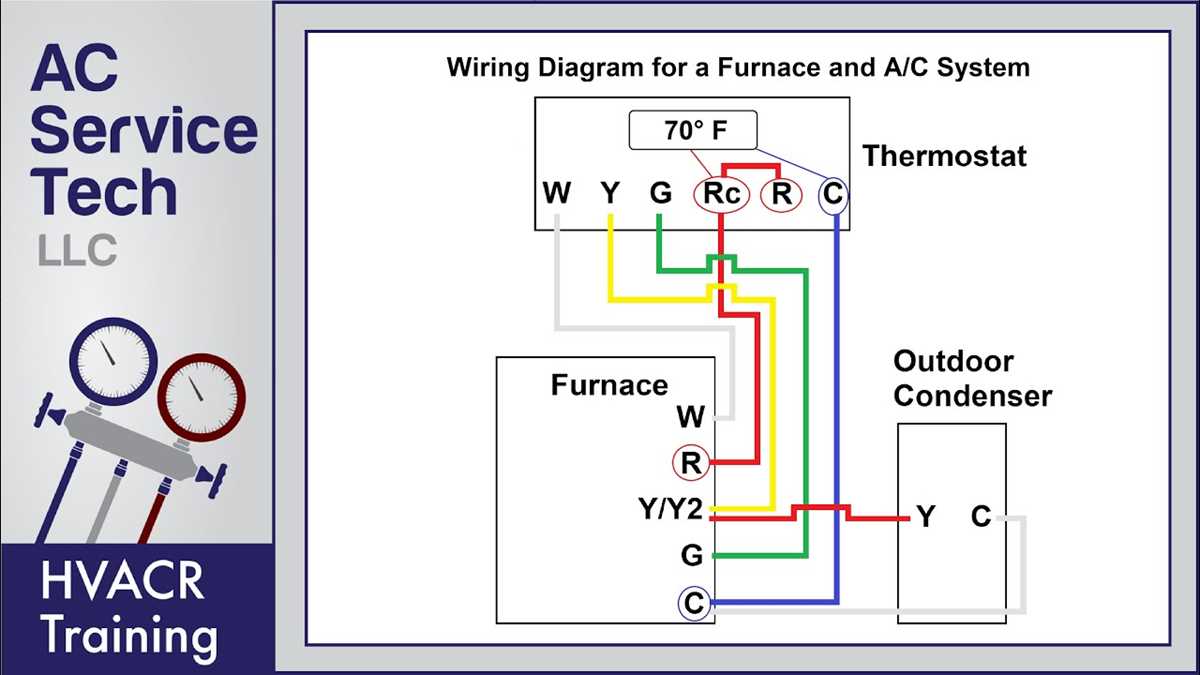
Before installing your new smart temperature control unit, carefully review the terminal connections. Identify the wires for heating, cooling, common, and power to ensure proper connection. Start by disconnecting power to the system and confirming the existing wiring matches the color codes and terminal labels on the new unit. This will prevent any confusion during installation.
For successful installation, ensure that each wire is securely connected to its designated terminal on the device. Follow the manufacturer’s guidelines regarding wire placement for heating and cooling systems, ensuring that the connections are tight and free of any insulation that could cause a short. Use wire connectors if necessary to maintain clean and safe connections.
If you encounter issues such as a blank display or unresponsive system after installation, check the connections again. Pay special attention to the common wire and ensure that it is properly linked to the system’s power source. Troubleshoot potential wiring faults by verifying each wire’s integrity, and make sure all connections are solid and secure. Proper wiring and correct terminal setup are the foundation for optimal performance.
Installing a Smart Temperature Control System
Start by turning off the main power to the HVAC system. Disconnect the existing unit and examine the color-coded terminals on both the old and new devices. These labels correspond to specific wires that control heating, cooling, and power. Match the labels carefully, as connecting them incorrectly can damage the new system or cause malfunction.
Ensure the common wire (C-wire) is properly installed. This wire is crucial for providing continuous power to the system. If your existing setup does not have a C-wire, you may need to add one to ensure proper operation. Some smart units can work without a C-wire, but they may rely on battery power or cause instability in certain configurations.
Wire Connections and Setup
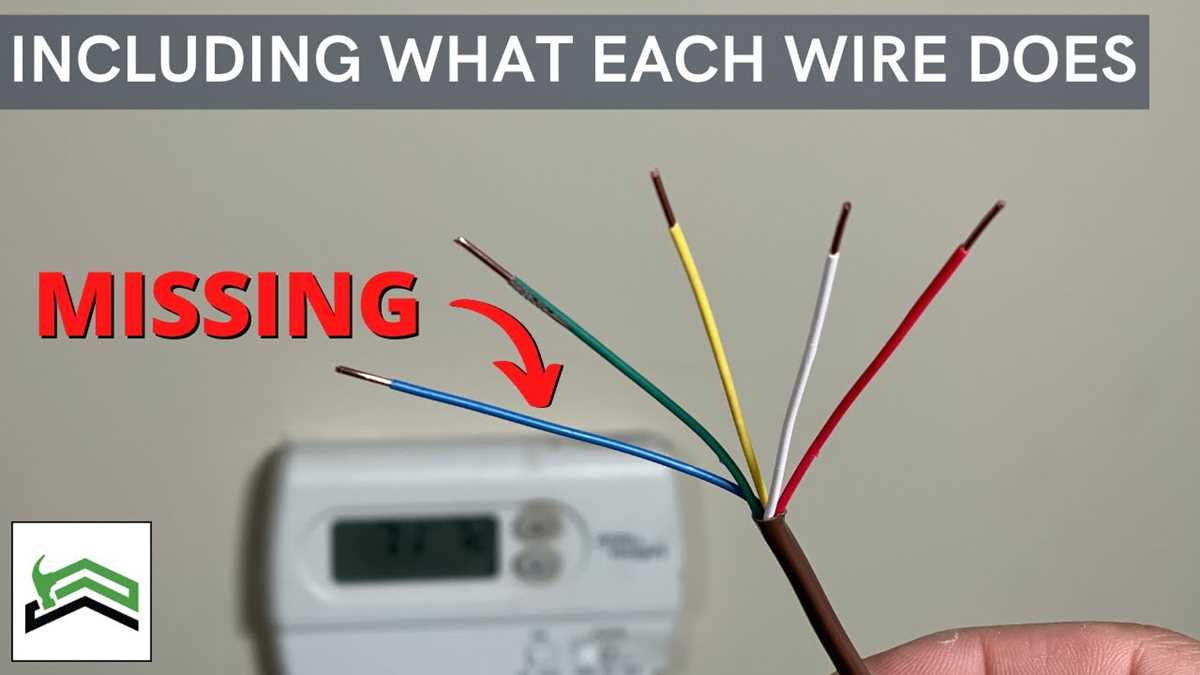
The heating and cooling wires should be securely connected to their respective terminals. The typical color coding for heating (often red or white) and cooling (often yellow or blue) can vary, so double-check the label on the new system. If you’re unsure, verify with the manufacturer’s instructions or consult a professional to prevent any issues.
Once the wires are securely connected, mount the device on the wall, ensuring that it sits flush with the base plate. Double-check all connections to confirm that each wire is tightly attached and that no insulation is left exposed. Loose connections can result in system failure or inaccurate temperature readings.
Troubleshooting and Testing
If the display is blank or unresponsive after installation, verify that the power is properly restored to the HVAC unit. A weak or missing connection on the common wire can cause the system to not power up correctly. Additionally, ensure that the correct terminal labels have been followed throughout the installation process.
Test the system by turning on the heating or cooling to check the responsiveness. If everything is working as expected, the unit should communicate with your HVAC system without delay. If issues persist, consult the troubleshooting guide or seek professional help to ensure your setup is correctly configured.
Understanding the Wiring Components and Terminals
The first step in setting up a smart temperature control system is identifying the correct terminals for each wire. Typically, the terminal labels correspond to different functions, such as heating (usually labeled “W” or “H”), cooling (labeled “Y” or “C”), and common power (marked as “C”). Ensure that the terminal designations on the unit match the connections from your existing system. If in doubt, check the user manual for a clear guide on wiring assignments.
The “R” terminal is for the primary power supply to the unit. It is usually connected to the red wire from the HVAC system’s transformer. This terminal sends power to the system, ensuring that it remains operational. If your system has a separate “Rh” and “Rc” terminal, they may be used for heating and cooling, respectively, but modern units often combine these terminals into a single “R” terminal for simplicity.
The “C” terminal is one of the most important for providing continuous power. The common wire (often blue) connects to this terminal and is responsible for powering the unit when the system is in standby mode. Without a properly connected common wire, the unit may not function correctly, especially when there is no active heating or cooling demand.
The “W” terminal controls heating, with the wire from your furnace or heating unit being attached here. This terminal signals the system to activate the heating process when a specific temperature drop is detected. Make sure that the wire connected to this terminal is secure and that no exposed wires are shorting out any other connections.
For cooling, the “Y” terminal connects to the air conditioning unit. This terminal activates the cooling process when the temperature rises beyond the desired threshold. If there is more than one cooling stage, you might also encounter a “Y2” terminal for the second stage of cooling. Check the wiring carefully to ensure that the system can handle multiple stages if applicable.
Once all the wiring components are connected to the correct terminals, double-check the connections and ensure that no wires are touching other terminals or components. Improper connections can lead to malfunction or even damage the unit. After installation, test the system to ensure that the heating and cooling components work as intended, and all connections remain secure throughout operation.