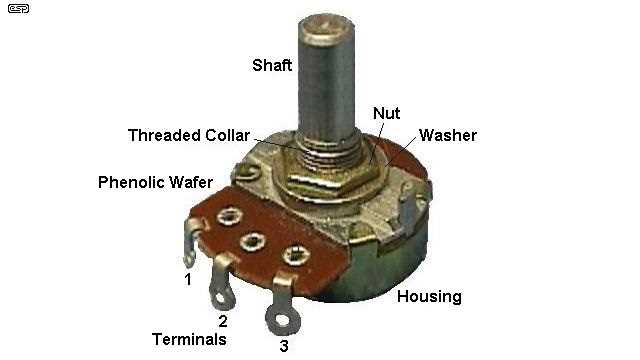
Ensure the control slider is properly oriented before connecting to your voltage or signal lines. Correct placement prevents misreading and signal fluctuations.
Identify the three leads carefully: input, output, and ground. Using a multimeter can confirm continuity and prevent accidental short circuits during installation.
Connect the input lead to the voltage source while keeping the ground securely attached to the reference point. This stabilizes the signal range and ensures linear adjustment.
Use the adjustable terminal for fine-tuning output and monitor changes with a test load or indicator. Adjusting gradually avoids sudden spikes and protects connected components.
Label each connection clearly if integrating multiple control units. This reduces errors during maintenance and future modifications of the circuit.
Check resistance range and rotation limits before full operation to verify the component matches circuit specifications. Confirming ratings prevents overloading or inaccurate control response.
After installation, perform functional testing by varying the control across its full range while measuring output voltage or signal changes. Ensure smooth transitions and consistent behavior throughout.
Step by Step Guide for Connecting and Adjusting a Potentiometer in Circuits
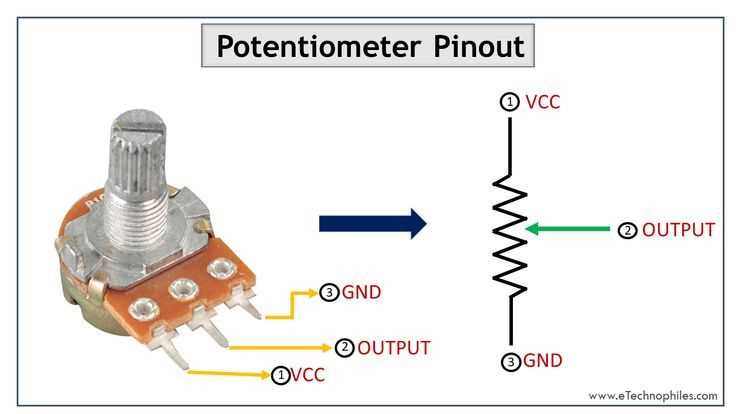
Identify the three terminals before installation: the voltage input, the output lead, and the reference ground. Using a multimeter to confirm continuity prevents misconnection and signal errors.
Secure the component on a stable surface to avoid movement while making connections. Loose mounting can cause inconsistent resistance readings and mechanical stress.
Connect the input terminal to the power source and ensure the reference lead is attached to the circuit ground. This stabilizes voltage distribution and prevents erratic outputs.
Attach the adjustable lead to the load or signal path and route it cleanly without sharp bends. Keeping leads separated reduces the risk of short circuits or interference.
Rotate the control slowly while monitoring output using a multimeter or oscilloscope. Gradual adjustment allows precise calibration and avoids sudden spikes that could damage downstream components.
Label each connection if multiple controls are used in a single circuit. Clear identification minimizes errors during troubleshooting or future modifications.
After installation, perform full-range testing by cycling the control through its entire range and verifying consistent output behavior. Document final settings and note any deviations for maintenance purposes.
Identifying Terminals and Lead Functions for Potentiometer Connections
Determine the three key pins before making any connection: the high-voltage input, the adjustable output, and the reference ground. Confirming their positions with a multimeter prevents incorrect installation.
Mark the leads according to their function to avoid confusion during assembly. Color coding or labeling ensures accurate placement in complex circuits with multiple controls.
Check continuity between terminals to verify the resistive path. This step confirms which lead adjusts voltage versus which serves as the fixed reference, avoiding misrouting.
Connect the input lead to a stable voltage source and ensure the ground lead is tied directly to the circuit reference point. This prevents voltage fluctuations and erratic signal behavior.
Route the adjustable output to the desired control point with minimal bends or tension. Keeping the lead straight reduces resistance variations caused by mechanical stress.
Use a meter to monitor changes while turning the control to confirm proper function. The output should vary smoothly from the reference level to the applied voltage without sudden jumps.
After installation, document lead assignments and test each range for consistency. Accurate records facilitate troubleshooting and future adjustments in multi-control setups.