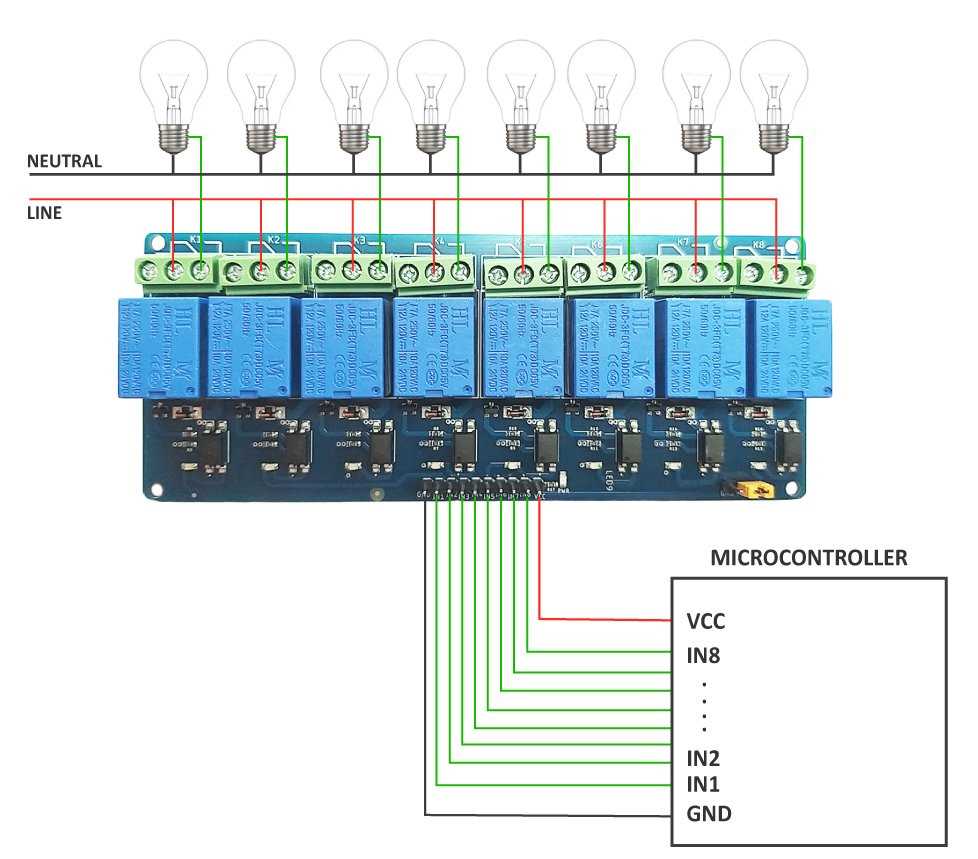
Begin by preparing the necessary components: a control board with 8 switching outputs, a suitable power supply, and the appropriate wiring tools. Ensure that the power supply voltage matches the input requirements of your system to avoid damage to components.
Connect the inputs from your controller or microcontroller to the input terminals of the switching system. Each output is typically connected to a device that requires control, such as lights, motors, or other electrical appliances. Double-check that each connection is securely fastened to prevent disconnections during operation.
For reliable performance, use flyback diodes across the output terminals to protect against voltage spikes caused by inductive loads. Capacitors at the input and output will help stabilize voltage and prevent noise or interference from affecting system performance. Once all components are wired, test the system with a multimeter to verify each output is correctly functioning.
Step-by-Step Guide to Wiring an 8-Output Control System
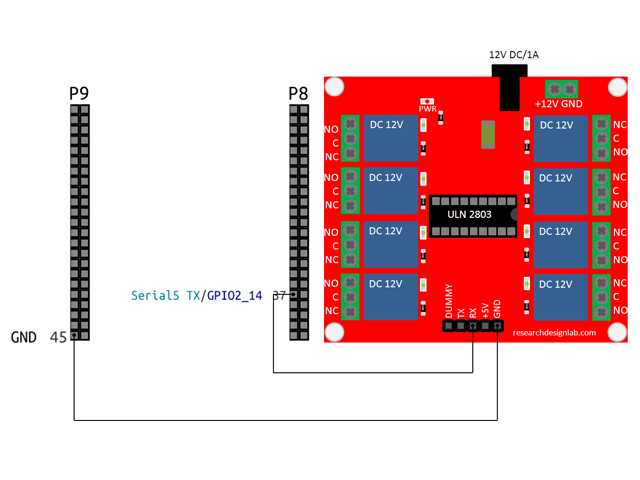
Start by identifying the input pins for the control signals. Connect these pins to your microcontroller or any other control system that will trigger the outputs. Ensure the input connections are made securely with proper insulation to avoid accidental shorts.
Next, connect the output terminals to the devices you wish to control, such as motors or lights. Each output will typically have a common (COM) and a normally open (NO) terminal. For each device, connect the power source to the COM terminal and the controlled device to the NO terminal. After wiring, use a multimeter to check for correct voltage at each output to ensure proper operation. Finally, power on the system and test the functionality of each output to verify all connections are working as expected.
Components and Tools Needed for 8-Output Control System Setup
You will need a control board capable of managing 8 outputs, such as a suitable switching platform that can handle multiple devices simultaneously. A typical setup includes inputs for control signals and outputs for triggering external devices. Ensure the system is rated for the voltage and current requirements of the connected devices.
Next, gather the necessary wiring components. You’ll need insulated jumper wires for connecting the inputs to the control system and outputs to the devices. Select wires with sufficient gauge based on the load requirements. For power delivery, ensure the wires can handle the current without overheating or excessive voltage drop.
Include protection components like flyback diodes to protect against voltage spikes, especially when dealing with inductive loads such as motors. Additionally, capacitors can help stabilize voltage and reduce noise in the system. A heat sink may also be necessary if your setup involves higher power components that could generate excessive heat during operation.
Finally, prepare a multimeter to check the output voltage levels and continuity after making the connections. Use this tool to ensure each output is correctly triggering and to verify that the system is running as expected. Safety equipment such as insulated gloves and safety glasses is also recommended when working with electrical components.
Troubleshooting Common Issues in 8-Output Control Systems
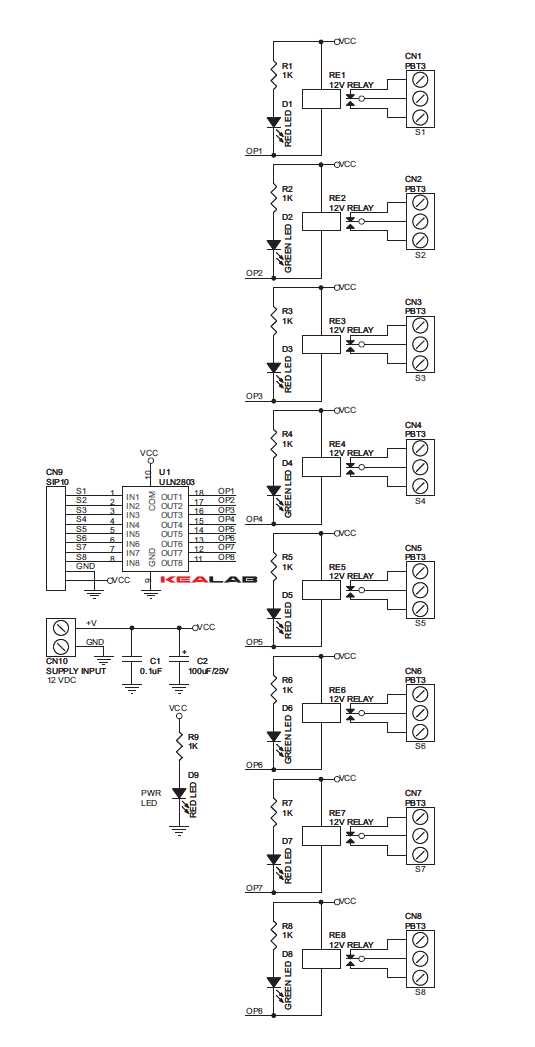
If the outputs are not activating, begin by checking the power supply to ensure it is correctly providing the necessary voltage. A low or unstable input voltage will prevent proper operation. Use a multimeter to verify the voltage at the input and ensure it matches the required specifications for the system.
Common Issues and Solutions:
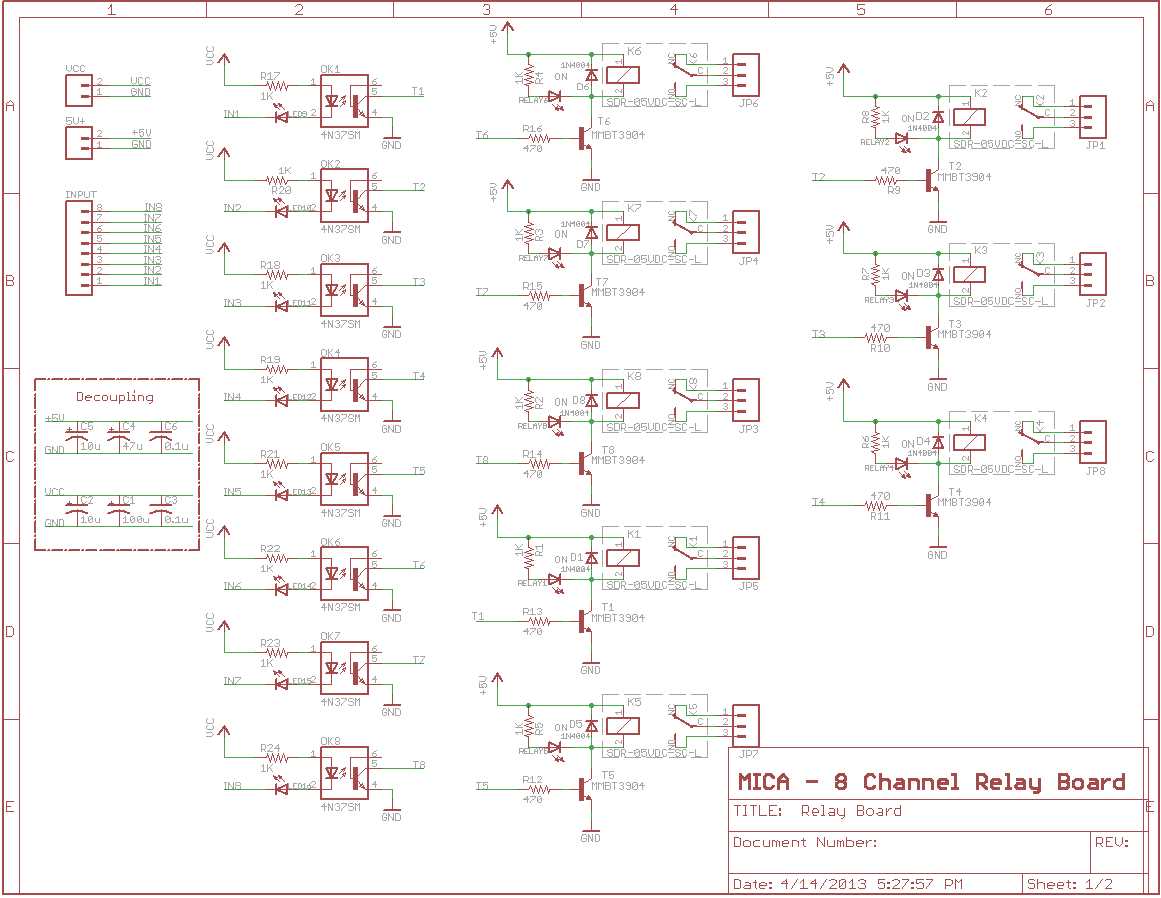
- Unresponsive outputs: Verify that the control pins are properly connected to the triggering device, such as a microcontroller. If necessary, test the signal lines with a voltmeter to confirm they are sending the correct signals.
- Overheating components: If any component is overheating, check for an overload condition. Ensure that the devices connected to the outputs are within the rated current limits. Consider using heat sinks or switching to a higher-rated control system for heavy loads.
- Incorrect triggering: If only some outputs trigger, inspect the wiring and connections for any loose or misconnected wires. A miswired control pin or damaged connection can prevent specific outputs from functioning.
If you notice erratic behavior, such as random activation or deactivation of outputs, add capacitors at the power input to help filter noise. Voltage spikes can cause instability, especially when switching inductive loads like motors. A diode across the load can help suppress these spikes and protect your system.
Lastly, if the system is not reacting to inputs at all, confirm that the microcontroller or control device is functioning correctly. Use a simple program to send known signals to the control system and check the response. If the issue persists, consider replacing the control device to rule out hardware failure.