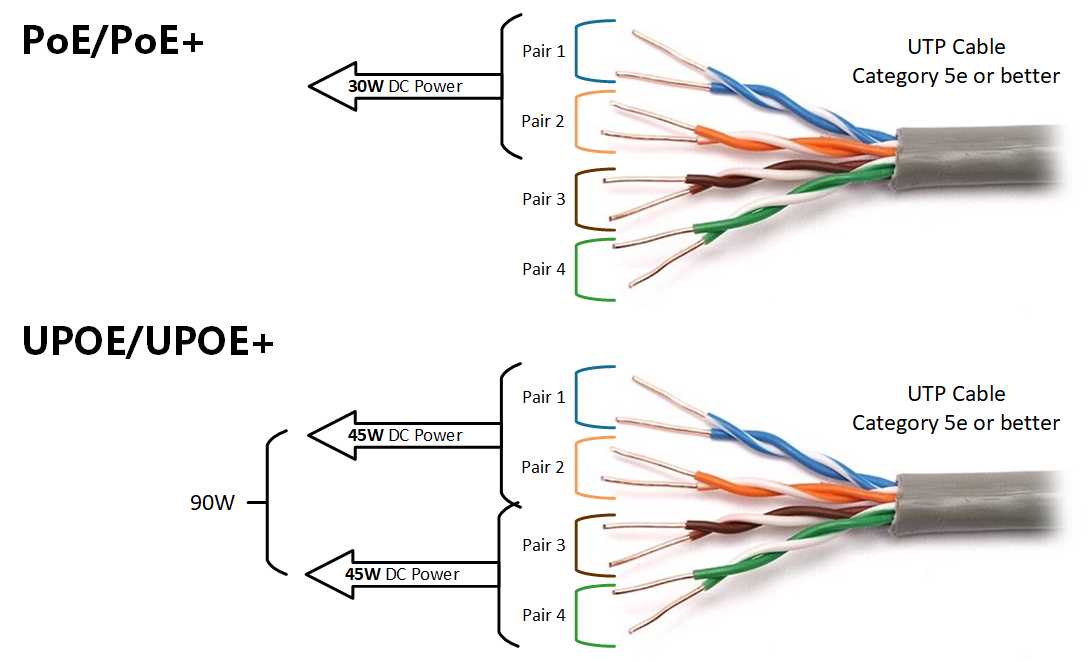
Connect the injector or switch to the network cable using standard Cat5e or Cat6 twisted pairs. Ensure each conductor is fully seated in the correct pin slot for consistent voltage delivery and data transfer.
Identify the positive and negative pairs for power transmission. Typically, pins 1 and 2 carry positive voltage while pins 3 and 6 carry negative. Confirm polarity before powering devices to prevent damage.
Use a punch-down tool or modular connector to secure the cable ends. Avoid untwisting pairs beyond 1.5 cm to maintain proper differential signaling and minimize interference.
Check insulation and continuity with a multimeter before applying power. Test each pair for resistance under 1 ohm to confirm proper connections and prevent voltage drop.
Label each cable at both ends to identify source and destination ports. This simplifies maintenance and helps isolate faults without disconnecting multiple devices.
Maintain separation from high-voltage AC lines. Keep at least 30 cm distance from electrical conduits to avoid electromagnetic interference that can disrupt data transmission.
Test the system under load by connecting powered devices and verifying both network performance and voltage stability. Monitor for flickering, signal loss, or overheating during initial operation.
Secure all connections in patch panels or enclosures. Tighten screws, clips, and strain reliefs to prevent accidental disconnection and maintain safe, reliable operation over time.
Power over Ethernet Connection Guide
Use Cat5e or Cat6 cables rated for 24 AWG or thicker to ensure reliable data transmission and sufficient voltage delivery to connected devices. Avoid damaged or low-quality cables that can cause voltage drops or intermittent connectivity.
Identify the injector or switch ports providing power and separate the positive and negative pairs carefully. Standard practice assigns pins 1 and 2 for positive voltage and pins 3 and 6 for negative, but always confirm with the device specification before connection.
Secure each cable end in the modular connector or patch panel using a punch-down tool or crimping method. Maintain the twisted pair structure as much as possible to reduce interference and preserve differential signaling for stable network performance.
Test each run with a multimeter or network tester before powering devices. Verify continuity, correct polarity, and resistance under 1 ohm, then connect the powered devices and monitor voltage and data throughput for safe, reliable operation.
Understanding Pin Assignments and Cable Pairs
Assign pin 1 to the positive voltage line and pin 2 to the corresponding negative return. This maintains correct polarity and prevents short circuits in powered connections.
Pairs should follow the standard color code: blue/white-blue, orange/white-orange, green/white-green, brown/white-brown. Maintaining this order reduces crosstalk and improves signal integrity.
For four-pair cables, transmit on pairs 1-2 and 3-6 while receiving on 4-5 and 7-8, depending on the port configuration. Misaligning these can lead to device malfunctions.
- Pin 3 – data positive (green)
- Pin 6 – data negative (green/white)
- Pin 4 – auxiliary positive (blue)
- Pin 5 – auxiliary negative (blue/white)
Twist each pair tightly along the cable to minimize electromagnetic interference. Longer untwisted segments can cause voltage drops and signal degradation over distances exceeding 100 meters.
When integrating mid-span injectors, match the output pins with the correct pairs. For example, voltage from pins 1-2 should not be routed to pins 3-6 without a transformer or isolation device to prevent overcurrent.
Verify continuity using a tester before final installation. Crossed pairs or swapped pins may allow partial connectivity but will reduce power delivery and create intermittent device failures.