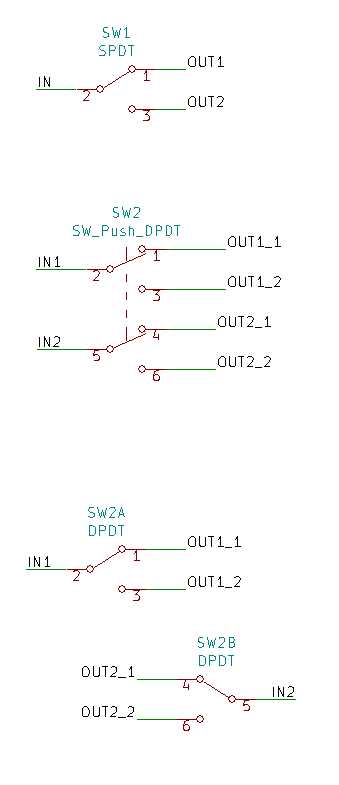
Connect the four input terminals directly to the power source while ensuring that the two output paths remain isolated until activation. Use terminal screws rated for at least 10 amps to maintain stable conductivity and prevent overheating during sustained operation.
Label each contact clearly with its corresponding output path to avoid misconnection when setting up the alternate states. Employ color-coded connectors to differentiate the poles, ensuring that each toggle position routes current precisely as intended.
Verify continuity across all paths using a multimeter before final installation. This prevents unexpected shorts and confirms that switching between the two output channels operates smoothly under load. Always test with the intended voltage level to match operational conditions.
Understanding DPDT Switch Terminal Layouts
Identify the six connection points on the component and mark them according to their pole and throw designation. The center terminals function as the common contacts, while the pairs on either side serve as outputs for the two positions. Accurate labeling prevents cross-connections and ensures correct signal routing.
The physical layout often positions the terminals in two parallel rows of three. Maintain a consistent orientation during installation, with the actuator lever facing forward. This arrangement allows for predictable switching behavior and simplifies testing of both states under load.
Use a multimeter to confirm continuity between the center contacts and each outer terminal when the lever is toggled. In one position, the common aligns with one row, and in the alternate position, it aligns with the opposite row. Verify each connection sequentially to avoid misalignment during assembly.
Mark each pole with distinct identifiers, such as color-coded sleeves or engraved symbols. This prevents confusion between the two parallel channels when multiple units are mounted in proximity or when the device is incorporated into larger electrical assemblies. Maintaining visual clarity reduces troubleshooting time.
For applications involving higher currents, secure each terminal with properly rated connectors and torque specifications. The mechanical layout supports consistent contact pressure, minimizing resistance and preventing arcing. Ensure that the spacing allows easy access for testing probes without bridging adjacent terminals.
Document the terminal mapping in a reference table to aid future maintenance or modifications. Include center-to-side continuity states for both lever positions, maximum current ratings, and any special connection notes. This creates a reliable reference that improves both installation accuracy and operational safety.
Common Connection Methods for DPDT Switches
Use the center terminals as common nodes and route input signals to them directly. Each outer terminal pair can then be connected to separate output lines, allowing the component to alternate signal paths reliably. Secure all connections with insulated crimp terminals rated for the load to prevent overheating.
For polarity reversal applications, link the center contacts to the power source and cross-connect the outer terminals to the load. This setup allows instant inversion of current flow when the lever is toggled, useful for motor control or reversible devices. Confirm continuity with a meter before full energization to avoid accidental shorting.
Implement bus bars or terminal blocks when multiple units need simultaneous operation. Grouping connections in a shared block reduces clutter and provides stable mechanical support. This method also simplifies maintenance by allowing quick disconnection of individual units without disturbing the rest of the assembly.
Surface-mount or panel-mounted layouts benefit from soldered connections combined with heat-shrink insulation. This approach increases vibration resistance and maintains reliable contact in mobile or industrial environments. Always test switching action under load conditions to verify that no contact misalignment or excessive resistance occurs.
Troubleshooting and Verifying DPDT Switch Operation
Begin by confirming continuity across each terminal pair using a multimeter set to the ohms function. Measure in both toggle positions to ensure that connections open and close correctly. Any unexpected resistance or open circuits indicates a faulty contact that must be cleaned or replaced.
Check for proper load response by energizing the device through the switch while monitoring voltage at the output terminals. Observe that toggling the actuator consistently reverses current flow without creating short paths. For motors, verify that rotational direction changes correspond to lever positions and that there is no sparking or overheating.
Maintain a log of observed anomalies during testing, including intermittent connectivity or delayed response. Use this data to isolate the problematic section, whether it is due to corrosion, loose mounting, or defective internal mechanisms. Regular verification under operational conditions ensures long-term reliability and prevents unexpected failures in more complex assemblies.