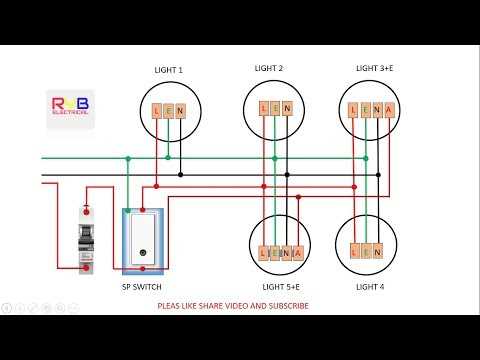
To ensure that your backup lighting system operates properly, follow the correct procedure for connecting the key components. The power source should be linked to the appropriate switch, which activates the backup system in case of a failure. Carefully configure the wiring so that the lights are powered by a secondary circuit once the primary power goes out. Make sure that the battery backup is integrated properly to ensure consistent performance during outages.
Check the setup for the correct placement of each element in the system. For instance, you’ll need to ensure the proper connections between the backup battery, the light fixtures, and the main circuit. A misconfiguration can result in malfunction or failure to activate when necessary. It’s crucial to understand the roles of different elements, such as the battery charger and the charging circuit, in providing a reliable power supply when needed most.
Once all components are wired correctly, test the system by simulating a power cut. Observe the backup mechanism to verify that it engages seamlessly. If the lights fail to switch on, double-check the connection points, particularly around the switching mechanism. Also, ensure that the batteries are sufficiently charged, as they are central to the operation during power interruptions.
Step-by-Step Guide to Wiring Emergency Backup Systems
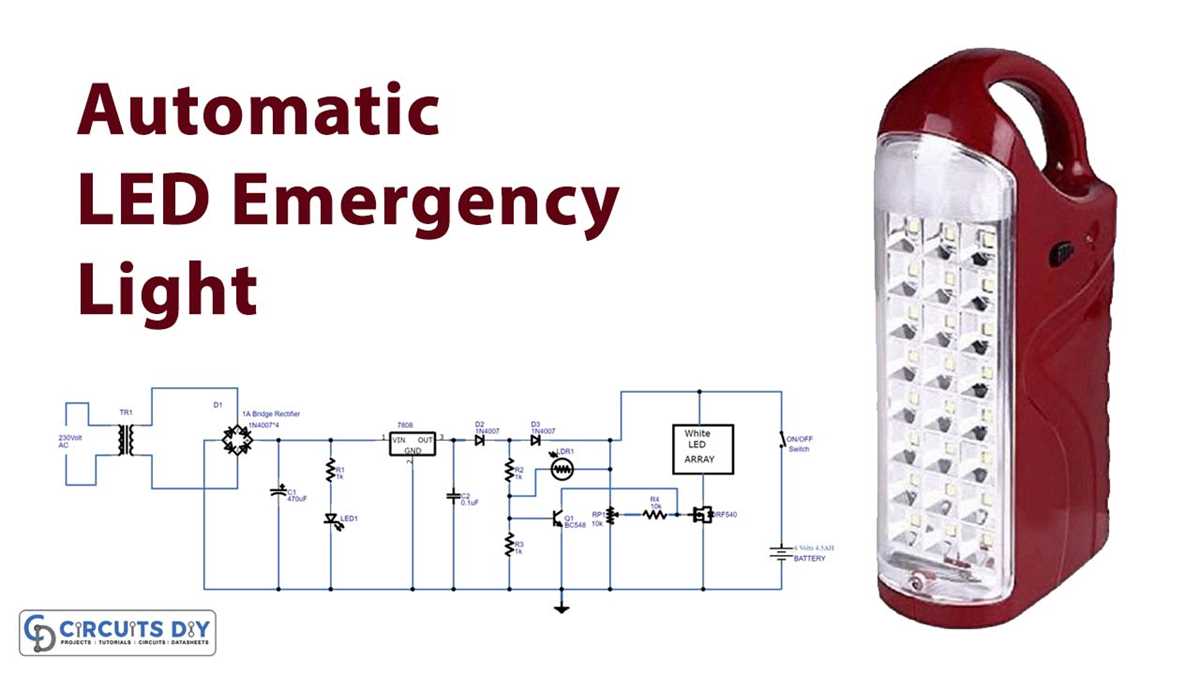
Begin by turning off the main power source to ensure safety. Identify the primary and secondary power sources; the first will be your regular supply, and the second will serve as the backup. Using the correct gauge wire, connect the primary power input to the input terminals of your backup system. Make sure to follow the manufacturer’s guidelines for proper wire sizing and connections.
Next, connect the backup system to the light fixtures that will be powered during an outage. Ensure that the positive and negative terminals are correctly aligned. The backup system should be able to provide power to the connected fixtures once the main source is lost. Double-check that the switch is correctly wired to enable seamless transition from primary to backup power.
The battery bank must be wired next. Connect the positive and negative terminals of each battery to the respective terminals on the backup unit. Be cautious of polarity, as incorrect connections may cause malfunction or damage. Install a fuse or circuit breaker between the batteries and the backup system to protect the components from overcurrent.
Now, integrate the charging mechanism to ensure the battery stays charged. Connect the charging terminals to the appropriate contacts on the backup unit. The charging system should only engage when the main power is available. Check that the charging circuit is designed to prevent overcharging, which can shorten the lifespan of the batteries.
Finally, perform a test to ensure everything is wired correctly. Simulate a power failure by turning off the main power supply. The backup system should automatically activate and provide power to the fixtures. Verify that the battery bank is supplying power, and monitor the performance to ensure that the system will reliably function during an actual power outage.
Understanding the Components of an Emergency Backup System
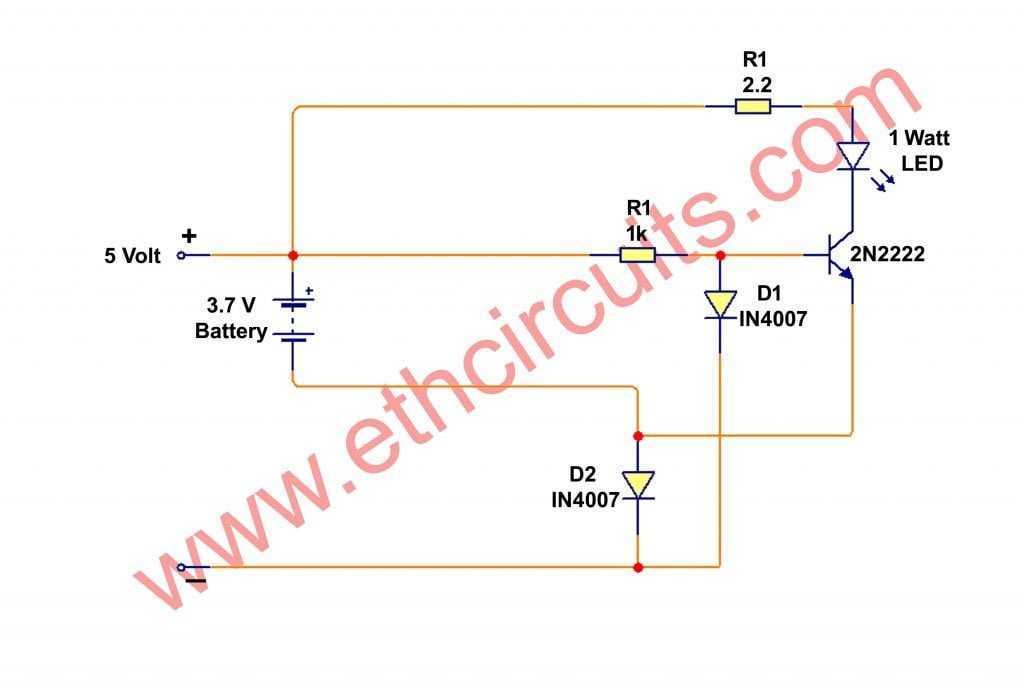
The primary component of any backup illumination setup is the power source, typically a battery pack designed to store energy when the main power is available. These battery packs are rechargeable and must be sized correctly to provide the required power for the duration of an outage. Choose a battery with sufficient capacity to run the connected lighting fixtures or devices for the desired amount of time.
Next, the backup power unit, often referred to as the inverter, is crucial. It converts the stored DC power from the batteries into AC power, which is used by the connected lights or appliances. When selecting an inverter, ensure that it has the correct wattage capacity to handle the load of all devices that need to be powered during an outage.
The charge controller is another critical component in the setup. It regulates the flow of current from the main electrical supply to the battery, ensuring the battery is charged efficiently without being overcharged. Look for charge controllers with overcharge protection and automatic switching capabilities to maintain battery health and optimize charging cycles.
Control Mechanism
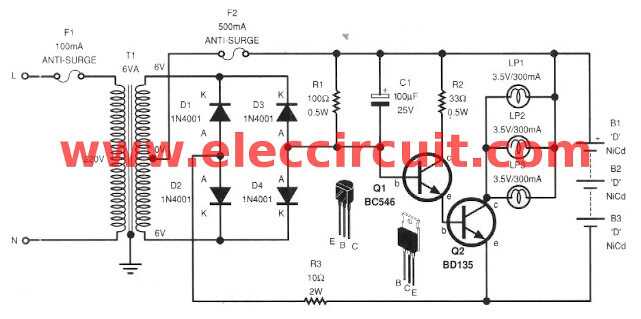
The control system manages the transition between the main power and backup power. This mechanism automatically detects power loss and switches the system to battery power. A relay or automatic transfer switch is typically used to manage this process. Ensure that the relay is fast-acting to reduce downtime when switching between power sources.
The lighting fixtures or devices connected to the backup system are the next important components. These should be energy-efficient, typically LED-based, to maximize the runtime of the backup system. When selecting fixtures, consider the total wattage and the energy consumption to ensure the battery can handle the load.
Wiring and Connectors
Proper wiring and connectors are essential to ensure safe and reliable operation of the backup system. Use appropriately rated cables for both the AC and DC circuits, and ensure that all connections are tight and insulated. Use high-quality connectors to prevent corrosion or loose connections, which can cause malfunctions or hazards.
Finally, regular maintenance is needed to ensure all components work as intended. Check the battery’s charge capacity, inspect wiring for wear, and test the automatic transfer switch to ensure it responds correctly during power outages. Regular testing and maintenance can extend the life of the entire backup illumination system and ensure reliable performance in emergencies.