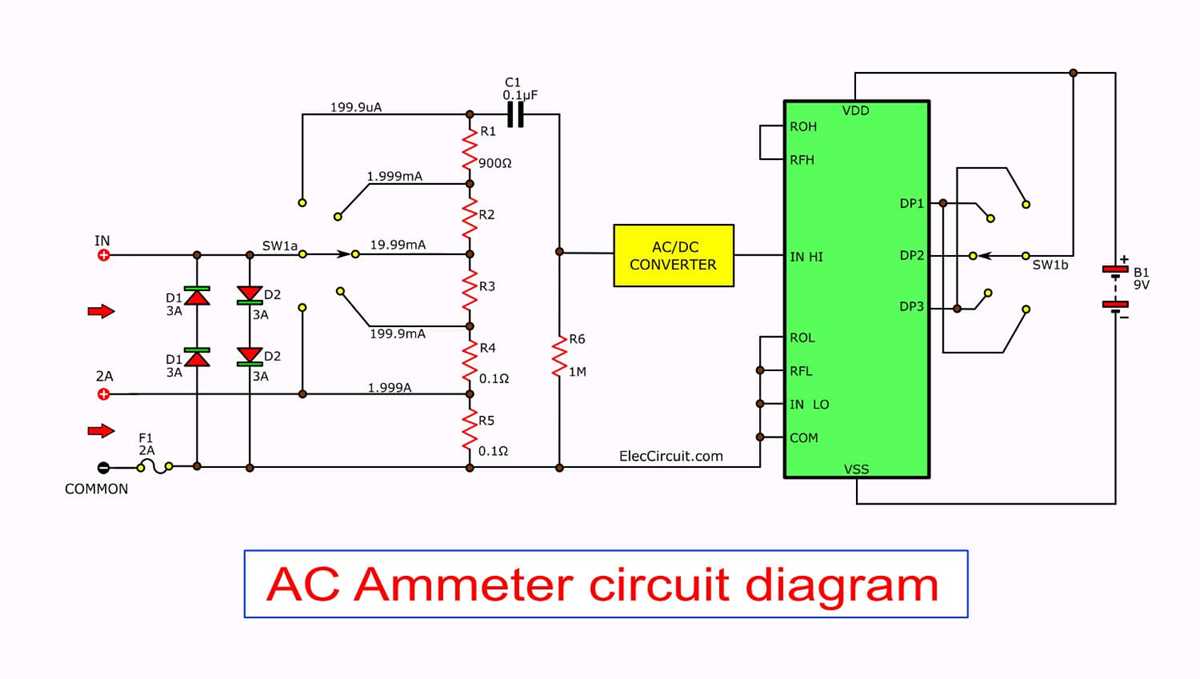
First, identify the key components that make up the testing device. Typically, you’ll find terminals for voltage, current, and resistance measurement. Be sure to match each lead to the correct terminal based on the task at hand.
The common terminal, usually denoted as “COM”, is where the black probe connects. This is used for measuring the reference ground during voltage and current tests. The red probe connects to the other terminals depending on the measurement you wish to make: VΩ for voltage and resistance, and a separate terminal for current measurements.
Before using the tool, always check the range selector. If you’re measuring voltage, ensure the device is set to the appropriate range based on the expected value. For current measurements, the tool should be correctly set for the type of current (AC or DC) you intend to measure.
Once connected, be cautious about overloads. If the device is set to measure low voltage but connected to a higher one, this can cause damage to the instrument. Always verify the expected value before turning on the power to the circuit you’re testing.
AVO Meter Circuit Setup Guide
Begin by correctly identifying the power input terminals. Typically, the power supply should be connected to the designated input terminals, marked for either AC or DC voltage. Ensure you are connecting the device to the correct power source as specified in the user manual.
The common terminal, often indicated by the “COM” label, is used for connecting the black probe. This is the reference ground for all measurements. The red probe should be connected to the other terminals depending on the function you’re using–either voltage, resistance, or current.
For accurate resistance measurements, ensure the device is set to the proper resistance range. The range should be adjusted based on the expected resistance value to avoid errors or damaging the tool. If you are testing a component, ensure it’s disconnected from any power source before making measurements.
Connecting for Voltage Measurements
When measuring voltage, select the appropriate voltage range. For low-voltage applications, use the lower range, while for higher voltage, adjust accordingly. Connect the probes to the respective terminals, ensuring the black probe is placed at the common terminal and the red probe at the voltage terminal.
For accurate current measurements, make sure the device is set to the correct current range and that the probes are placed correctly. Depending on the device, there may be a separate terminal for current measurements, and the probe will need to be connected there instead of the voltage terminal.
Final Checks and Testing
After all connections are made, perform a quick test to verify functionality. Begin by measuring known values to ensure accuracy. Always double-check the range settings before taking any readings, as incorrect settings may cause inaccurate results or potential damage to the device.
Identifying Key Components in an AVO Meter Circuit
Start by locating the common terminal, typically marked “COM,” where the black probe connects. This terminal serves as the reference ground for all measurements and is the first component to identify when setting up the device.
The next critical component is the voltage terminal, often marked with a “V” or “VΩ” label. This is where the red probe connects when measuring voltage. Ensure that the range is properly set based on the expected voltage to avoid damaging the device.
For measuring resistance, identify the terminal labeled with the omega symbol (Ω). When testing resistance, ensure that the circuit is de-energized to avoid damage to both the meter and the component under test.
The current measuring terminal, often marked with “A” for amperes, is used when measuring the flow of electric charge. In many models, there may be a separate terminal for alternating current (AC) and direct current (DC), so double-check the configuration.
- Capacitors: These components store electrical energy and are critical for helping the circuit achieve accurate readings, especially when measuring resistance or voltage under dynamic conditions.
- Switches: Used to toggle between measurement modes, such as voltage, current, and resistance. A malfunctioning switch can result in improper readings.
Next, the display section, which is usually a digital or analog readout, shows the measurement results. Ensure that the screen is clear of any obstructions and free from damage, as it plays a key role in interpreting the data.
Finally, the battery is an often overlooked but critical part of the setup. Ensure that the battery is fully charged or replaced if needed. A weak battery can lead to inaccurate readings or a complete failure to function.
After identifying and connecting all components, perform a basic test by checking a known value to ensure that all components are working as expected. Any discrepancies may indicate a problem with one of the parts.