Begin by identifying the power supply leads and ground terminal on the mounting bracket. The connections should be clearly labeled: neutral, live, and ground. Ensure that the wiring matches the configuration in the manual to avoid errors in setup.
For a proper setup, use wires that match the motor’s specifications. Pay close attention to wire gauge and length, as this will directly impact the fan’s performance. A connection that is too loose or too tight can lead to overheating or malfunctions.
Once the basic connections are in place, check for any additional components, such as capacitors or remote control receivers. Properly connect these parts according to the manual’s instructions. Incorrect placement or wiring of auxiliary components can cause operational issues.
Before powering on the system, verify that each terminal is tightly secured. If you’re unsure, use a torque wrench to apply the correct force, as loose connections can cause arcing, which can damage the unit. Perform a quick test to ensure everything functions smoothly before finalizing the installation.
Wiring Guide for Ceiling Fan Installation
Begin by identifying the power leads and ground terminal before starting the setup. The wiring should be connected to the correct terminals: one for neutral, one for live, and one for grounding. Each terminal will be clearly marked to help you avoid mistakes.
Ensure that the wire gauge used meets the specifications in the motor’s manual. Using too small or too large of a wire can lead to overheating or improper performance. The wires should be cut to the appropriate length to avoid excess that could create a cluttered installation.
For safety, always connect the ground wire to the motor’s frame. This will help prevent electric shock in case of a short circuit. Make sure the grounding connection is secure, as a poor ground can lead to electrical hazards.
Connecting the Capacitor and Remote Control
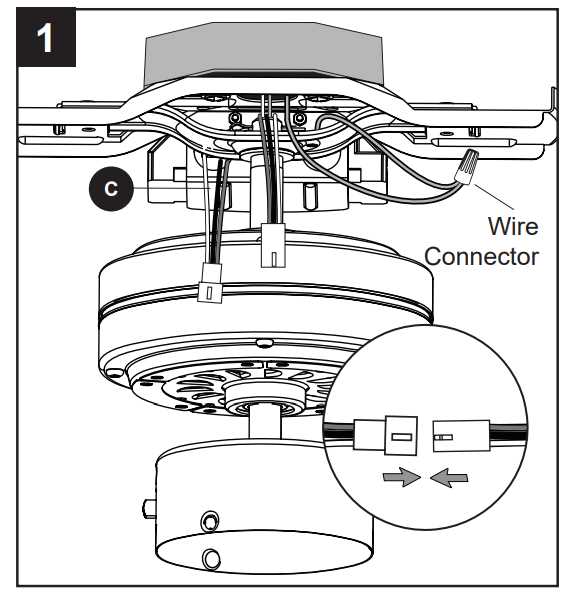
If your system includes a capacitor or remote control module, make sure you follow the exact placement instructions. The capacitor should be connected between the start winding and power leads. A misconnection here can affect the motor’s starting capabilities.
When connecting the remote control, pay attention to the receiver’s wiring. It should be connected in a way that doesn’t interfere with the main power leads or ground. Place the receiver carefully to avoid strain on the wires or any exposed connections.
Final Checks and Testing
Before turning on the power, perform a visual inspection to ensure all connections are tight and properly insulated. Once you power up the system, test the fan at low speed first. Listen for any unusual sounds or vibrations that might indicate a wiring issue. If everything runs smoothly, you’re ready to complete the installation and use the fan safely.
How to Identify and Connect the Wires in Ceiling Fan Motors
Start by examining the junction box. Inside, you’ll typically find three key connections: neutral, live, and ground. These should be clearly marked, but if not, refer to the manual for specific labeling. The neutral wire is usually white, while the live wire will be black or red.
The ground wire, often green or bare copper, should be securely attached to the motor frame. This connection is crucial for safety, as it prevents electrical shocks. Use a grounding screw to fasten it firmly in place.
Once you have identified the wires, focus on the power leads. The black (live) wire should be connected to the motor’s live terminal, while the white (neutral) wire should go to the corresponding neutral terminal. Ensure that these connections are tight to avoid any loose connections that could cause arcing.
In many installations, a capacitor is included to help with motor start-up. This component is usually connected between the start winding and one of the power leads. Be sure to check the capacitor’s specifications to ensure it’s installed correctly for the motor’s voltage requirements.
If the system includes a remote control or additional functionality like speed settings, you may need to connect a receiver. This receiver typically wires into the live and neutral connections, and it’s important to follow the exact manual instructions for the receiver’s placement to avoid interference with the main power leads.
Next, check the wire gauge. For most installations, the recommended gauge is 18 AWG for smaller setups, though heavier-duty models may require thicker wire. Using a wire that’s too thin for the current load can result in overheating and damage over time.
Once all wires are connected, double-check each terminal to ensure they are tight and secure. Any loose connection could lead to improper function or cause overheating. Use a torque wrench if needed to apply the correct pressure when tightening the terminal screws.
Finally, after all connections are made, conduct a quick test to ensure the system is working properly. Start the motor at a low speed and listen for any unusual sounds or vibrations, which could indicate a wiring issue. If everything seems smooth, the installation is complete.