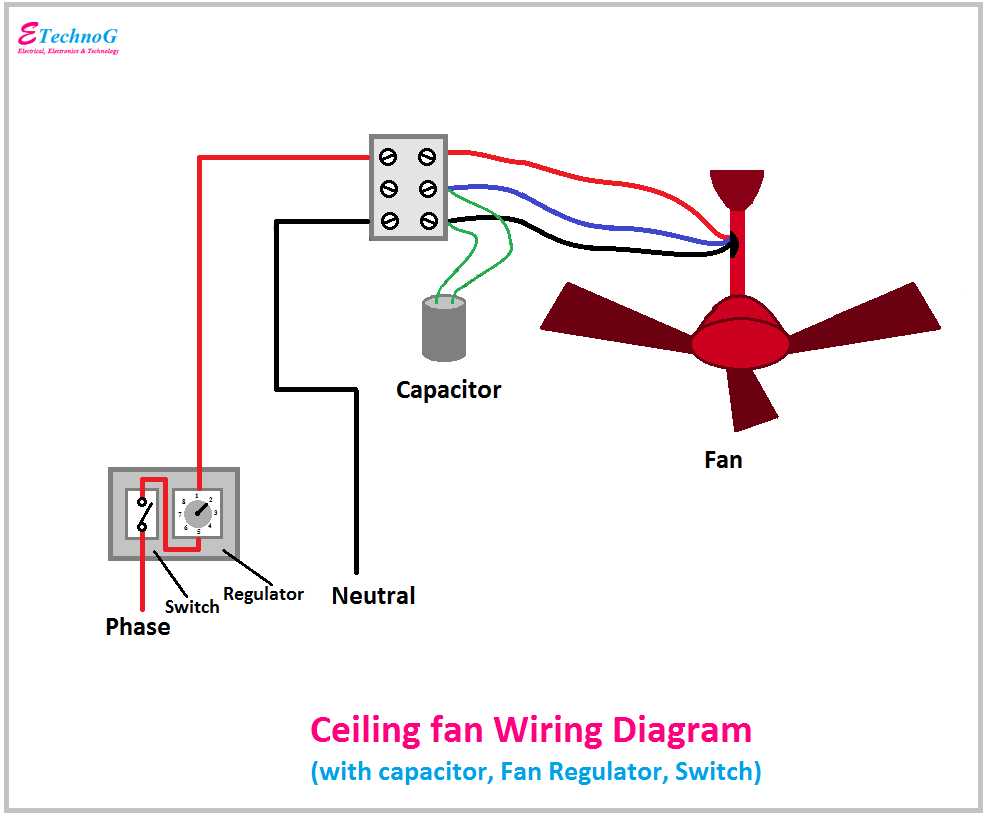
Begin by identifying the correct wires for your overhead fixture. Usually, you’ll encounter black (hot), white (neutral), and green (ground) wires. The black wire should be connected to the hot terminal of your light, the white wire to the neutral terminal, and the green wire to the ground screw. Always turn off the circuit breaker before working on electrical connections.
Next, when installing the fixture, ensure that you securely fasten the wires using wire nuts. For a ceiling light setup with a pull chain or dimmer, make sure to follow the manufacturer’s wiring instructions. A wrong connection may prevent proper operation or pose a risk of electrical hazards.
If the fixture includes a remote control or other advanced features, you may need to connect additional wires, such as a blue wire for control signals. Always double-check the color coding of each wire according to the fixture’s manual to avoid confusion. Testing the system with a multimeter will confirm that the connections are safe and functional.
Ceiling Fixture Electrical Connections
Start by correctly identifying the three main wires: black (hot), white (neutral), and green (ground). The black wire should be connected to the hot terminal, white to the neutral, and green to the ground screw on the junction box. Make sure the power is completely turned off at the breaker before starting any work.
If you’re dealing with a unit that has a remote control or wall switch, there may be an additional blue wire to control the lighting. This should also be properly attached to its designated terminal, following the fixture’s manual instructions. Use wire nuts to connect all wires securely and prevent any loose connections, which could lead to short circuits or electrical fires.
Once the wiring is done, the fixture should be mounted to the ceiling bracket. Pay attention to the mounting plate, which will hold the fixture in place. It is crucial to ensure the unit is properly secured to avoid it falling after installation. After the fixture is attached, check each wire connection once again with a multimeter to ensure everything is functioning correctly.
If there is any flickering or irregular behavior after powering on, double-check the connections for any loose or incorrectly attached wires. In some cases, faulty dimmer switches can also cause issues. Testing each part of the system step by step will help isolate and resolve potential problems quickly.
How to Identify the Correct Wires for Ceiling Fan Installation
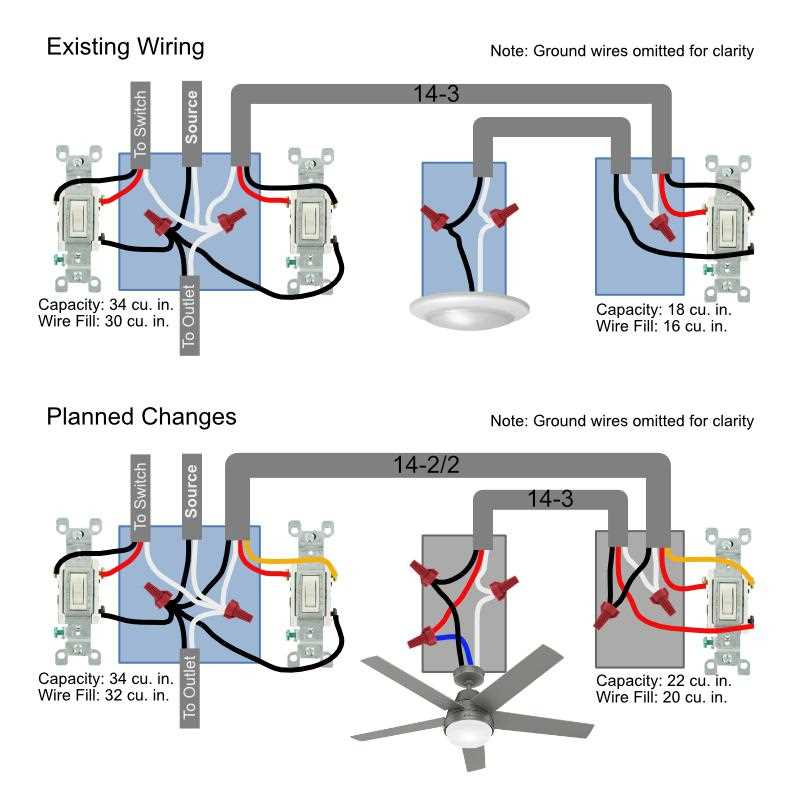
The first step in installing any overhead fixture is identifying the wires. Look for three main colors: black (hot), white (neutral), and green or copper (ground). The black wire is typically used to carry electricity to the light or motor. The white wire serves as the return path for the electricity, and the green or copper wire is used for grounding to prevent electrical shocks.
Black Wire (Hot)
The black wire is the primary wire for power. It carries the current from the power source to the fixture. Always ensure that the black wire is securely connected to the hot terminal of the ceiling mount. If your system includes a dimmer or remote control, you may also find additional black wires for controlling separate components like the light and motor.
White Wire (Neutral)
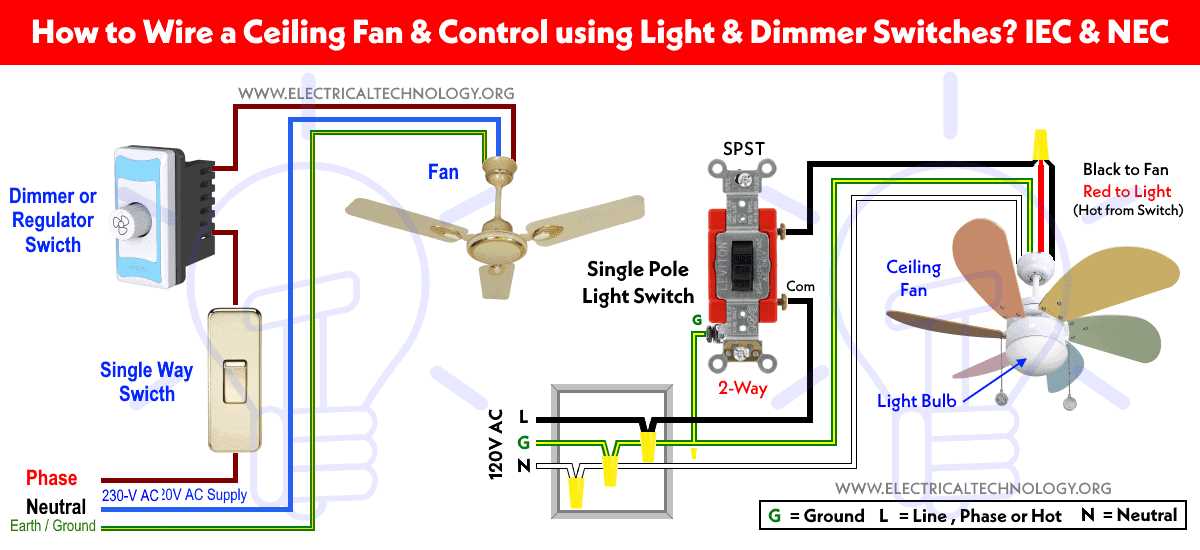
The white wire completes the circuit by providing a return path to the power source. It is critical to attach the white wire to the neutral terminal to allow the current to flow properly. Never connect the neutral wire to the ground, as this can lead to short circuits or malfunctioning of the entire setup.
In cases where your fixture includes a separate light function, the wiring may have multiple black wires. These wires may be color-coded to indicate different functions–one for the light and one for the motor. Always refer to the fixture’s manual to confirm the correct assignment.
The green or copper wire is for grounding the fixture. It should be attached to the grounding screw in the electrical box. This step is crucial for safety, as it prevents electric shock in case of faulty wiring. If there is no dedicated ground wire, the metal frame of the fixture should be grounded directly to the electrical box.
- Check the ceiling box for pre-installed wiring. The presence of a green or bare wire indicates it’s grounded.
- If there’s no ground wire in the ceiling box, you may need to add one from the fixture to the box.
If the installation involves a fan with additional features like a remote control or speed control, you may encounter extra wires. These can include a blue wire for lighting control or a red wire for separate fan speed control. Be sure to follow the manufacturer’s instructions to correctly identify these extra wires and connect them accordingly.
- Blue wire: Usually connected to the light kit in the fixture.
- Red wire: Often used to control the fan speed independently from the light.
Use a multimeter to double-check your wire connections before finalizing the installation. This will ensure there are no electrical shorts or incorrect connections, which could cause malfunctions or safety hazards. Once the connections are confirmed, proceed with securing the fixture to the ceiling and restoring power to test the system.