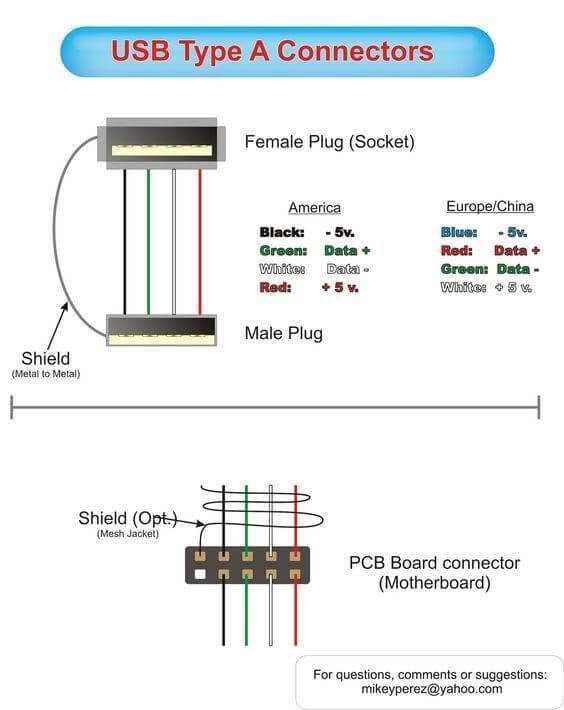
Before starting any project involving data transfer cables, identify the specific terminals and their function. Typically, there are four main connections: power, ground, data +, and data -. Make sure each wire is connected to its corresponding terminal to ensure proper functionality and avoid connection issues.
The power wire should be connected to the power terminal, usually marked as VBUS or 5V, providing the necessary voltage for devices to operate. The ground wire, often marked GND, completes the circuit and ensures the safe flow of electricity. Make sure to confirm that both power and ground wires are securely fastened before proceeding with data connections.
The remaining two wires, data + and data -, are responsible for the transfer of data between connected devices. These wires are typically color-coded (often green for data + and white for data -) and must be connected properly to ensure efficient communication. Any incorrect connection can result in data transfer errors or device malfunction.
USB Wiring Guide
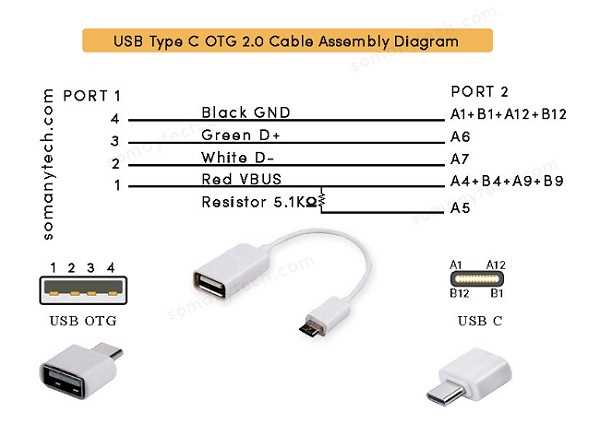
Start by confirming the number of terminals your cable has. Most data cables have four or five conductors, depending on the type of connection and data transfer speed required. The primary wires include a power line, a ground line, and two data lines for communication.
The power wire is usually marked as 5V or VBUS, which supplies the necessary voltage for connected devices. This wire should be connected securely to its corresponding terminal to ensure proper voltage delivery to the device. It is important to avoid overloading this wire by ensuring that the connected devices don’t exceed the power requirement.
For data transmission, two lines are typically used: data + and data -. These wires are responsible for the flow of information between the devices. The data + line is often green, while the data – line is usually white. Properly connect these to their designated terminals to ensure that data can flow smoothly without errors or signal loss.
The ground wire, often marked GND, ensures a safe return path for the electrical current. It is crucial to connect this line properly, as it helps protect against electrical surges and improves signal integrity. Ensure that the ground wire is connected to a secure and clean ground terminal to maintain the stability of the circuit.
Identifying the Pinout for USB Connections
To properly set up a connection, understanding the pinout is crucial. A typical connection will involve four main pins, each with a specific function. These include two data lines, a power line, and a ground connection. It’s important to identify each pin correctly before proceeding with any connections.
Start by identifying the power pin, which is commonly labeled as 5V or VBUS. This pin supplies power to the connected device, typically providing a stable 5V DC. Ensure that the power pin is connected securely to avoid malfunctioning or insufficient power delivery to the device.
Next, locate the ground pin, often marked as GND. The ground pin serves as the return path for current, completing the circuit. It is vital to connect this pin to a solid ground terminal to ensure proper functionality and reduce the risk of electrical interference or shorts.
The remaining two pins are used for data transfer. The data + pin, often color-coded green, is responsible for sending positive data signals. The data – pin, commonly color-coded white, handles the negative signals. Connecting these pins in the correct orientation is critical for the reliable exchange of information between devices.
Always double-check the pinout and ensure that each wire is inserted into the correct slot. Reversing or misplacing these connections can lead to data transfer errors, power failures, or device malfunctions. If you’re unsure, consult a pinout chart for your specific cable type or device model to avoid mistakes.