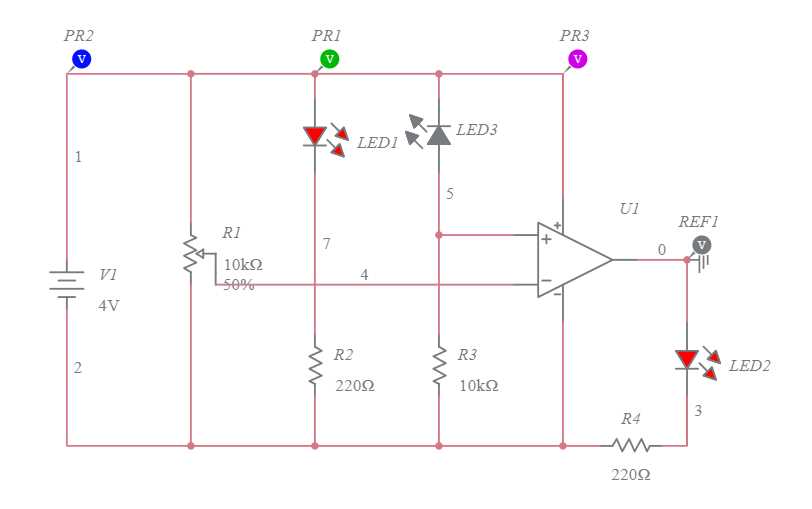
To set up a basic object detection system using infrared light, begin by connecting the emitter and receiver. The emitter will generate infrared light, which is reflected by objects in its path, while the receiver detects this reflection. When the emitted infrared beam is interrupted by an object, the receiver’s output changes, indicating the presence of the object.
Make sure the components are correctly oriented: the emitter should point towards the area you want to monitor, and the receiver should be positioned to detect the reflected light. For a stable operation, ensure that the distance between the emitter and the receiver is within the sensor’s range, which is usually specified in the component’s datasheet.
The control module, such as a microcontroller or a logic gate, can be used to process the signal from the receiver. This allows the system to perform actions like activating a switch, triggering an alarm, or logging the detection event. For accurate operation, the signal from the receiver should be amplified if necessary, and the module should be programmed to interpret the changes in the signal correctly.
IR Proximity Sensor Circuit Diagram Guide
To begin setting up an infrared object detection system, you’ll need two key components: an infrared emitter and a photodiode (or phototransistor). The emitter sends out infrared light, which reflects off objects in the surroundings. The receiver detects this reflected light. If no object is present, the receiver outputs a low signal; when the beam is interrupted, the signal will switch, indicating detection.
Start by wiring the infrared emitter to a power source. Ensure that the current and voltage ratings match the emitter’s specifications. The emitter typically operates with a forward voltage of around 1.2V and draws current in the range of 10-20mA, depending on its specifications. A current-limiting resistor is often placed in series with the emitter to prevent overcurrent conditions.
Connecting the Receiver
The photodiode or phototransistor acts as the receiver. It should be placed in line with the emitted infrared light beam, facing the area you want to monitor. When the emitted light reflects off an object, the receiver detects this reflection and generates a change in its output signal. This signal can then be interpreted by the control circuit to trigger other actions.
Wire the receiver’s anode (positive terminal) to the power supply and the cathode to the ground. Depending on the type of phototransistor, you may need to use a pull-up resistor on the output to ensure a clean high signal when the receiver detects light. The value of this resistor depends on the phototransistor and the supply voltage used.
Signal Processing and Amplification
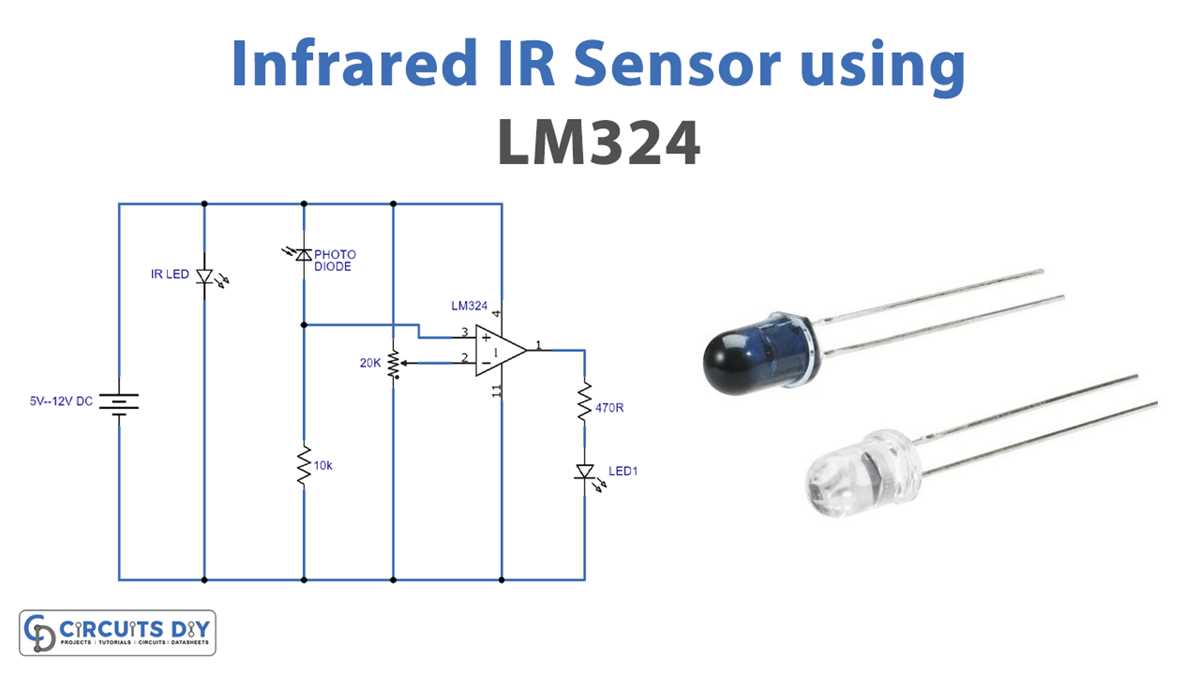
The signal from the receiver can be weak, especially when the light reflection is minimal. To amplify the signal, use a simple transistor amplifier circuit. By placing a small NPN transistor like the 2N2222 between the phototransistor and the microcontroller, you can strengthen the output, making it easier for the control system to detect changes. The transistor acts as a switch, amplifying the signal for further processing.
For smoother signal processing, consider using an operational amplifier (op-amp) to condition the signal. This helps to filter noise and stabilize the output for better accuracy, especially if the environment is noisy or the system is subject to interference from ambient light sources.
Once the signal is amplified, it can be fed into a microcontroller, such as an Arduino, for further processing. The microcontroller can then perform tasks such as turning on a light, activating a motor, or logging data depending on the system’s application. If using a microcontroller, ensure the signal is within the required voltage range for the input pins to avoid damage.
If you’re aiming for a more complex application, consider using a modulation technique for the emitted infrared light. By modulating the light with a frequency, the system can be less susceptible to interference from ambient infrared sources, such as sunlight or indoor lighting. This can be achieved by using a pulse-width modulation (PWM) driver circuit for the emitter.
How to Wire an IR Proximity Sensor for Simple Object Detection
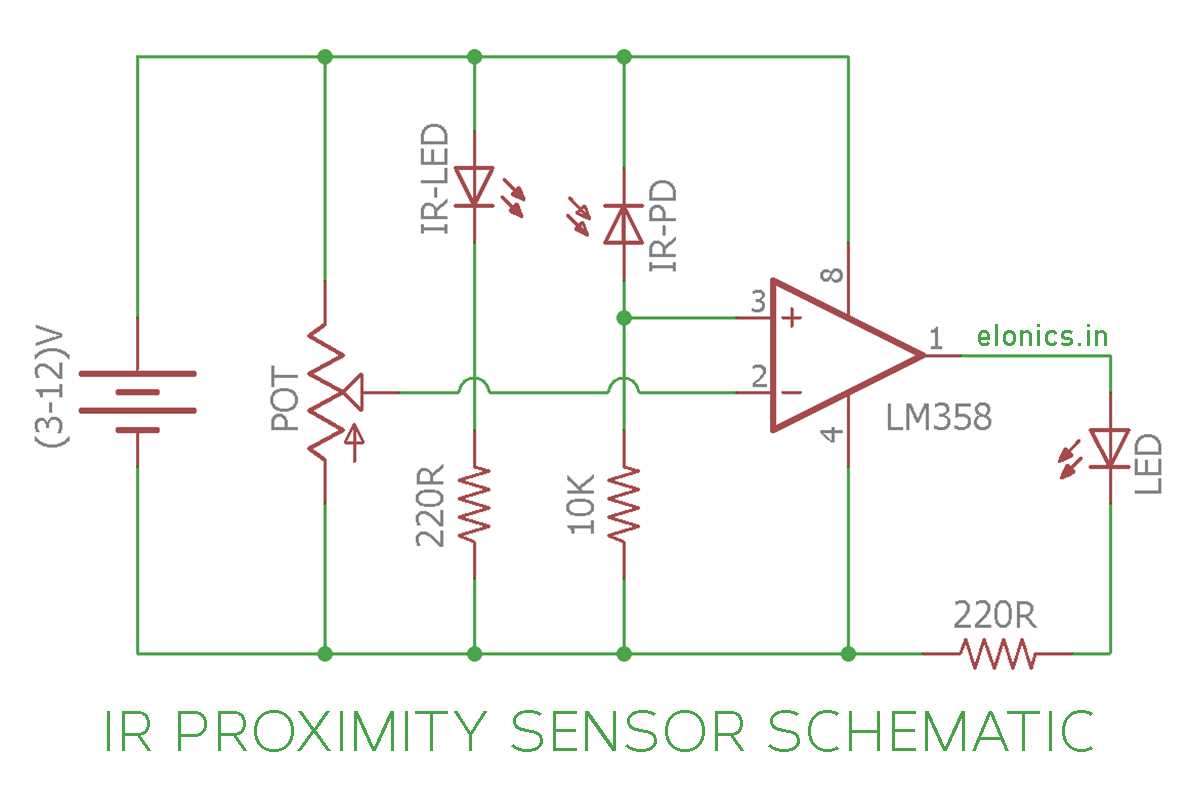
To set up an infrared object detection system, start by connecting the infrared emitter to a suitable power source. Most infrared LEDs used for this purpose operate on a 5V supply. Place a current-limiting resistor in series with the LED to avoid damaging it. Typically, a 220-ohm resistor is sufficient for a 5V supply. The positive terminal of the LED should be connected to the positive side of the power source, while the negative terminal goes to ground through the resistor.
Connecting the Receiver and Output
The photodiode or phototransistor will act as the receiver. Wire the positive terminal of the phototransistor to the power supply, while the negative terminal should be connected to the ground through a pull-down resistor. This resistor will ensure a stable low output when no infrared light is detected. To process the output signal, connect the output terminal of the phototransistor to an input pin on a microcontroller like an Arduino. The signal will go high when the infrared light is reflected back to the receiver.
For more reliable operation, you can use a transistor as a switch to amplify the signal from the phototransistor. This can help ensure that the microcontroller receives a strong enough signal for processing. Make sure to add a base resistor between the phototransistor and the base of the transistor to control the switching behavior. The collector will connect to the microcontroller input, while the emitter goes to the ground. This setup will allow for easy detection and trigger-based actions, such as turning on an LED or activating a motor.