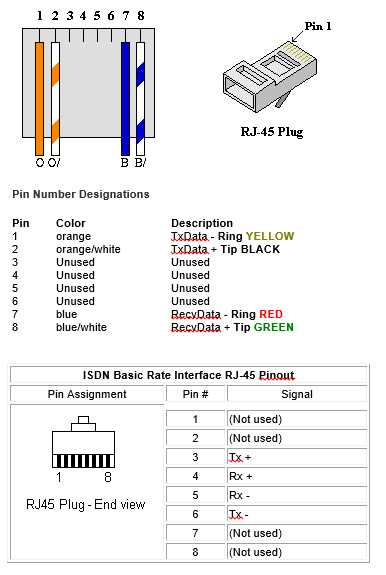
Use the T568B pin sequence unless a network already follows T568A. This layout is the most common in office and home Ethernet installations. Arrange the eight conductors in the order white-orange, orange, white-green, blue, white-blue, green, white-brown, brown before inserting them into the 8P8C plug and crimping.
Trim the outer jacket so that about 12–15 mm of twisted pairs remain visible. Untwist each pair only as much as needed to align the conductors in the correct order. Excess untwisting increases signal interference and may reduce link stability at 1 Gbps speeds.
Check orientation of the plug before inserting the conductors. Hold the plastic plug with the clip facing downward and the metal contacts pointing upward. Pin numbers then run from left to right (1–8). Confirm that each conductor reaches the front edge of the plug; partial insertion leads to failed contacts after crimping.
Use a ratcheting crimping tool designed for 8P8C modular plugs. Apply firm pressure until the ratchet releases. The metal blades inside the plug pierce conductor insulation and press each line into the copper core. After crimping, test the cable with a network tester; proper continuity should appear across all eight positions without pair reversal.
For links between a computer and a switch or router, terminate both cable ends with the same color order such as T568B on both sides. If connecting two computers directly without an intermediate device, one end uses T568A and the opposite end uses T568B, creating a crossover layout that swaps the transmit and receive pairs.
RJ45 Connector Wiring Diagram With T568A and T568B Pinout Cable Color Order
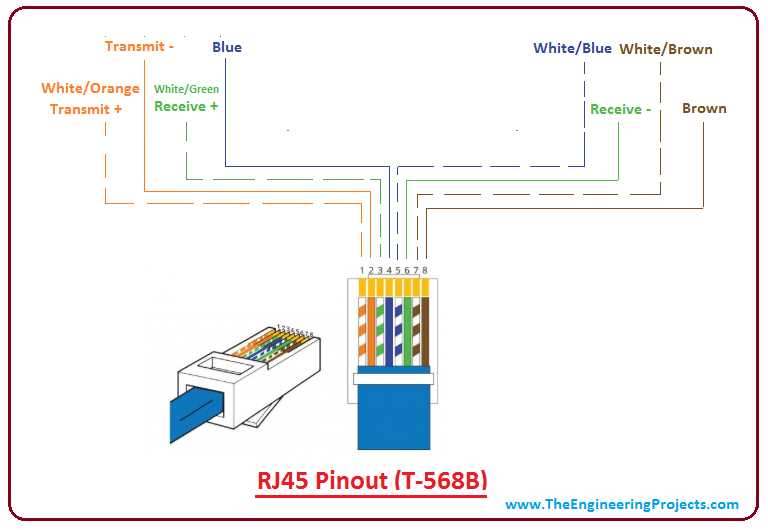
Choose one termination standard and keep it identical on both cable ends. The two recognized layouts are T568A and T568B. T568A pin sequence from position 1 to 8 follows white-green, green, white-orange, blue, white-blue, orange, white-brown, brown. T568B uses white-orange, orange, white-green, blue, white-blue, green, white-brown, brown. Align the eight conductors in this exact order before inserting them into the 8P8C modular plug.
Pin positions and signal pairs
Positions 1–2 carry the first data pair, 3–6 carry the second pair, while 4–5 and 7–8 form the remaining pairs used in Gigabit Ethernet. Maintain each twisted pair up to the contact point; keep untwisted length under 13 mm. Excess separation increases crosstalk and can reduce network stability at 1000BASE-T speeds.
Cable color alignment inside the plug
Hold the modular plug with the plastic clip facing downward and metal contacts upward. Insert the arranged conductors until every copper end touches the front wall of the plug. The outer jacket should extend inside by at least 6–8 mm so the crimp tab clamps the sheath instead of individual conductors. This prevents pullout during cable movement or installation inside patch panels and wall outlets.
RJ45 pinout and cable color sequence for T568A and T568B standards
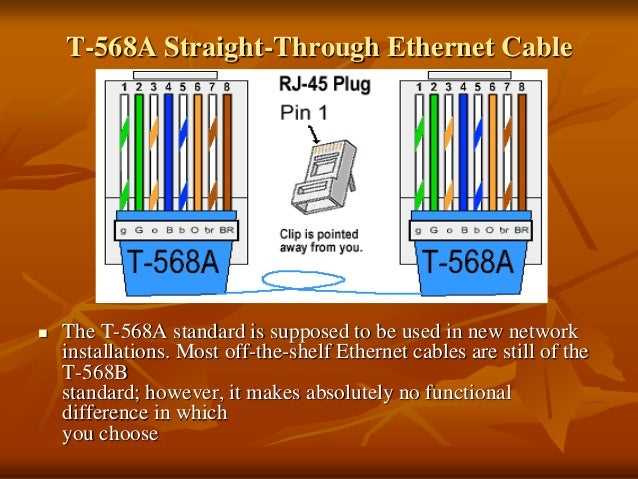
Select one termination layout and apply it consistently across both ends of the Ethernet cable. Two arrangements dominate structured cabling: T568A and T568B. Both support Fast Ethernet and Gigabit Ethernet; the difference lies only in the placement of the green and orange pairs.
Hold the 8P8C modular plug with the clip facing downward and the contacts facing upward. Pin numbers then run from 1 on the left to 8 on the right. Each position connects to one conductor inside the twisted-pair cable.
The conductor order used in the T568A layout appears as follows:
- Pin 1 – white green
- Pin 2 – green
- Pin 3 – white orange
- Pin 4 – blue
- Pin 5 – white blue
- Pin 6 – orange
- Pin 7 – white brown
- Pin 8 – brown
The T568B layout swaps the green and orange pairs while leaving the blue and brown pairs unchanged:
- Pin 1 – white orange
- Pin 2 – orange
- Pin 3 – white green
- Pin 4 – blue
- Pin 5 – white blue
- Pin 6 – green
- Pin 7 – white brown
- Pin 8 – brown
Maintain twisted pairs as close to the plug contacts as possible. Untwist less than 13 mm of each pair. Excess separation increases crosstalk and may reduce signal stability on 1000BASE-T networks.
Use identical color order on both ends of a cable when connecting computers to switches or routers. A crossover layout appears when one side follows T568A and the opposite side follows T568B, which swaps the transmit and receive pairs between devices.