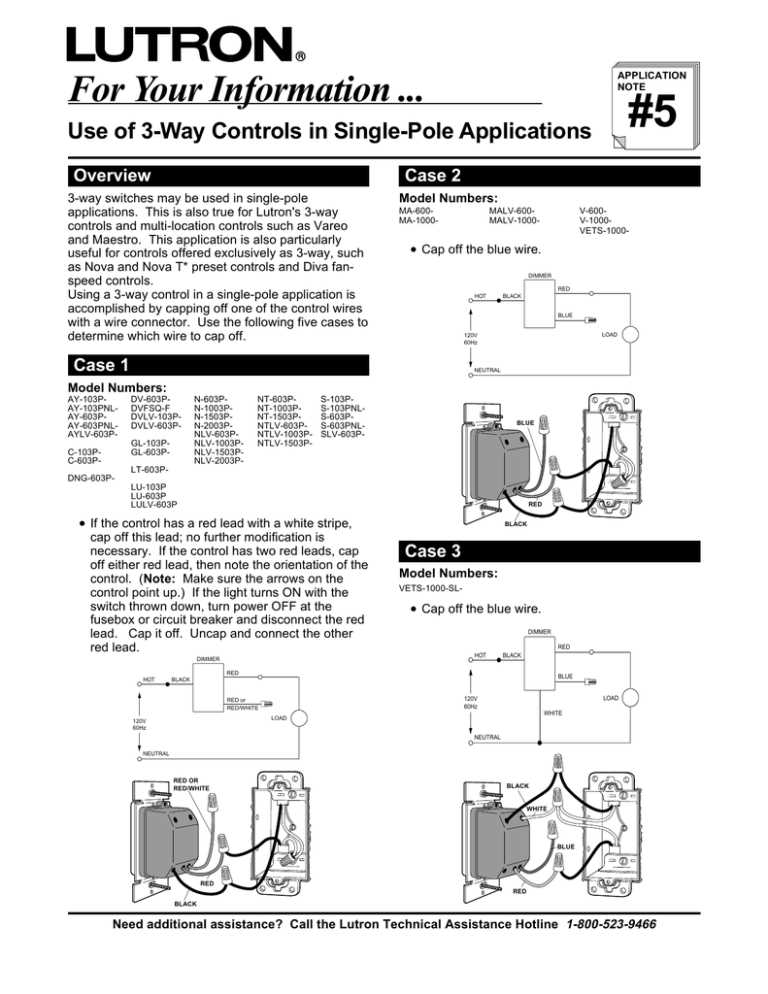
Begin by ensuring the power is turned off at the breaker before beginning any electrical work. This will help avoid electric shocks and protect both you and your equipment. Use a voltage tester to double-check that the power is fully disconnected from the circuit before starting.
Next, carefully identify the two switches you will be connecting. One will control the light from one location, while the other will provide control from a different point in the room. Make sure both switches are compatible with each other and the lighting system you’re working with, as improper pairings can lead to malfunction.
Start by connecting the black (hot) wires to the terminal screws on the switch. For a proper connection, strip the wire ends carefully to expose the copper, but do not remove too much insulation. This ensures a secure fit into the terminal without any exposed wire, which could create a short circuit.
Once the switches are connected, proceed with grounding. The grounding wire must be attached securely to the switch’s ground terminal, ensuring the system is safe from electrical surges. Any loose or improperly connected ground could lead to dangerous situations, especially in the event of an overload.
After completing the connections, mount the switch into the electrical box, ensuring all wires are tucked safely inside. Double-check each wire’s connection and tighten any screws to avoid loose terminals that can cause flickering or power issues.
Finally, restore power to the circuit and test the functionality of the switch. If everything is properly connected, you should be able to control the light from both locations without issue. If the light doesn’t function as expected, double-check the wiring and ensure each connection is correct and secure.
Wiring the 3-Way Light Control Switch Step by Step
Turn off the power at the circuit breaker before starting. Use a voltage tester to double-check that the circuit is not live. This is the most important first step to avoid electrical hazards while working.
Identify the wires in the existing setup. You should have three main wires: the black (hot), white (neutral), and green (ground). The black wire will carry the current, while the white wire completes the circuit. The ground wire is for safety purposes.
Remove the existing switch and carefully disconnect the wires. Make sure to note which wire is connected to each terminal, as this will help with the reinstallation. It’s important to avoid damaging any existing wires in the process.
Connect the black (hot) wire to the terminal screw marked “common” on the new switch. This terminal is usually a darker color compared to the others. The black wire should carry the electrical current from the power source to the switch.
Now connect the two remaining black wires to the traveler terminals on the switch. These terminals are typically marked with brass or silver screws. The traveler wires will allow control of the light from two different locations.
Secure the ground wire to the green terminal on the switch. This provides a safe path for electricity in case of a fault. The ground wire must be tightly secured to avoid any risk of electric shock.
Once all the connections are made, mount the switch into the electrical box. Tighten all screws to ensure the switch is firmly secured, and ensure no bare wire is exposed that could cause a short circuit or spark.
Finally, restore the power and test the switch. If everything is connected properly, you should be able to control the light from both locations. If the light doesn’t function correctly, double-check the wire connections and ensure everything is secure and correctly placed.
Common Wiring Errors and How to Avoid Them with the Dimmer Switch
One of the most common mistakes is improperly connecting the traveler wires. These wires must be connected to the correct terminals, usually marked with brass or silver. If these are connected to the wrong terminals, the switch will not function properly, and you may experience issues with controlling the light from multiple locations. Always check the wiring plan and verify terminal markings before securing the wires.
Incorrect Grounding
Improper grounding can lead to electrical hazards, including shocks or fire. Ensure the green ground wire is securely connected to the ground terminal. If this connection is not tight or missing, the safety features of the electrical system will be compromised. Use a voltage tester to ensure the ground is properly connected after installation.
Loose Connections
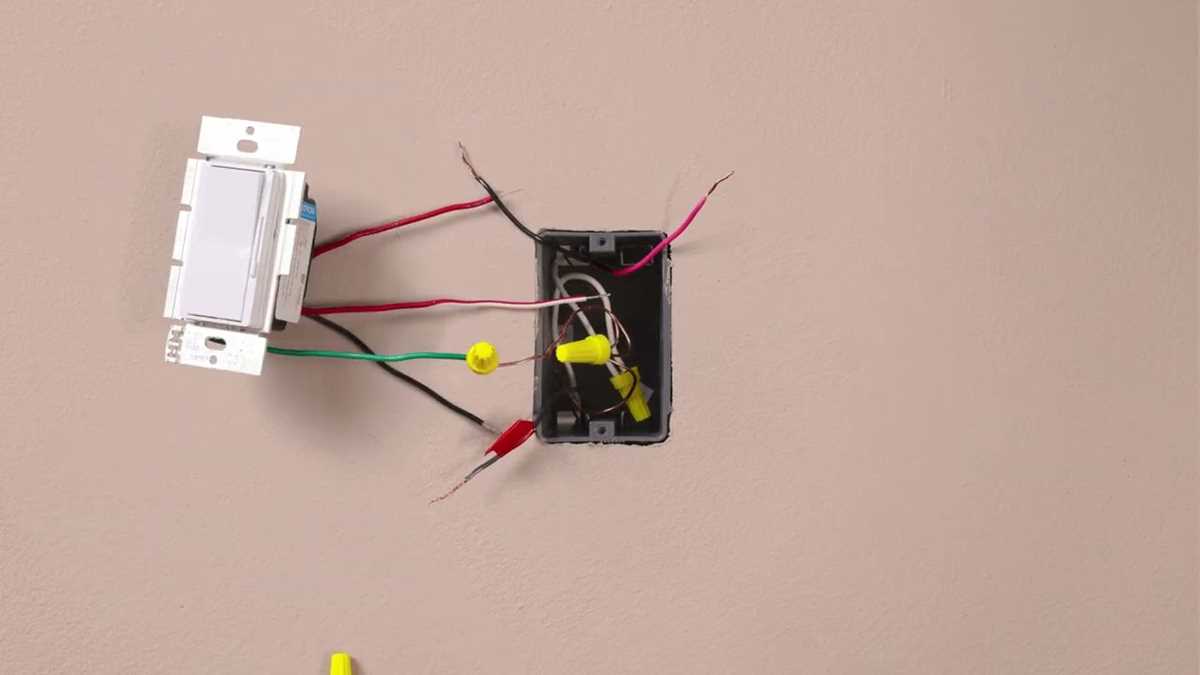
Loose wire connections are a major cause of intermittent power issues or complete failure of the light control system. When attaching wires to the terminals, make sure each connection is tight and secure. Never allow any exposed wire to touch other conductors, as this can create short circuits and cause sparks.
| Error | Solution |
|---|---|
| Improper traveler wire connections | Check that traveler wires are attached to the correct terminals. |
| Incorrect grounding | Ensure the green ground wire is securely connected to the ground terminal. |
| Loose connections | Make sure all wires are tightly secured and check for exposed wire. |
Another mistake is not checking the voltage level before connecting. Make sure that the system is powered off and that the wiring connections are safe. A simple error in this step can cause irreparable damage to the switch or create a fire hazard. Always test the circuit with a voltage tester to confirm that no current is flowing before beginning work.
Lastly, not following the manufacturer’s guidelines can lead to issues with system functionality or even void the warranty. Be sure to review the installation manual carefully and follow the wiring instructions exactly. If unsure about any step, consult a licensed electrician for assistance to ensure everything is set up correctly and safely.