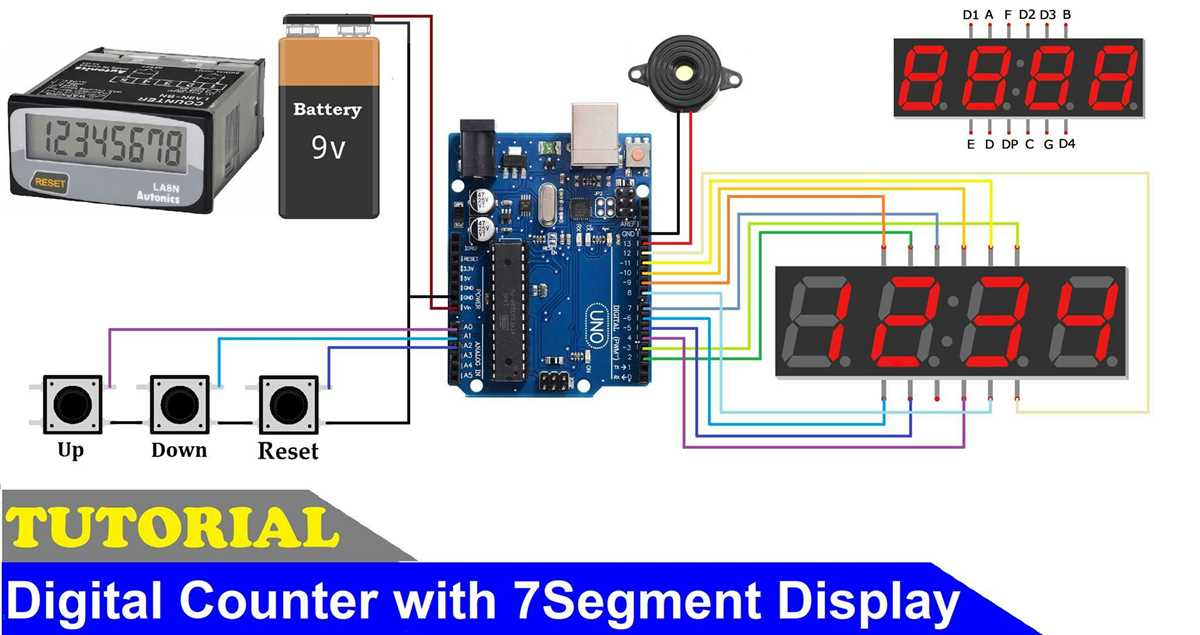
Start by gathering the necessary components: a 4-digit display, a microcontroller (like Arduino or a similar device), and a frequency divider. You’ll also need resistors, transistors, and possibly a shift register to control each segment of the display.
Begin by wiring the display to the microcontroller, ensuring each segment is properly connected to the correct output pins. Each digit will require a dedicated line for controlling its segments, while the microcontroller will send the appropriate signals to display numbers sequentially.
For counting, you’ll need a frequency divider or a clock signal. This will generate pulses that the microcontroller can use to increment the number on the display. Connect the clock source to the input of the counter circuit to drive the count and increment it at the desired rate.
If the system isn’t displaying correctly, check for loose connections, incorrect wiring, or issues with the microcontroller’s code. Make sure that the timing for the count is accurate and that all segments are receiving the correct signals to light up the appropriate digits.
4 Digit Counter Circuit Guide
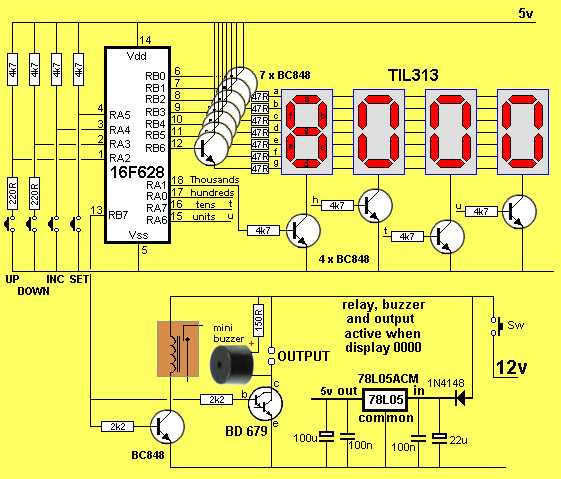
Start by connecting the microcontroller or logic IC to the 7-segment display. Each segment of the display needs to be wired to a specific output pin on the controller. Use appropriate resistors to limit the current flowing to each segment to avoid damage.
Next, set up the clock pulse generator. This pulse will drive the counting mechanism. It could be a simple oscillator circuit, or you could use a timer IC, such as the 555 timer, to generate a clock signal at the desired frequency. Make sure the pulse rate is in sync with the desired counting speed.
To display the correct numbers, you’ll need to use a multiplexing technique if you’re working with a 7-segment display. This involves rapidly switching between the digits, so each one is shown for a short period. The microcontroller will handle the timing and switching between digits to create the illusion of a stable number display.
If the display isn’t showing the expected numbers, double-check the wiring for the display segments and the pulse generator. Verify that all connections are secure and that your controller is properly programmed to handle the display and counting logic. Troubleshoot the power supply and ensure the clock pulse is stable and reliable.
Components Needed for Building a 4 Digit Counter
Start with a 7-segment display for each number you wish to show. Each display typically has 7 segments that need to be wired separately. Ensure you have the right type of display, such as common anode or common cathode, to match your design’s requirements.
A microcontroller or logic IC will be required to handle the counting logic and control the display. Popular choices include Arduino, PIC, or 74LS series ICs. These devices will process the counting signals and drive the segments on the display according to the desired pattern.
For controlling the segments of the display, you’ll need current-limiting resistors. Typically, a 220-ohm resistor is placed in series with each segment to prevent excess current from damaging the display. Choose the correct value based on your display’s specifications.
A clock pulse generator is essential for driving the counting action. You can use a 555 timer IC to generate the clock pulses or opt for a crystal oscillator. The frequency of this clock determines how fast the numbers will increment.
To facilitate multiplexing between the digits, you may need additional transistors or shift registers. Shift registers like the 74HC595 help manage multiple outputs while minimizing the number of pins needed on the microcontroller.
Wires and breadboards or PCB are required for connecting the components. For a more stable and permanent setup, consider soldering the components onto a PCB. A breadboard can be useful for prototyping and testing the circuit before final assembly.
A power supply is necessary to provide the correct voltage to all the components. Most microcontrollers and displays work with 5V DC, but check the requirements of your specific components to ensure proper operation.
Lastly, a programming tool or software is required for setting up the microcontroller’s logic. If using Arduino, you’ll need the Arduino IDE to upload the code that controls the display and increments the value. For other controllers, you’ll need the appropriate software or programming device to load your code.