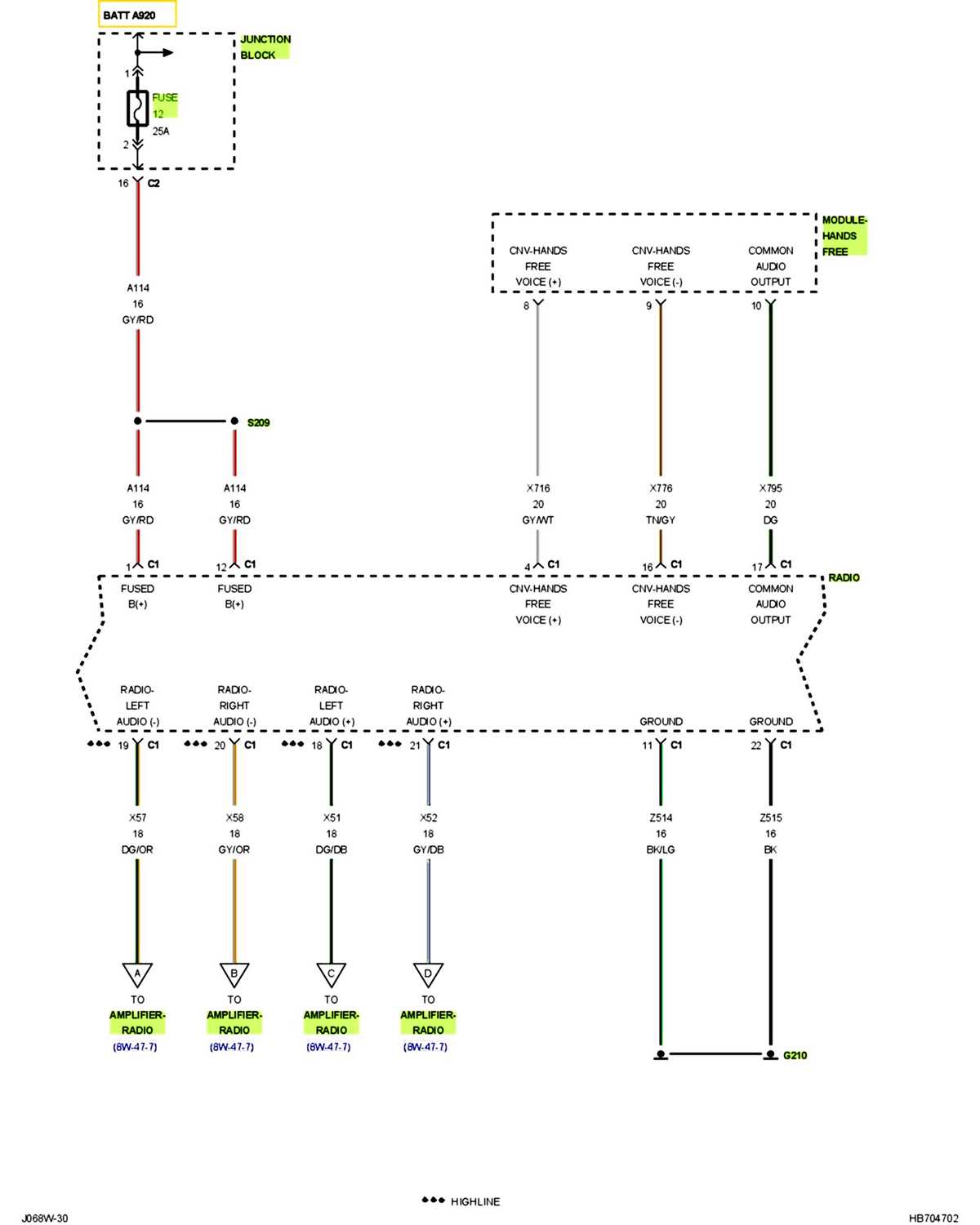
Connect the main power lead directly to the battery terminal using a 14-gauge cable to ensure stable voltage delivery. Use an inline fuse rated at 30 amps close to the power source to prevent overloads and protect the system from short circuits.
Identify the ground point on the chassis before attaching any negative terminals. Choose a clean, unpainted metal surface and secure the connection with a ring terminal and bolt to minimize resistance and signal interference.
Match each speaker lead by tracing color codes from the control unit. Use a multimeter to verify polarity to prevent phase issues, which can reduce sound clarity and bass response.
Integrate aftermarket components by connecting them to the corresponding factory terminals without splicing into the main harness. Employ crimp connectors or solder joints with heat shrink tubing for durability and long-term reliability under vibration.
2006 Truck Audio Connection Guide
Begin by disconnecting the battery to prevent short circuits during installation. Attach a 14-gauge power lead directly to the positive terminal with a 30-amp inline fuse positioned within 6 inches of the battery.
Locate the factory ground point under the dash or near the firewall. Clean the metal surface before securing the negative terminal with a ring connector to ensure minimal resistance and stable performance.
Identify the control unit’s output leads by tracing color codes. Verify polarity with a multimeter to prevent phase mismatches that can distort sound output.
When integrating additional amplifiers, connect their remote turn-on lead to the ignition-switched output. Use crimp connectors or solder with heat shrink tubing to prevent loose contacts and signal drops during vibration.
Route speaker leads along existing harnesses to avoid interference. Keep wires at least 6 inches from high-current cables such as those powering lighting or motors to reduce unwanted noise.
Secure all connections with zip ties or cable clamps to prevent movement. Loose wiring can create rattles and reduce the reliability of the system under rough road conditions.
Test each speaker channel individually before reinstalling panels. Play a test tone or audio track to check for correct channel mapping and verify that all faders and balance controls respond correctly.
After confirming functionality, reinstall the control unit and trim panels carefully. Ensure no wires are pinched or stretched, as this can lead to shorts or permanent damage to the harness over time.
Locating Power and Ground Connections for the Truck Audio System
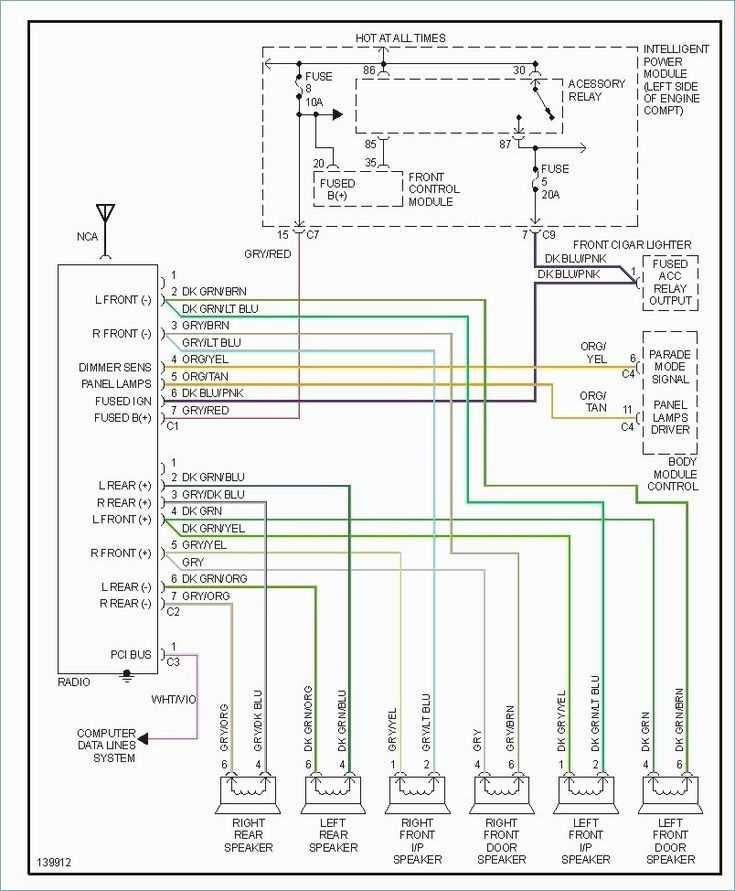
Start by identifying the main power source near the battery. Use a 14-gauge cable and include a 30-amp inline fuse within 6 inches of the terminal to protect the circuit from overloads and shorts.
Trace the factory ground points under the dash or along the firewall. Ensure the metal surface is free of paint and corrosion before attaching the ring terminal to achieve a low-resistance connection that stabilizes the system’s performance.
Verify switched and constant power leads using a multimeter. Switched leads should show 12 volts only when the ignition is on, while constant leads maintain voltage at all times for memory retention in the control unit.
When connecting additional components, attach remote turn-on leads to the ignition-switched output. Secure connections with crimp or soldered joints covered with heat shrink tubing to prevent loosened contacts caused by vibration and movement.
After all connections are secured, test the system by applying power and monitoring voltage at each terminal. Check for voltage drops and ensure the ground path maintains under 0.2 ohms to prevent noise or intermittent operation in the audio system.