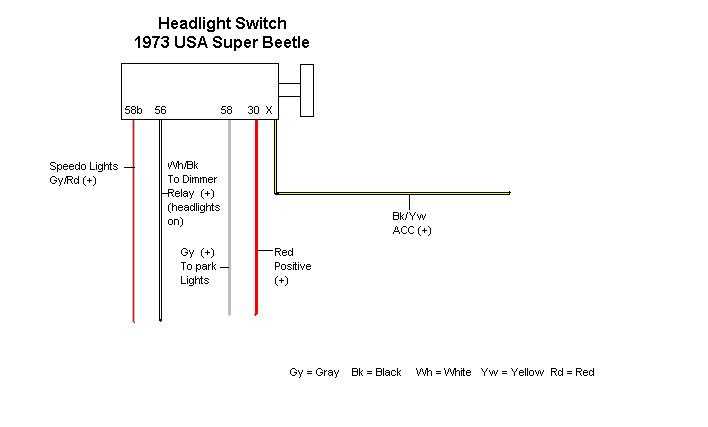
Connect the main rotary controller directly to the fuse box terminals following the color-coded leads to avoid short circuits and ensure stable current flow for low and high beam filaments.
Verify each pin assignment before linking the dashboard knob to prevent backfeeding or accidental power surges that could damage relays or bulbs. Use a multimeter to confirm continuity between terminals.
Route the positive and ground cables along the vehicle frame using insulated clips to prevent chafing and interference with other circuits. Maintain at least 5 mm separation from fuel lines and heat sources for safety.
Test the lighting functions individually after installation by switching between different modes and observing response times. Check for flickering or uneven illumination, which often indicates loose connections or corroded contacts.
Control Panel Connector Setup and Testing
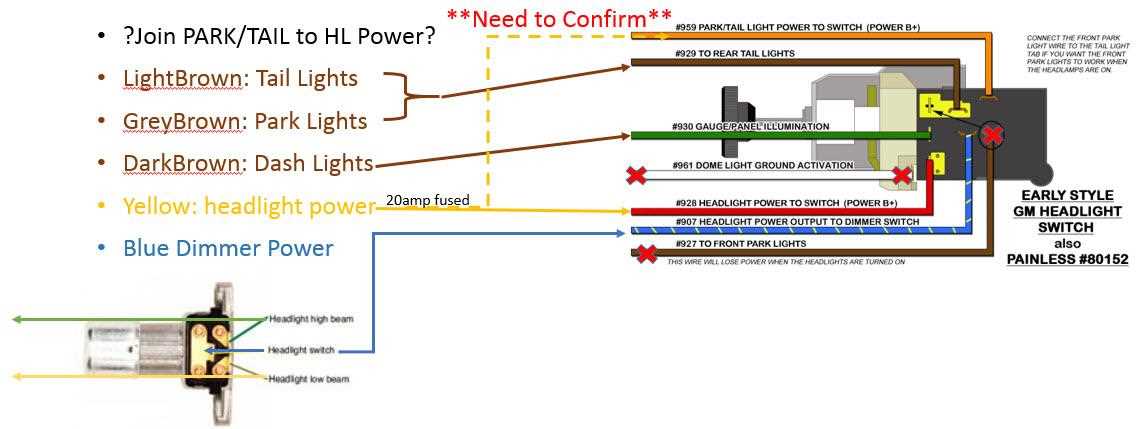
Attach the rotary knob directly to the relay block using the color-coded terminals indicated for low and high beams. Ensure that the positive lead is connected to a fused power source and the ground wire is securely fastened to the chassis to prevent voltage drops.
Follow these steps for verification:
- Check continuity between all terminals with a multimeter.
- Activate each lighting mode separately and observe response.
- Secure loose leads with insulated clamps to avoid contact with moving parts.
- Inspect connectors for corrosion or bent pins that can cause intermittent failures.
After completing the setup, run a full system test at night to confirm uniform brightness and stable operation across all circuits.
Identifying Cables and Connector Pins for Control Modules
Label each lead before connecting to the control module by matching the color codes to their corresponding terminals. Red typically carries the main power, black is ground, and blue or green wires are reserved for mode-specific circuits.
Use a multimeter to test each pin for continuity and verify that no cross-connections exist. Pins with multiple contacts should be checked individually to prevent short circuits or signal interference between high and low output paths.
Secure the connectors with locking tabs or heat-shrink tubing to maintain stable contact under vibration. Loose pins often cause intermittent flickering or failure in auxiliary lighting functions.
Document the layout of each lead and terminal in a reference chart. Include voltage readings under load and note any deviations. This record simplifies future troubleshooting and ensures repeatable results when replacing or upgrading components.