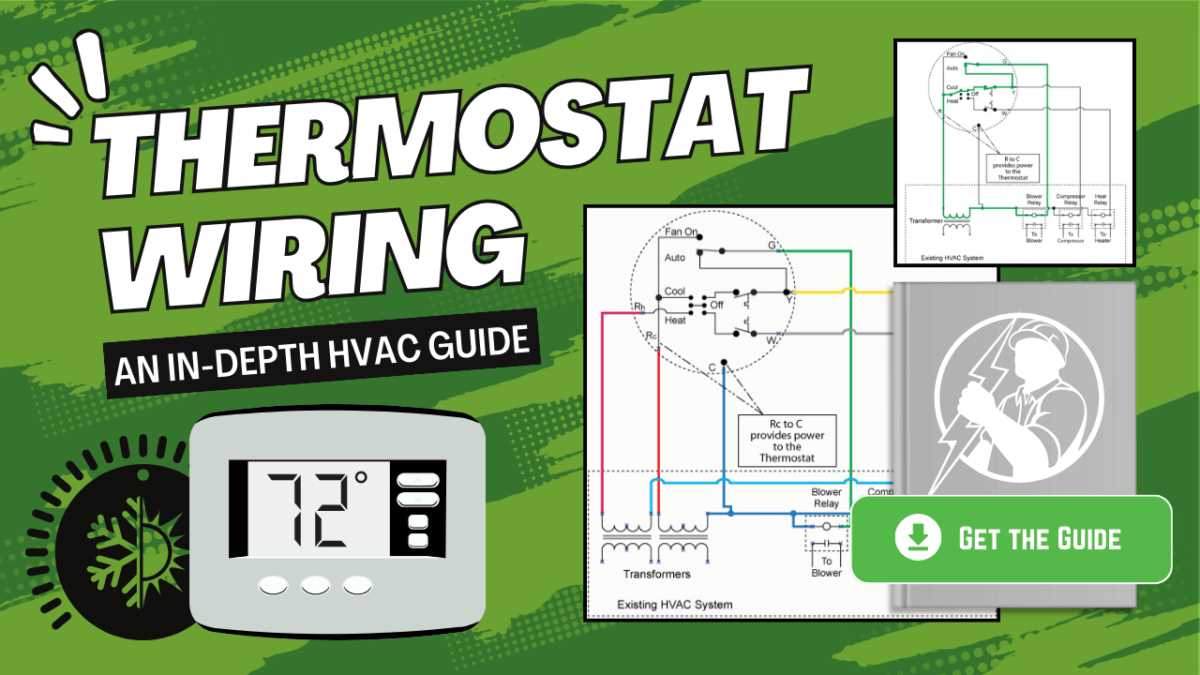
Before proceeding with the installation, it’s crucial to identify the correct connections. The unit you’re working with will likely have a specific set of terminals designed for controlling the cooling system, so make sure to match the correct wires with the corresponding terminals. Often, color codes are used to simplify this task, and understanding these codes will prevent wiring mistakes that could lead to malfunction or safety hazards.
Start by disconnecting the power supply to avoid any electrical shocks. Locate the control panel of your cooling unit, where you will find the connection points. Generally, you’ll encounter terminal blocks marked with letters such as “C,” “Y,” “R,” and “W,” which indicate specific wiring instructions. Consult the unit’s manual for the precise configuration and ensure each wire is securely attached to its respective terminal.
If you’re replacing an older unit or control system, pay attention to the wiring setup of the previous system. Taking a picture or making a note of the existing connections can be helpful during the replacement process. Keep in mind that incorrect connections can lead to system failure, which could be costly to repair.
Once the wiring is complete, test the system. Restore power and adjust the control settings to verify that everything is functioning correctly. If there’s no response from the unit or the settings don’t reflect the desired temperature, double-check all connections and troubleshoot any issues.
Thermostat Wiring Guide for Air Conditioner Systems
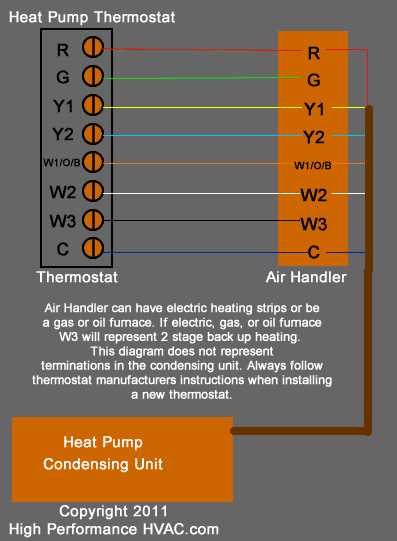
To connect the control system to your cooling equipment, begin by ensuring you have the correct wires and connection points for a safe and accurate installation. The terminals are usually marked with standard labels such as “C,” “Y,” “R,” and “W.” These correspond to specific connections for power, cooling, and heating functions. Check the unit’s manual for exact labels as different models may use variations.
Next, prepare the wires. Typically, the color coding of the wires indicates their purpose. For example, red often represents the power (R), white for heating (W), and yellow for cooling (Y). Ensure each wire is stripped to the proper length and that no insulation is left exposed at the connection points. This minimizes the risk of short circuits or incorrect connections.
Start by connecting the red wire to the “R” terminal, which provides power from the control system. The white wire, connected to the “W” terminal, handles heating functions in some units. If your system includes a cooling feature, connect the yellow wire to the “Y” terminal. The “C” terminal serves as the common wire, providing a return path for the power, and it should be securely attached as well.
Checking and Reconnecting the Control Panel
After connecting the wires to their respective terminals, ensure that the control panel is properly reattached. Double-check each wire for secure connections and that no exposed wires are touching each other. Once you confirm that all connections are correct, you can mount the control panel back onto the wall or enclosure.
Before powering on the system, ensure the control panel is correctly positioned and that all wires are not under stress. If you are dealing with a replacement or upgrade, compare the new control system’s connections with the old one to ensure compatibility. If in doubt, consult the user manual or a professional technician for assistance.
Testing and Troubleshooting
Power up the system after installation. Use the settings on the control panel to test the operation. Adjust the temperature and check if the system responds by turning on the cooling function. If the system does not respond, first confirm that all wires are correctly connected and that no wires are loose or disconnected.
If the system still fails to operate properly, you may need to test each wire individually for continuity or check the control panel for any errors. In cases of ongoing issues, it may be necessary to consult a professional to ensure the unit is functioning as expected.
Understanding the Components Involved in Thermostat Connections
The key components for connecting a temperature control device to the system include the control unit, power terminals, and various signal wires. Each part plays a role in regulating the system based on the settings you choose. It is important to understand how each element interacts to achieve proper system operation.
The first key part is the power supply terminal, often labeled “R” or “C.” This is where the main power from the electrical panel connects to the system. The power supply is responsible for energizing the control panel and other components, allowing the system to receive the necessary electrical input to function.
Signal Wires for Cooling and Heating Control
The signal wires are used to send commands from the control unit to activate either the cooling or heating components. Typically, the wire for cooling is labeled “Y,” while heating control is indicated by the “W” wire. These wires should be connected securely to the respective terminals to ensure that the system reacts to the input from the control device appropriately.
The common wire, usually marked as “C,” serves as a return path for the power used by the system. It ensures a consistent flow of electricity and supports the proper operation of the control panel. A proper connection here is critical for ensuring stable performance.
Understanding the Role of the Control Panel
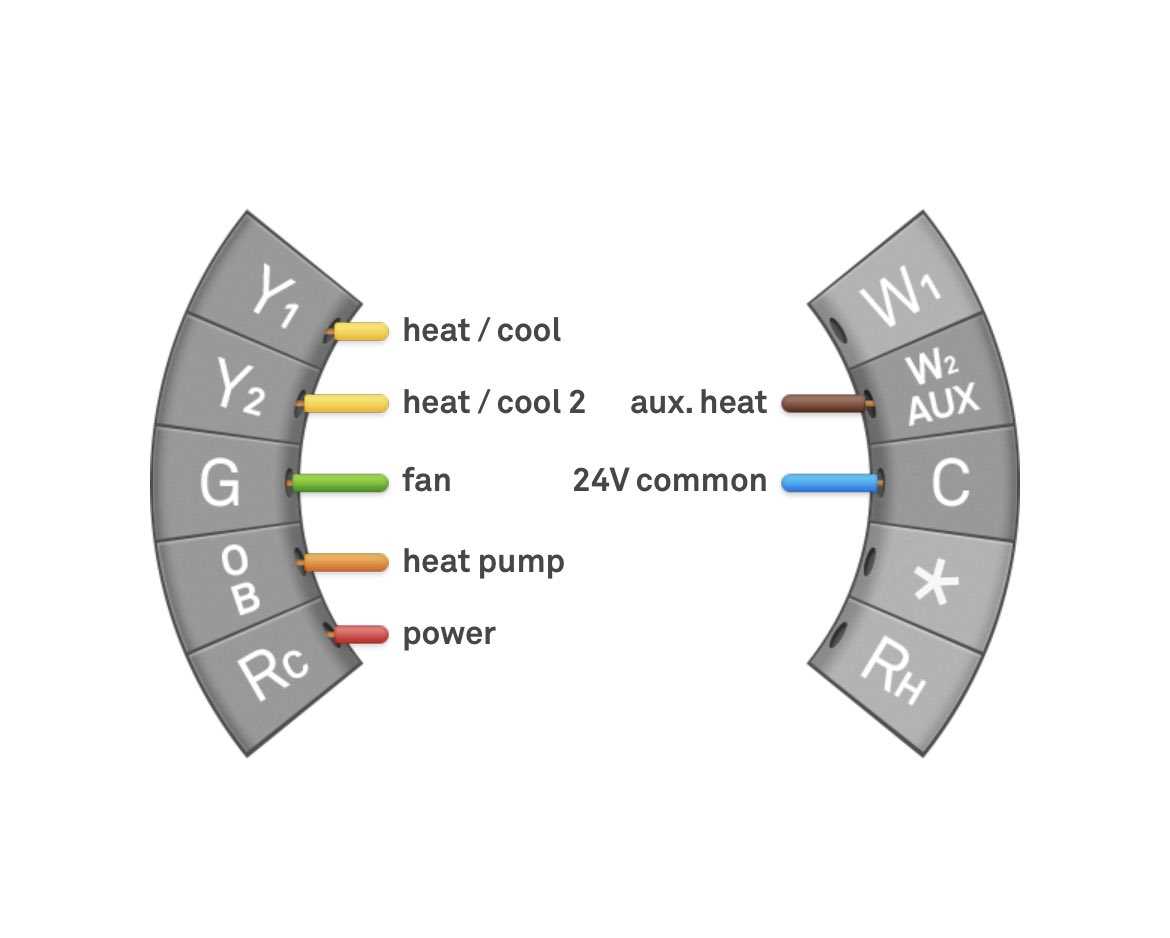
The control panel or device is responsible for receiving user input and sending out the appropriate commands. It can vary from a basic manual unit to a more advanced programmable model, but the function remains the same: to control the operational status of the system. Ensure the connections to the panel are secure to avoid issues with system responsiveness.
Many systems today come with additional features, such as fan control or humidity management, and these require dedicated connections. For example, the “G” terminal might be used for activating the fan, while others may handle additional sensors or devices that help regulate the environment.
Before you begin, it’s important to check if your model requires any special connections. For some advanced systems, extra components may be necessary for more precise control, such as a sensor wire or an additional common wire for the control unit to function properly.
Finally, after confirming all connections, make sure to test the system thoroughly. Use the control device to adjust the temperature and ensure each component responds accordingly. If everything operates correctly, the installation has been completed successfully, and the system will maintain the desired settings based on user input.