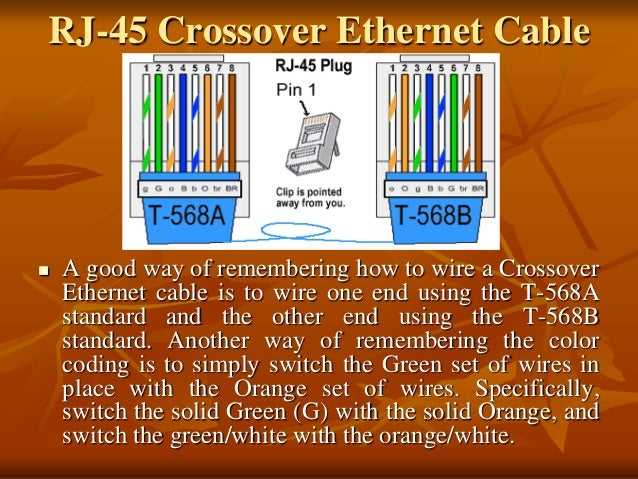
Ensure each conductor is correctly matched to its corresponding terminal to maintain optimal signal transfer and prevent crosstalk between data channels.
Identify color-coded pairs and confirm their sequence according to the established standard to avoid misalignment that can result in packet loss or intermittent connectivity.
Use a continuity tester before final insertion to verify that each path is intact and that no shorts exist between conductors, which can disrupt network stability.
Trim insulation and expose only the necessary length of each wire to improve contact reliability while minimizing the risk of stray strands creating shorts across adjacent pairs.
Label both ends clearly to simplify future maintenance or upgrades, ensuring that each segment can be traced without relying on guesswork during troubleshooting.
Structured Guide to Cat5 Cable Connections and Layouts
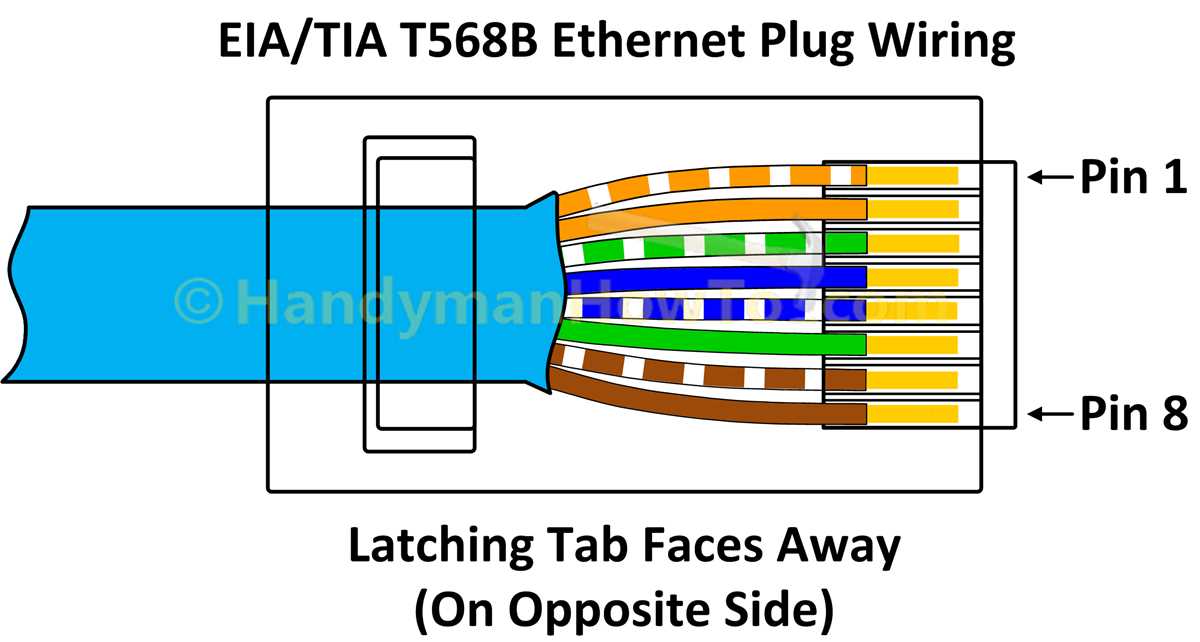
Start by separating the twisted pairs carefully to prevent interference between data paths while preparing the conductors for termination.
Maintain consistent color order at both ends following the T568A or T568B standard to ensure compatibility with existing network devices and switches.
Trim insulation to expose 5–7 millimeters of each conductor to achieve a reliable contact within modular plugs without leaving excessive exposed wire.
Use a modular crimping tool with proper pressure to secure connectors evenly, avoiding loose contacts that could cause intermittent signal drops or errors.
Arrange runs neatly in conduit or cable trays to minimize bend radius and avoid kinks, which can degrade high-frequency transmission and reduce performance over longer distances.
Label each endpoint clearly with identifiers for easier troubleshooting and future expansions, reducing downtime when network changes are required.
Verify continuity and pair integrity with a cable tester before deployment, checking for open lines, shorts, or misaligned pairs that could affect network reliability.
Document all layouts and connections in a reference sheet that shows endpoints, patch panels, and switch ports to streamline maintenance and prevent confusion in complex setups.
Mapping Each Wire to Correct Terminals for Data Transmission
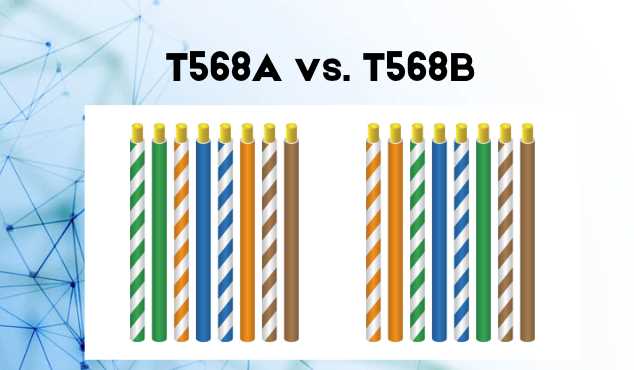
Identify each twisted pair by color code and separate them carefully to prevent crosstalk before connecting to the designated pins.
Follow T568A or T568B sequence consistently at both ends to maintain signal integrity and avoid network errors caused by swapped pairs.
Trim insulation precisely so that each conductor reaches the connector slot without excess exposure, preventing short circuits and signal loss.
Insert each wire fully into the corresponding terminal and ensure the metal contacts pierce the conductor insulation for a firm connection.
Check pin alignment visually and with a tester to confirm that each pair matches the intended transmit and receive channels before patching to devices.
Avoid mixing transmit and receive lines between endpoints, as this can lead to partial or failed communication and inconsistent speeds.
Secure all connectors with a consistent crimp pressure to prevent wires from slipping out or making intermittent contact during operation.
Document each endpoint’s terminal mapping with clear labeling, which simplifies troubleshooting and ensures future modifications do not disrupt existing connections.