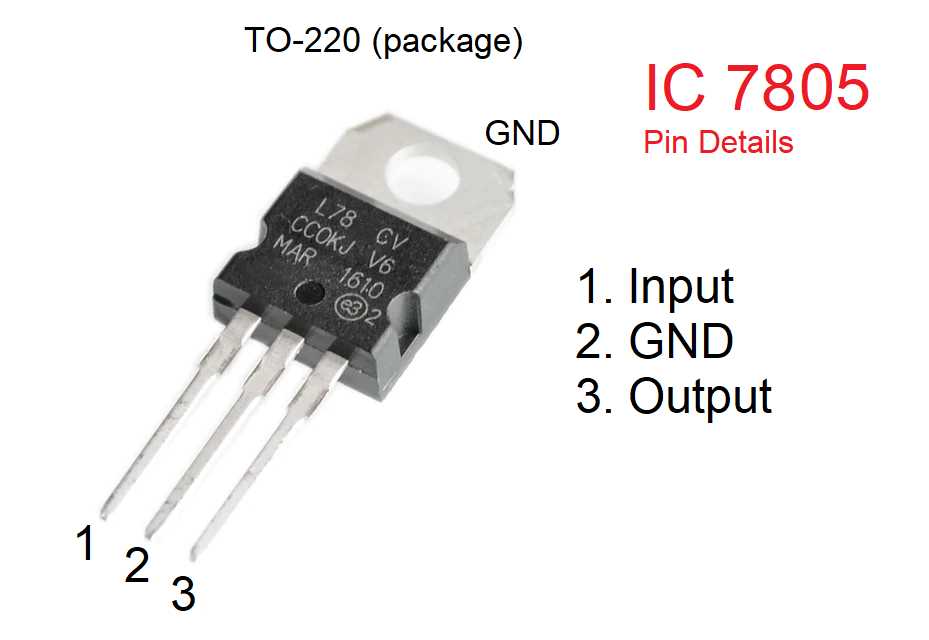
Connect the input pin to a DC source providing 7 to 12 volts to ensure consistent output. Add a small ceramic capacitor between the input and ground to filter high-frequency noise and prevent voltage spikes.
Place an output capacitor of at least 0.1µF between the output and ground to stabilize the 5V line. For improved transient response, a 1µF electrolytic capacitor can be added near the load.
Use proper heat dissipation techniques such as a small aluminum heatsink if the regulator will supply currents above 500mA. Ensure airflow around the component to maintain stable operation under load.
Label and isolate connections to avoid accidental shorts. Keep wiring as short as possible and use insulated wires rated for the expected current to maintain safety and reliability.
Test the setup with a multimeter to verify that the output remains steady at 5 volts under varying loads. Check that voltage fluctuations do not exceed ±0.1V to protect sensitive devices.
Power Regulator Layout and Connections
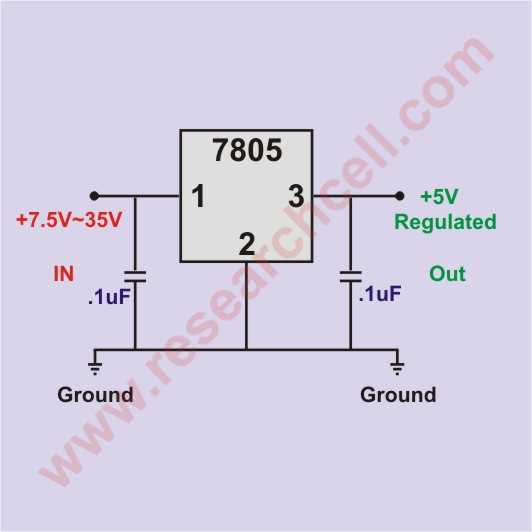
Connect the input pin to a DC source ranging from 7 to 12 volts to maintain stable 5V output. Use a ceramic capacitor of 0.33µF between input and ground to filter voltage spikes.
Attach the output pin to the load with a 0.1µF capacitor to reduce high-frequency noise. For better transient response, add a 1µF electrolytic capacitor close to the load terminals.
Include a heatsink when supplying currents above 500mA. Ensure the regulator has airflow around it to prevent thermal shutdown and maintain constant voltage under heavy load.
Keep wiring short and use insulated conductors rated for the expected current. Label connections clearly to prevent miswiring and accidental shorts that could damage connected devices.
Check input polarity carefully; reversing the DC source can destroy the component. Add a small diode in series with the input for reverse voltage protection if necessary.
Test the output with a multimeter to confirm a steady 5 volts. Observe voltage under load changes to ensure fluctuations stay below ±0.1V for sensitive electronics.
When integrating multiple regulators on the same board, keep them separated to prevent thermal coupling. Use decoupling capacitors near each regulator for stable operation.
For portable applications, verify that the source can supply adequate current without significant voltage drop. Include fuses or PTC resettable devices to protect both the power source and the load.
Connecting Input and Output Terminals for Stable Voltage
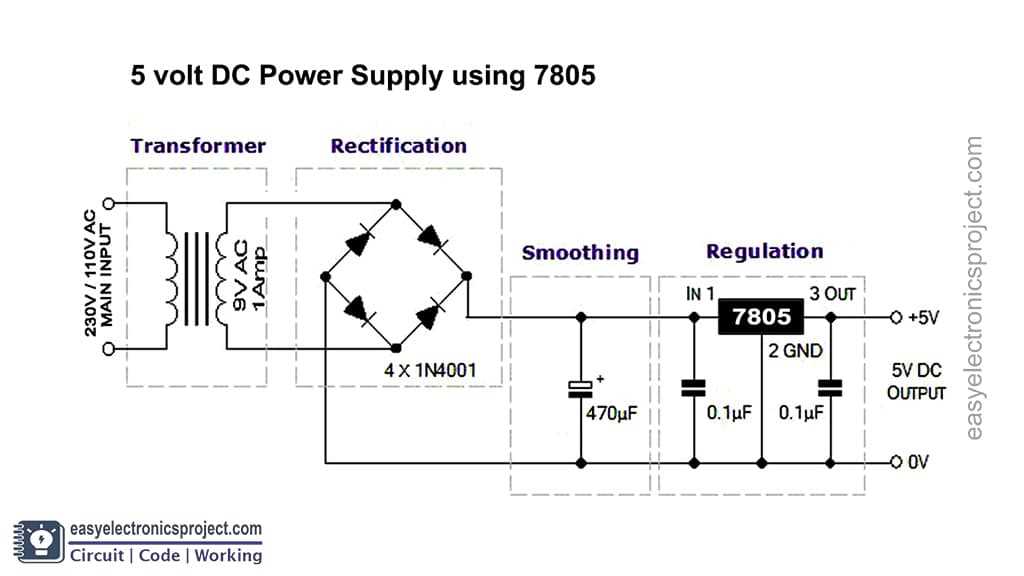
Attach the input lead to a DC source rated between 7 and 12 volts to provide consistent 5V regulation. Use a 0.33µF ceramic capacitor between input and ground to filter out high-frequency noise.
Connect the output lead directly to the load and place a 0.1µF capacitor across output and ground to prevent voltage fluctuations. For improved response to sudden load changes, add a 1µF electrolytic capacitor near the load.
Ensure solid solder joints on both input and output terminals. Loose connections can cause intermittent voltage drops or spikes that may damage sensitive components.
- Keep wire lengths short to minimize resistance and inductance
- Use insulated wires rated for the expected current
- Label input and output clearly to avoid polarity mistakes
- Check all connections with a multimeter before powering the load
Include reverse polarity protection by placing a diode in series with the input. This prevents damage if the source is accidentally connected backward.
Verify output stability under different load conditions. Measure voltage at the load terminals to ensure fluctuations remain below ±0.1V, maintaining safe operation for all connected devices.