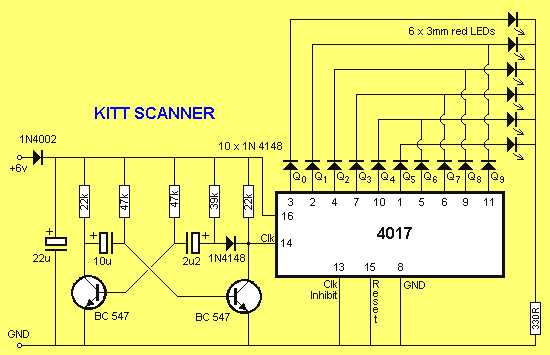
Connect the power pins correctly to ensure stable operation and prevent damage. Pin 16 must receive positive voltage while pin 8 is grounded. Double-check polarity before powering the module.
Apply clock pulses to trigger sequential outputs at pin 14. Use a stable square wave with amplitude matching the IC’s voltage rating. Adjust pulse frequency to control output timing.
Reset pin configuration controls counting cycles. Bringing pin 15 high will immediately reset the sequence to the first output. Integrate a push button or microcontroller logic for precise reset control.
Observe outputs with LEDs or other indicators to verify proper sequence operation. Connect current-limiting resistors to each indicator to avoid overloading the outputs. This visual check ensures each stage triggers in order.
Consider connecting additional components like decoupling capacitors between power and ground pins to stabilize voltage fluctuations. Values around 0.1 µF are commonly used for noise suppression.
Adjust the setup for multiple sequences by selectively using reset and enable pins. This allows chaining multiple ICs or creating custom counting lengths.
Understanding 4017 IC Connections and Output Sequence
Connect the power rails accurately by linking the positive voltage to pin 16 and grounding pin 8. Incorrect connections can immediately damage the IC.
Feed clock pulses to the clock input at pin 14. Each rising edge advances the active output to the next stage. Use a stable square wave to maintain consistent sequencing.
Use the reset input to control sequence cycles. Applying a high signal to pin 15 returns the active output to the first stage. This allows precise cycle management in counting applications.
Observe outputs sequentially across pins Q0 to Q9. Only one output pin is high at a time, moving stepwise with each pulse. Verify with LEDs and current-limiting resistors to avoid overload.
Enable pin logic determines output activation. Tying the enable pin low allows normal operation, while a high signal disables all outputs. Integrate control logic to selectively pause or start sequences.
Include decoupling capacitors between power and ground to stabilize voltage fluctuations. Typical values of 0.1 µF prevent false triggering.
Chain multiple ICs for extended sequences by connecting the carry-out pin to the clock input of the next module. This expands counting beyond ten steps with predictable output behavior.
Test each stage individually before integrating with other components. Ensure sequential LEDs illuminate in order, confirming correct propagation and timing.
Identifying Each Pin and Its Electrical Role
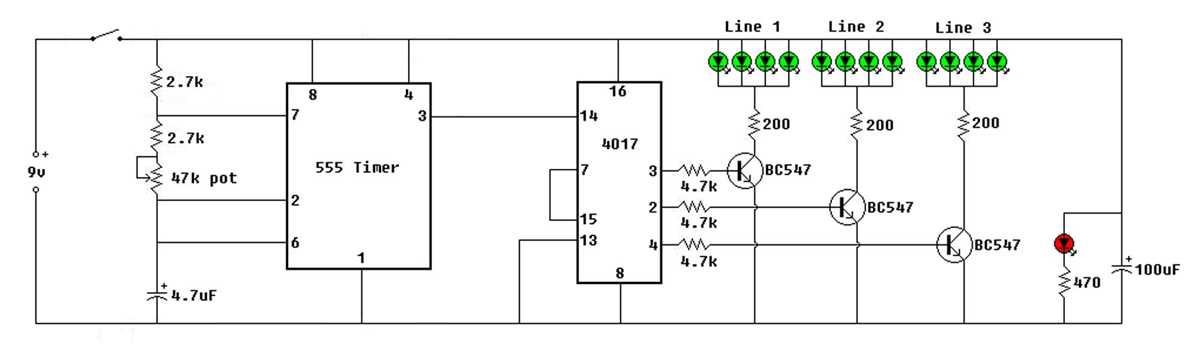
Pin 16 serves as the positive power input, supplying the IC with the operating voltage. Connect it to a stable 5V to 15V source depending on the module rating. Fluctuations here can cause miscounting or permanent damage.
Pin 8 is the ground reference, completing the electrical loop. All voltage measurements and logic levels are referenced to this point. Ensure a solid connection to prevent erratic output behavior.
Output pins Q0 through Q9 represent sequential stages. Each one goes high in turn with each applied clock pulse. Use current-limiting resistors when connecting LEDs or relays to avoid overloading the outputs.
- Pin 14 is the clock input, triggering transitions between outputs.
- Pin 15 is the reset input, forcing the first output high when set high.
- Pin 13 controls enable/disable, allowing temporary suspension of output activity.
- Pin 12 serves as carry-out, useful for cascading multiple modules.
Understanding each pin ensures predictable sequence operation and proper integration with other electronics.